

Has your personal data been recently exposed?
Check if information like your Social Security number, email, and passwords is exposed on the dark web.


You have reached the maximum number of scans allowed. Please come back after 24 hours.

Scanning the dark web...
Scanning public databases...
Scanning millions of records...
Narrowing down the search...
We need more information
Please enter a few more details to ensure we show you the right information.
You’re at high risk
We found your personal information on the dark web and on data broker sites.
 Up to $3M Reimbursement for identity theft, with up to $1M for Stolen Funds†††
$10K Scam Reimbursement7
Scam Support
Credit, Checking and Savings Activity Alerts: Unlimited Accounts
Credit & Payday Loan Lock2
Credit Monitoring:
3 Bureau1
Automatic Data Broker Removal8
Dark Web Monitoring
Priority 24/7 Customer Phone Support
Up to $3M Reimbursement for identity theft, with up to $1M for Stolen Funds†††
$10K Scam Reimbursement7
Scam Support
Credit, Checking and Savings Activity Alerts: Unlimited Accounts
Credit & Payday Loan Lock2
Credit Monitoring:
3 Bureau1
Automatic Data Broker Removal8
Dark Web Monitoring
Priority 24/7 Customer Phone Support
LifeLock Total

No one can prevent all cybercrime or prevent all identity theft.
- Price valid for introductory term. After that, your price will renew at the standard price.
- Your subscription begins immediately after your transaction is complete. A payment method is required at sign-up for trials, and you will be charged at the end of your trial, unless canceled first.
- Prices are subject to change and may be charged up to 35 days prior to renewal. Cancel here or contact Member Services.
- Restrictions apply. Automatically renewing subscription required. If you're a victim of identity theft and not satisfied with our resolution, you may receive a refund for the current term of your subscription. See lifelock.norton.com/guarantee for complete details.
††† Up to $1 million coverage for Lawyers and Experts included with all plans. Reimbursement and expense compensation vary according to plan. Insurance benefits are issued by third parties. See lifelock.norton.com/legal for policy info.
1 Bureau Monitoring and Monthly Credit Report and Score / 3 Bureau Monitoring and Monthly Credit Report and Score.
2 Credit Lock cannot prevent all account takeovers, unauthorized account openings, or credit file inquiries. Deactivates if you downgrade or cancel your subscription.
7 Scam protection coverage as part of identity theft benefits is currently available to all customers residing in the United States, including U.S. territories and the District of Columbia, with the exception of residents of New York. Gen Digital is not a licensed insurance producer. Benefits under the Master Policy are issued and covered by HSB Specialty Insurance Company. You can find further details and exclusions in the summary of benefits.
8 After setup, automatic data broker removal service scans and requests removal every 90 days.
You’re at medium risk
We found your personal information on data broker sites.
Up to $1.2M Reimbursement for identity theft, with up to $100K for Stolen Funds†††
$5K Scam Reimbursement7
Scam Support
Credit, Checking and Savings Activity Alerts:
5 Accounts
Credit & Payday Loan Lock2
Credit Monitoring:
3 Bureau1
Automatic Data Broker Removal8
Dark Web Monitoring
Priority 24/7 Customer Phone Support
LifeLock Advanced
No one can prevent all cybercrime or prevent all identity theft.
- Price valid for introductory term. After that, your price will renew at the standard price.
- Your subscription begins immediately after your transaction is complete. A payment method is required at sign-up for trials, and you will be charged at the end of your trial, unless canceled first.
- Prices are subject to change and may be charged up to 35 days prior to renewal. Cancel here or contact Member Services.
- Restrictions apply. Automatically renewing subscription required. If you're a victim of identity theft and not satisfied with our resolution, you may receive a refund for the current term of your subscription. See lifelock.norton.com/guarantee for complete details.
††† Up to $1 million coverage for Lawyers and Experts included with all plans. Reimbursement and expense compensation vary according to plan. Insurance benefits are issued by third parties. See lifelock.norton.com/legal for policy info.
1 Bureau Monitoring and Monthly Credit Report and Score / 3 Bureau Monitoring and Monthly Credit Report and Score.
2 Credit Lock cannot prevent all account takeovers, unauthorized account openings, or credit file inquiries. Deactivates if you downgrade or cancel your subscription.
7 Scam protection coverage as part of identity theft benefits is currently available to all customers residing in the United States, including U.S. territories and the District of Columbia, with the exception of residents of New York. Gen Digital is not a licensed insurance producer. Benefits under the Master Policy are issued and covered by HSB Specialty Insurance Company. You can find further details and exclusions in the summary of benefits.
8 After setup, automatic data broker removal service scans and requests removal every 90 days.
Good news!
We didn’t find your personal information across millions of records or on public data sources.
Up to $1.05M Reimbursement for identity theft, with up to $25K for Stolen Funds†††
Identity Restoration Specialists
Credit, Checking and Savings Activity Alerts:
2 Accounts
Credit & Payday Loan Lock2
Credit Monitoring:
2 Bureau1
Automatic Data Broker Removal8
Dark Web Monitoring
Breach Alerts
24/7 Customer Phone Support
Lifelock Core
No one can prevent all cybercrime or prevent all identity theft.
- Price valid for introductory term. After that, your price will renew at the standard price.
- Your subscription begins immediately after your transaction is complete. A payment method is required at sign-up for trials, and you will be charged at the end of your trial, unless canceled first.
- Prices are subject to change and may be charged up to 35 days prior to renewal. Cancel here or contact Member Services.
- Restrictions apply. Automatically renewing subscription required. If you're a victim of identity theft and not satisfied with our resolution, you may receive a refund for the current term of your subscription. See lifelock.norton.com/guarantee for complete details.
††† Up to $1 million coverage for Lawyers and Experts included with all plans. Reimbursement and expense compensation vary according to plan. Insurance benefits are issued by third parties. See lifelock.norton.com/legal for policy info.
1 Credit features require successful setup, identity verification, and sufficient credit history by the appropriate credit bureau. Credit monitoring features may take several days to activate after enrollment.
2 Identity Lock cannot prevent all account takeovers, unauthorized account openings, or credit file inquiries. Deactivates if you downgrade or cancel your subscription.
8 After setup, automatic data broker removal service scans and requests removal every 90 days.

 Why do we ask?
Finding your match...

10 cents
If your information is exposed or stolen in a data breach, it can end up on the dark web where it can be sold for as little as 10 cents.
100M+
LifeLock monitors hundreds of millions of data points a second.
- Up to $1.05M Reimbursement for identity theft, with up to $25K for Stolen Funds†††
- Up to $1.2M Reimbursement for identity theft, with up to $100K for Stolen Funds†††
- Up to $3M Reimbursement for identity theft, with up to $1M for Stolen Funds†††
- Up to $1.05M Reimbursement for identity theft, with up to $25K for Stolen Funds††† for each adult
- Up to $1.2M Reimbursement for identity theft, with up to $100K for Stolen Funds††† for each adult
- Up to $3M Reimbursement for identity theft, with up to $1M for Stolen Funds††† for each adult
- Up to $1.05M Reimbursement for identity theft, with up to $25K for Stolen Funds††† for each adult
- Up to $1.2M Reimbursement for identity theft, with up to $100K for Stolen Funds††† for each adult
- Up to $3M Reimbursement for identity theft, with up to $1M for Stolen Funds††† for each adult
- Credit Monitoring Coverage1
- Credit Monitoring1 each adult
- Credit Monitoring1 for family
- Credit, Checking & Savings Account Activity Alerts
- Credit, Checking and Savings Activity Alerts for each adult
- Credit, Checking and Savings Activity Alerts for family
- 401K & Investment Account Activity Alerts
- 401K/Investment Account Alerts for each adult
- 401K/Investment Account Alerts for family
- Recurring and Unusual Charge Alerts
- Unexpected & Suspicious Charge Alerts for each adult
- Unexpected & Suspicious Charge Alerts for family
- Stolen Funds Reimbursement†††
- Stolen Funds Reimbursement††† for each adult
- Stolen Funds Reimbursement††† for family
- Lawyers and Experts†††
- Lawyers & Experts††† for each adult
- Lawyers & Experts††† for family
- Automatic Data Broker Removal8
- Automatic Data Broker Removal8 for each adult
- Automatic Data Broker Removal8 for family
- Scam Reimbursement7
- Scam Reimbursement7 for each adult
- Scam Reimbursement7 for family
- Credit Reports & Scores1
- Credit Report & Score for each adult
- Credit Report & Score for family
- Social Media Monitoring
- Social Media Monitoring for each adult
- Social Media Monitoring for family


††† Up to $1 million coverage for Lawyers and Experts included with all plans. Reimbursement and expense compensation vary according to plan. Insurance benefits are issued by third parties. See LifeLock.Norton.com/legal for policy info.
1 Credit features require successful setup, identity verification and sufficient credit history by the appropriate credit bureau. Credit monitoring features may take several days to activate after enrollment.
7 Scam protection coverage as part of identity theft benefits is currently available to all customers residing in the United States, including U.S. territories and the District of Columbia, with the exception of residents of New York. Gen Digital is not a licensed insurance producer. Benefits under the Master Policy are issued and covered by HSB Specialty Insurance Company. You can find further details and exclusions in the Summary of Benefits.
8 After setup, automatic data broker removal service scans and requests removal every 90 days.
Why do we ask?
Identifying your concerns gives us the ability to recommend the right plan for your needs.
Why do we ask?
Knowing this number helps us recommend coverage that fits your needs.
Why do we ask?
Providing your email address makes you eligible for notifications of potential identity threats.
20 types of phishing attacks with examples
Phishing attacks come in many guises, from easy-to-spot spam emails to carefully crafted AI scams that target you personally. Learn more about common types of phishing in this guide. Then, join LifeLock for identity theft protection that can help alert you to signs of fraud and identity theft if you’re pulled in by a phishing scam.





Phishing is a type of online scam where someone pretends to be a trusted source to trick you into sharing your personal details, login information, or payment data. Phishing attacks can be delivered via email, text, phone calls, social media posts, or even QR codes. If you’re not careful, falling for phishing can result in identity theft, hacked accounts, and lost funds.
Learn about different types of phishing so you can stay safer online and help avoid disclosing sensitive data to scammers.
1. Email phishing
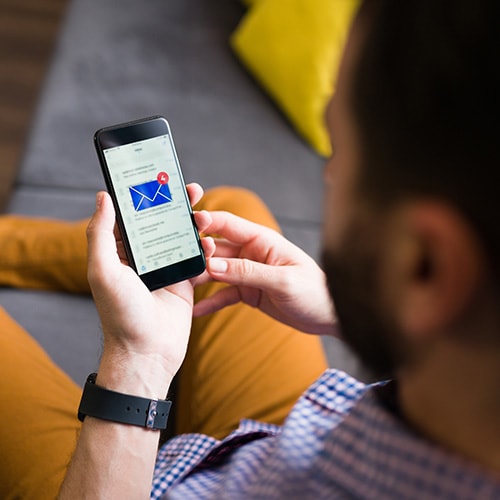
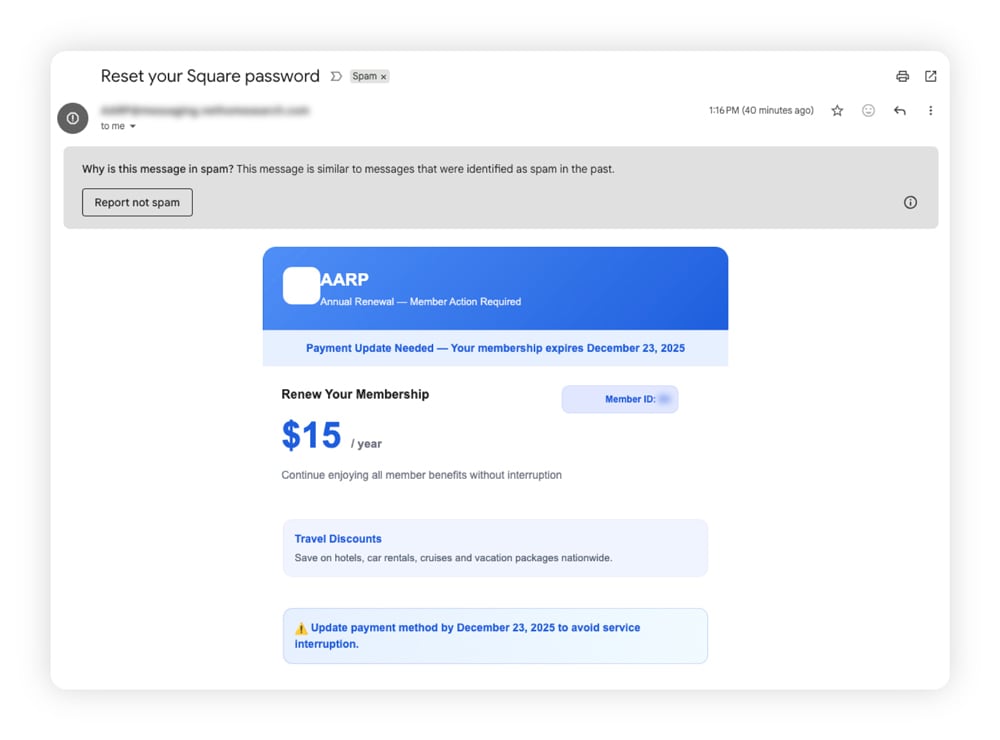
Email phishing is a scam message sent to your email address that tries to convince you to click on a malicious link, usually to steal your login details, personal information, or payment data. It’s what many people mean when they say “phishing,” and it may have been the earliest form of this scam.
Email phishing is one of the most common types of phishing attacks because it’s cheap, fast, and scalable. Attackers can automate campaigns and send phishing messages to millions of people in seconds, virtually for free. Even if only 0.01% of recipients fall for the phishing attack, the cybercriminal behind the campaign can still profit.
While many phishing emails end up in your spam folder, accidentally opening one can put you at risk. Seemingly banal messages like shipping updates, invoices, or account security notifications could be cleverly disguised phishing attacks. As of February 2025, invoices were the most common lure, making up about 32% of detected phishing emails according to Statista.
Common email phishing tactics:
- Bulk emails with generic greetings.
- Messages impersonating popular or trusted brands, such as Geek Squad scam emails.
- Requests to confirm account information.
- Urgent or threatening demands.
- Links that lead to fake login pages.
- Claims that you’ve won a fabulous prize.
2. Spear phishing
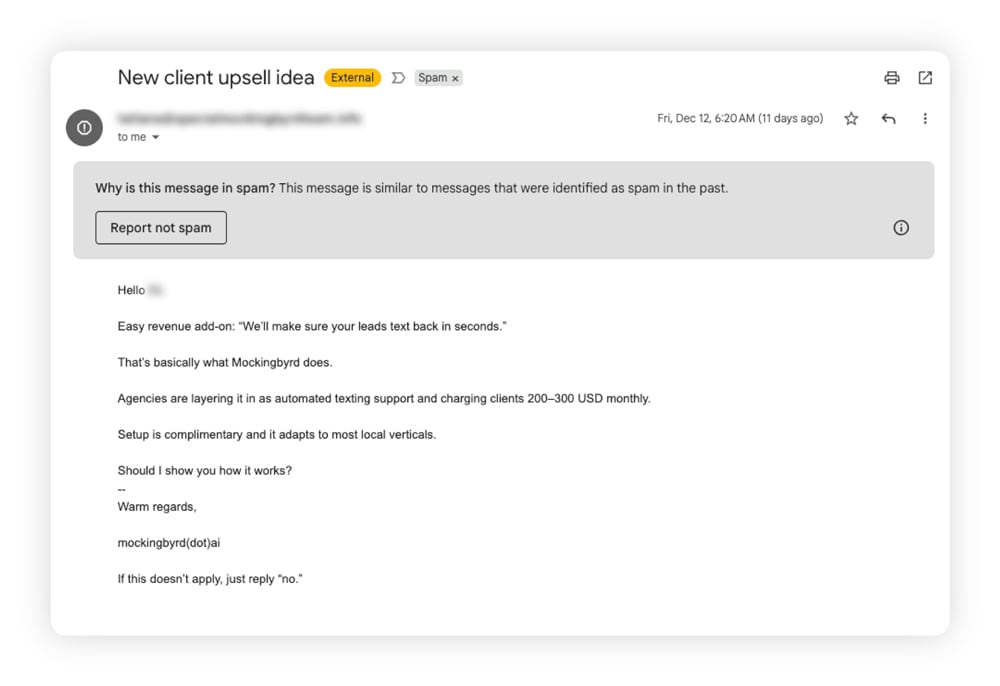
Spear phishing is a type of phishing that targets a specific individual or company. Cybercriminals behind spear phishing attacks may know personal details like your real name, date of birth, job, or even your browsing habits. They use this knowledge to make their stories more believable, so you’re more likely to click the links they send.
This approach relies heavily on social engineering — using personalization and trust to lower a victim’s guard and manipulate them into sharing sensitive information.
Common spear phishing tactics:
- Personalized messages.
- Messages referencing recent projects or coworkers.
- Emails that appear to come from a real contact.
- Time-sensitive or “confidential” requests.
- Requests to pay an invoice or send W-2s.
3. Whaling
Whaling is a type of phishing specifically designed to target executives, founders, and other individuals with authority, access, and money. Cybercriminals may spend months preparing to successfully “harpoon” the whale: they may study their victim carefully, gathering as much information as possible to make their pretext believable.
In July 2024, scammers used AI-generated audio to replicate the voice of the CEO of Ferrari, an Italian luxury car maker. The attacker referenced a fake acquisition and pushed for urgent action, but an executive suspected something was off and asked the “CEO” to remind him what book he had recommended a few days earlier. When the caller stumbled, the executive hung up and stopped the scam.
Common whaling tactics:
- Impersonation of senior executives or board members.
- Mentions of non-disclosure agreements or confidentiality.
- Emails referencing real projects, deals, or internal initiatives.
- Fake legal subpoena or compliance-related emails.
- Ransomware threats or blackmail.
- Requests for urgent wire transfers or large financial approvals.
- Emails that appear to be from external auditors or regulators.
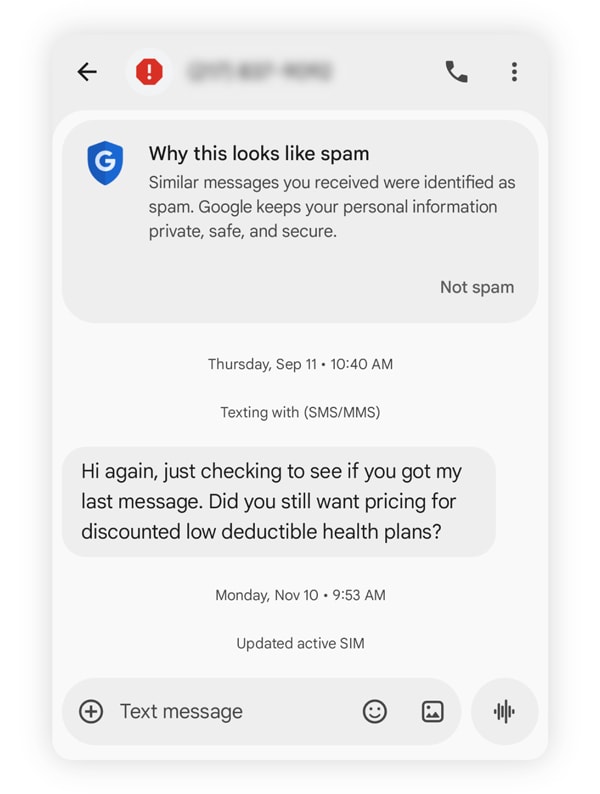
4. Smishing
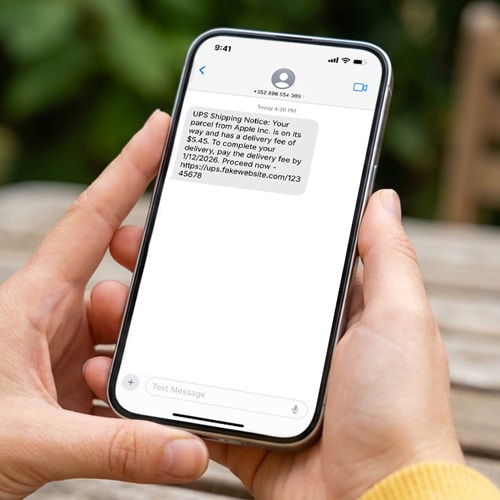
Smishing (SMS phishing) is phishing carried out through text messages. USPS scam texts are a classic example: a fake delivery notice urges you to tap a link to confirm an order you never placed or resolve some “problems” with a delivery.
If your phone number has been exposed after a data breach, you may find yourself on the receiving end of more smishing attacks.
Common smishing tactics:
- “Problem with delivery” notifications.
- Bank alerts claiming suspicious activity.
- Prize or reward messages.
- Fake 2FA notifications.
- Messages claiming one of your accounts has been suspended.
- Fake payment failure alerts.
- Texts posing as customer support requesting immediate action.
5. Vishing
Vishing, short for “voice phishing,” is a scam in which a fraudster impersonates a trusted person or organization over the phone. Modern vishing attacks increasingly use AI-generated voices to mimic real people, making calls sound more convincing and driving the rise of AI-powered scams. In some cases, just a few seconds of recorded audio can be enough to create a realistic voice clone.
In November 2025, Harvard University reported that attackers had posed as IT support over the phone. Alumni and donors were tricked into sharing their contact information after callers claimed there was an account issue that required immediate attention.
Common vishing tactics:
- Robocalls designed to identify people willing to engage.
- Calls claiming your Social Security number or government ID has been suspended.
- Tax-related calls threatening arrest or legal action.
- Bank fraud calls warning of suspicious or unauthorized activity.
- Tech support calls claiming your device has been compromised.
- Executive impersonation calls pressuring employees to approve payments or share sensitive data.
6. Angler phishing
Angler phishing is when scammers pose as customer support agents on social media and jump in to “assist” people publicly posting complaints or questions about a brand or company.
But instead of providing actual assistance, the scammer redirects the frustrated customer to a malicious website or tricks them into revealing sensitive account information.
Common angler phishing tactics:
- Requests to verify or “secure” your account to resolve an issue.
- Fake support profiles using brand logos, similar usernames, and copied bios.
- Direct messages that move the conversation away from public threads.
- Links to fake support pages or login forms.
- Requests for passwords, one-time codes, or payment details.
7. Clone phishing
Clone phishing is a scam where attackers copy a real email you may have already received, then resend it with a harmful link or attachment swapped in. Because the message looks so familiar, it blends in easily.
A clone phishing case involving the Salty2FA phishing kit cloned legitimate login pages and even simulated multi-factor verification. Victims clicked on links from emails that appeared routine, then entered credentials on near-perfect copies of real sites.
Common clone phishing tactics include:
- A follow-up email that closely copies a legitimate message to feel familiar and trustworthy.
- Links with changed or slightly misspelled URLs that redirect to malicious sites.
- Small changes to the sender’s email address that are easy to miss at a glance.
- Replaced attachments that contain malware instead of the original file.
- Urgent language claiming the previous message had an error or needs immediate action.
8. Quishing
Quishing (QR code phishing) hides harmful links inside QR codes. Scanning such a QR code can send you to a fake site designed to collect logins, payment details, or other personal details.
In July 2025, the FBI warned the public about unsolicited packages with QR codes attached. This new iteration of brushing scams involved unexpected deliveries accompanied by QR codes that led to malicious websites. QR code scams could also appear on fake parking notices, menus, or bus stops, tricking people into scanning codes that lead to fraudulent sites.
Common quishing tactics:
- QR codes placed on parking meters, pay stations, or fake violation notices.
- Unsolicited packages containing QR codes that promise more information.
- Emails or text messages using QR codes instead of clickable links to bypass filters.
- QR codes on fake menus, Wi-Fi access signs, or event materials.
- QR codes leading to fake login pages or payment portals.
9. Evil twin phishing
Evil twin phishing is a type of phishing scam in which attackers set up a clone Wi-Fi network that appears to be legitimate. Once you connect, attackers can intercept your internet traffic or redirect you to fake login pages designed to capture credentials or other sensitive information.
Common evil twin phishing tactics:
- Fake public Wi-Fi networks named after legitimate hotspots like “Free Airport WiFi.”
- Lookalike café or hotel networks that mimic the real network’s name.
- Rogue access points that force users to a fake login or terms page.
- Wi-Fi networks that prompt users to re-enter email or social media credentials.
- Fake corporate or conference Wi-Fi used to capture employee logins or session data.
10. HTTPS phishing
HTTPS phishing is a scam that uses secure-looking websites to trick users into sharing sensitive information. Attackers host phishing pages on sites that use the secure HTTPS encryption protocol, complete with a padlock icon, to appear legitimate and trustworthy. Since malicious websites often use the less secure HTTP encryption protocol (note the missing “s”), having HTTPS in the URL can mislead people into believing a website is safe.
Between September 2024 and March 2025, Iran-linked hackers set up HTTPS-secured phishing sites that mimicked legitimate services. Links led targets to polished pages where somebody quietly collected credentials.
Common HTTPS phishing tactics:
- Phishing websites that use HTTPS certificates to appear secure and remind users to trust the padlock icon.
- Fake login pages that closely mimic real websites while running over an encrypted connection.
- URLs that look legitimate at a glance.
11. Domain phishing
Domain phishing happens when cybercriminals register web addresses that closely resemble those of real brands or services. These lookalike domains are then used to draw you into clicking, logging in, or sharing details.
Common domain phishing tactics:
- Lookalike domains that use misspellings or extra words to mimic real websites.
- URLs that swap letters with similar-looking characters (also called homograph attacks).
- Subdomains that hide the real domain name to appear trustworthy.
12. Pharming
Pharming is a cyberattack that redirects users from legitimate websites to fake ones. Instead of relying on deceptive emails or messages, attackers manipulate the way web traffic is routed, sending victims to malicious sites even when they type in the correct web address.
This redirection can happen through compromised DNS servers, malware on a device, or changes to a system’s hosts file. Once users land on the fake site, they may be tricked into entering login credentials, financial information, or other sensitive data, believing they are interacting with a real and trusted website.
Common pharming tactics:
- Compromising DNS servers to redirect traffic to fake websites.
- Infecting devices with malware that alters DNS settings or hosts files.
- Hijacking routers to change network DNS configurations.
- Setting up fake websites designed to steal sensitive information.
13. Pop-up phishing
Pop-up phishing covers fake alerts, ads, or scareware that appear on your screen and try to rush you into clicking or downloading something harmful. These pop-ups often claim there’s a serious problem with your device, convince you your phone has been hacked, or claim you’ve just won a fabulous prize.
Common pop-up phishing tactics:
- Fake virus or security alerts designed to pressure immediate clicks.
- Malicious ads that redirect users to harmful websites or downloads.
- Pop-ups that are difficult to close and force interaction.
14. Watering hole phishing
Watering hole phishing is when attackers compromise a legitimate, trusted website and use it to redirect visitors to malicious pages, inject phishing content, or silently collect data. Instead of targeting victims’ inboxes, these attacks rely on predictable browsing habits, infecting users who simply visit a site they already trust.
In one real-world example, the APT29 threat group, a threat actor associated with the Russian government, compromised various trusted websites to deliver malicious redirects, a campaign that Amazon Web Services later shut down.
Common watering hole phishing tactics:
- Compromising trusted websites that are frequently visited by a specific group.
- Injecting malicious redirects that send visitors to phishing or malware sites.
- Embedding fake login prompts or forms on legitimate pages.
- Using drive-by downloads that install malware when a page loads.
- Targeting victims based on routine browsing habits rather than direct outreach.
15. Man-in-the-Middle phishing
Man-in-the-middle (MITM) phishing is when attackers secretly intercept and manipulate the connection between you and a legitimate website. This often happens on unsecured networks, where attackers can spy on internet traffic, redirect requests, or inject content without the victim realizing anything is wrong.
By controlling part of the connection, attackers can divert requests to load a legitimate website to a malicious, spoofed version of the site. They may also be able to capture login credentials, session cookies, or display fake login prompts that appear to come from the real site, leading directly to account takeovers or data theft.
Common MITM phishing tactics:
- Hacking unsecured public Wi-Fi networks to intercept or alter internet traffic.
- Redirecting users to fake login pages or prompts.
- Using slightly altered domains or invalid certificates that users may overlook.
16. Fake product or service phishing
This type of phishing is a scam in which attackers guide users to malicious platforms selling fake (or nonexistent) goods or services through fraudulent ads, promotions, or sponsored posts. These scams often appear in social media ads. If you click, you could be redirected to fake landing pages designed to steal login credentials, payment details, or other sensitive information.
Attackers may impersonate real platforms (as in Amazon scams), or they may direct users to the website of a no-name platform with suspiciously steep discounts. Social media phishing ads are more common than you may think: a Reuters investigation even estimated that 10% of Meta’s 2024 revenue may have come from ads for scams and banned goods.
Common fake product or service phishing tactics:
- Dramatic discounts.
- Unsecure payment portals.
- Using AI “influencers” to mislead social media users.
- Time-sensitive deals.
- Websites that look and feel real, but contain many non-functional parts, generic text, or broken links.
17. Snowshoe phishing
Snowshoe phishing is a technique where scammers send phishing messages from many different IP addresses, domains, or sender accounts to avoid detection. Instead of sending a large volume of emails from one source, attackers “spread out” their activity, making it harder for spam filters and security systems to spot and block the campaign.
The name comes from the way snowshoes distribute a person’s weight over a wider surface area to prevent sinking, similar to how attackers spread their traffic to stay under detection thresholds. This technique helps phishers slip past automated spam filters that may normally be triggered by high email volumes, making them less likely to spot fake emails.
Common snowshoe phishing tactics:
- Sending low volumes of phishing emails from many different IP addresses.
- Rotating sender domains or email accounts frequently.
- Using newly registered or short-lived domains to host phishing pages.
- Slightly changing message content to avoid pattern-based detection.
- Distributing attacks slowly over time rather than all at once.
18. Search engine phishing
Search engine phishing happens when malicious websites appear in search results, either as paid ads or high-ranking pages. These sites are designed to look legitimate, catching people who are simply searching for help or answers to their questions. They may also be spoofed websites that mimic legitimate organizations.
This type of phishing is sometimes called SEO poisoning, in reference to the “search engine optimization” practices organizations use to help ensure their pages appear nearer the top of Google search results.
Common search engine phishing tactics:
- Lookalike domains placed at the top of search results through paid ads.
- SEO-optimized phishing pages designed to rank for popular support or login queries.
- Malicious links disguised as “official” downloads or help pages.
19. Image phishing
Image phishing is a scam technique that uses images instead of text to hide malicious content and bypass security filters. Attackers embed phishing links, fake buttons, or QR codes inside images, making them harder for email filters and scanners to analyze. When users click the image or scan the code, they’re taken to phishing websites designed to steal logins, payment details, or other sensitive information.
Common image phishing tactics:
- Images that contain clickable buttons or links leading to suspicious sites.
- Emails made entirely of images to evade text-based filters.
- QR codes embedded inside images that redirect to malicious websites.
- Fake invoice or receipt images prompting urgent action.
- Brand-styled images that closely mimic legitimate companies.
20. LLM phishing
LLM phishing is a newer phishing tactic that targets large language models through prompt injection — a type of cyberattack where malicious actors produce content designed to manipulate LLMs or AI agents. Attackers may try to influence AI tools into sharing malicious links or providing misleading information that sends users to fake websites.
“LLM phishing” can also refer to phishing campaigns that use AI technology to ensure scam messages sound more convincing and realistic.
Common LLM phishing tactics:
- AI-written messages that closely mimic natural language, tone, and grammar to sound human.
- Chatbot-style phishing that engages victims in back-and-forth conversations.
- Suspicious links that appear in AI overviews or AI chat tools.
Tips to defend yourself from phishing attacks
There are many different forms of phishing, but the steps you can take to protect yourself are often similar, regardless of how the attack is delivered. Following these best practices can help you prevent identity theft and protect your personal information online:
- Don’t respond: Replying confirms your contact details and can invite more attacks.
- Avoid clicking links: Visit websites directly rather than clicking links in emails, texts, or ads.
- Don’t open attachments: Unexpected files can hide malware or lead to fake login pages.
- Use a VPN: Encrypting your internet connections helps protect against evil twin and man-in-the-middle phishing attacks on public Wi-Fi.
- Enable pop-up blockers: Blocking pop-ups cuts down exposure to scare-based pop-up phishing.
- Turn on two-factor authentication (2FA): Extra verification helps stop account takeover attempts tied to phishing.
- Get dark web monitoring: This service, included in many identity protection software packages, including LifeLock, alerts you if your personal information is found on dangerous dark web forums, helping you know when to be on the lookout for identity theft.
- Double-check deals and alerts: Fake purchase notices and scams often rely on urgency and familiarity, so pause before acting.
Protect your identity with LifeLock
Anyone can fall for a phishing scam — especially when stressed, distracted, or tired. What’s more, AI technology is being abused by scammers to mount highly convincing phishing campaigns. Identity protection software can help mitigate the dangerous aftermath of falling for a phishing scam.
LifeLock monitors the dark web and notifies you if your personal information is detected in places where it shouldn’t be. It can also alert you to potential misuse of your Social Security number, such as attempts to open new credit. And if identity theft occurs, you get access to generous financial coverage as well as our U.S.-based restoration specialists who will help you get back on your feet.
FAQs
What are the four Ps of phishing?
The four Ps of phishing are pretend, problem, pressure, and payoff. Phishing messages pretend to be trustworthy, fabricate a problem, apply pressure to get you to act fast, and promise a payoff if you comply.
What are the signs of phishing?
Common signs of phishing include unexpected messages, urgent language, links or attachments you weren’t expecting, and requests for personal info or payment details.
Can hackers make it look like you sent an email to yourself?
Yes, hackers can use email spoofing to make it look like you sent an email to yourself. It can make a message appear as if it came from your own address, even though it didn’t.
Editors’ note: Our articles provide educational information about identity theft, scams, financial fraud, and other topics that can put your identity or personal accounts at risk. LifeLock offerings may not cover or protect against every type of crime, fraud, scam, or threat we write about. For more details about how we write, review, and update our articles, see our Editorial Policy.
This article contains
- 1. Email phishing
- 2. Spear phishing
- 3. Whaling
- 4. Smishing
- 5. Vishing
- 6. Angler phishing
- 7. Clone phishing
- 8. Quishing
- 9. Evil twin phishing
- 10. HTTPS phishing
- 11. Domain phishing
- 12. Pharming
- 13. Pop-up phishing
- 14. Watering hole phishing
- 15. Man-in-the-Middle phishing
- 16. Fake product or service phishing
- 17. Snowshoe phishing
- 18. Search engine phishing
- 19. Image phishing
- 20. LLM phishing
- Tips to defend yourself from phishing attacks
- Protect your identity with LifeLock
- FAQs
Related articles