





 Why do we ask?


Good to know: Phishing relies on social engineering tactics, as do romance scams, baiting, and catfishing. They all use psychological manipulation to dupe victims into making harmful decisions.
Has your personal data been recently exposed?
Check if information like your Social Security number, email, and passwords is exposed on the dark web.


You have reached the maximum number of scans allowed. Please come back after 24 hours.

Scanning the dark web...
Scanning public databases...
Scanning millions of records...
Narrowing down the search...
We need more information
Please enter a few more details to ensure we show you the right information.
Risk level:
High
You’re at high risk
We found your personal information on the dark web and on data broker sites.
Your personalized protection plan
Product Benefits:
 Up to $3M Reimbursement for identity theft, with up to $1M for Stolen Funds†††
$10K Scam Reimbursement7
Scam Support
Credit, Checking and Savings Activity Alerts: Unlimited Accounts
Credit & Payday Loan Lock2
Credit Monitoring:
3 Bureau1
Automatic Data Broker Removal8
Dark Web Monitoring
Priority 24/7 Customer Phone Support
Up to $3M Reimbursement for identity theft, with up to $1M for Stolen Funds†††
$10K Scam Reimbursement7
Scam Support
Credit, Checking and Savings Activity Alerts: Unlimited Accounts
Credit & Payday Loan Lock2
Credit Monitoring:
3 Bureau1
Automatic Data Broker Removal8
Dark Web Monitoring
Priority 24/7 Customer Phone Support
LifeLock Total
Your price:
$
349.99
Your price:
$
34.99
60-day money back guarantee with an annual plan
24/7 Live Member Support
No one can prevent all cybercrime or prevent all identity theft.
- Price valid for introductory term. After that, your price will renew at the standard price.
- Your subscription begins immediately after your transaction is complete. A payment method is required at sign-up for trials, and you will be charged at the end of your trial, unless canceled first.
- Prices are subject to change and may be charged up to 35 days prior to renewal. Cancel here or contact Member Services.
- Restrictions apply. Automatically renewing subscription required. If you're a victim of identity theft and not satisfied with our resolution, you may receive a refund for the current term of your subscription. See lifelock.norton.com/guarantee for complete details.
††† Up to $1 million coverage for Lawyers and Experts included with all plans. Reimbursement and expense compensation vary according to plan. Insurance benefits are issued by third parties. See lifelock.norton.com/legal for policy info.
1 Bureau Monitoring and Monthly Credit Report and Score / 3 Bureau Monitoring and Monthly Credit Report and Score.
2 Credit Lock cannot prevent all account takeovers, unauthorized account openings, or credit file inquiries. Deactivates if you downgrade or cancel your subscription.
7 Scam protection coverage as part of identity theft benefits is currently available to all customers residing in the United States, including U.S. territories and the District of Columbia, with the exception of residents of New York. Gen Digital is not a licensed insurance producer. Benefits under the Master Policy are issued and covered by HSB Specialty Insurance Company. You can find further details and exclusions in the summary of benefits.
8 After setup, automatic data broker removal service scans and requests removal every 90 days.
Risk level:
Medium
You’re at medium risk
We found your personal information on data broker sites.
Your personalized protection plan
Product Benefits:
Up to $1.2M Reimbursement for identity theft, with up to $100K for Stolen Funds†††
$5K Scam Reimbursement7
Scam Support
Credit, Checking and Savings Activity Alerts:
5 Accounts
Credit & Payday Loan Lock2
Credit Monitoring:
3 Bureau1
Automatic Data Broker Removal8
Dark Web Monitoring
Priority 24/7 Customer Phone Support
LifeLock Advanced
Your price:
$
199.99
Your price:
$
19.99
60-day money back guarantee with an annual plan
24/7 Live Member Support
No one can prevent all cybercrime or prevent all identity theft.
- Price valid for introductory term. After that, your price will renew at the standard price.
- Your subscription begins immediately after your transaction is complete. A payment method is required at sign-up for trials, and you will be charged at the end of your trial, unless canceled first.
- Prices are subject to change and may be charged up to 35 days prior to renewal. Cancel here or contact Member Services.
- Restrictions apply. Automatically renewing subscription required. If you're a victim of identity theft and not satisfied with our resolution, you may receive a refund for the current term of your subscription. See lifelock.norton.com/guarantee for complete details.
††† Up to $1 million coverage for Lawyers and Experts included with all plans. Reimbursement and expense compensation vary according to plan. Insurance benefits are issued by third parties. See lifelock.norton.com/legal for policy info.
1 Bureau Monitoring and Monthly Credit Report and Score / 3 Bureau Monitoring and Monthly Credit Report and Score.
2 Credit Lock cannot prevent all account takeovers, unauthorized account openings, or credit file inquiries. Deactivates if you downgrade or cancel your subscription.
7 Scam protection coverage as part of identity theft benefits is currently available to all customers residing in the United States, including U.S. territories and the District of Columbia, with the exception of residents of New York. Gen Digital is not a licensed insurance producer. Benefits under the Master Policy are issued and covered by HSB Specialty Insurance Company. You can find further details and exclusions in the summary of benefits.
8 After setup, automatic data broker removal service scans and requests removal every 90 days.
Risk level:
Low
Good news!
We didn’t find your personal information across millions of records or on public data sources.
Your personalized protection plan
Product Benefits:
Up to $1.05M Reimbursement for identity theft, with up to $25K for Stolen Funds†††
Identity Restoration Specialists
Credit, Checking and Savings Activity Alerts:
2 Accounts
Credit & Payday Loan Lock2
Credit Monitoring:
2 Bureau1
Automatic Data Broker Removal8
Dark Web Monitoring
Breach Alerts
24/7 Customer Phone Support
Lifelock Core
Your price:
$
124.99
Your price:
$
12.49
60-day money back guarantee with an annual plan
24/7 Live Member Support
No one can prevent all cybercrime or prevent all identity theft.
- Price valid for introductory term. After that, your price will renew at the standard price.
- Your subscription begins immediately after your transaction is complete. A payment method is required at sign-up for trials, and you will be charged at the end of your trial, unless canceled first.
- Prices are subject to change and may be charged up to 35 days prior to renewal. Cancel here or contact Member Services.
- Restrictions apply. Automatically renewing subscription required. If you're a victim of identity theft and not satisfied with our resolution, you may receive a refund for the current term of your subscription. See lifelock.norton.com/guarantee for complete details.
††† Up to $1 million coverage for Lawyers and Experts included with all plans. Reimbursement and expense compensation vary according to plan. Insurance benefits are issued by third parties. See lifelock.norton.com/legal for policy info.
1 Credit features require successful setup, identity verification, and sufficient credit history by the appropriate credit bureau. Credit monitoring features may take several days to activate after enrollment.
2 Identity Lock cannot prevent all account takeovers, unauthorized account openings, or credit file inquiries. Deactivates if you downgrade or cancel your subscription.
8 After setup, automatic data broker removal service scans and requests removal every 90 days.
1/2
Finding your match...

DID YOU KNOW?
10 cents
If your information is exposed or stolen in a data breach, it can end up on the dark web where it can be sold for as little as 10 cents.
100M+
LifeLock monitors hundreds of millions of data points a second.
Based on your concerns, the best plan for you is:
LifeLock Core
(Individual)
LifeLock Advanced
(Individual)
LifeLock Total
(Individual)
LifeLock Core
(2 adults)
LifeLock Advanced
(2 adults)
LifeLock Total
(2 adults)
LifeLock Core
(2 adults + up to 10 kids)
LifeLock Advanced
(2 adults + up to 10 kids)
LifeLock Total
(2 adults + up to 10 kids)
Pricing details below*
Pricing details below*
Pricing details below*
Pricing details below*
Pricing details below*
Pricing details below*
Pricing details below*
Pricing details below*
Pricing details below*
- Up to $1.05M Reimbursement for identity theft, with up to $25K for Stolen Funds†††
- Up to $1.2M Reimbursement for identity theft, with up to $100K for Stolen Funds†††
- Up to $3M Reimbursement for identity theft, with up to $1M for Stolen Funds†††
- Up to $1.05M Reimbursement for identity theft, with up to $25K for Stolen Funds††† for each adult
- Up to $1.2M Reimbursement for identity theft, with up to $100K for Stolen Funds††† for each adult
- Up to $3M Reimbursement for identity theft, with up to $1M for Stolen Funds††† for each adult
- Up to $1.05M Reimbursement for identity theft, with up to $25K for Stolen Funds††† for each adult
- Up to $1.2M Reimbursement for identity theft, with up to $100K for Stolen Funds††† for each adult
- Up to $3M Reimbursement for identity theft, with up to $1M for Stolen Funds††† for each adult
- Credit Monitoring Coverage1
- Credit Monitoring1 each adult
- Credit Monitoring1 for family
- Credit, Checking & Savings Account Activity Alerts
- Credit, Checking and Savings Activity Alerts for each adult
- Credit, Checking and Savings Activity Alerts for family
- 401K & Investment Account Activity Alerts
- 401K/Investment Account Alerts for each adult
- 401K/Investment Account Alerts for family
- Recurring and Unusual Charge Alerts
- Unexpected & Suspicious Charge Alerts for each adult
- Unexpected & Suspicious Charge Alerts for family
- Stolen Funds Reimbursement†††
- Stolen Funds Reimbursement††† for each adult
- Stolen Funds Reimbursement††† for family
- Lawyers and Experts†††
- Lawyers & Experts††† for each adult
- Lawyers & Experts††† for family
- Automatic Data Broker Removal8
- Automatic Data Broker Removal8 for each adult
- Automatic Data Broker Removal8 for family
- Scam Reimbursement7
- Scam Reimbursement7 for each adult
- Scam Reimbursement7 for family
- Credit Reports & Scores1
- Credit Report & Score for each adult
- Credit Report & Score for family
- Social Media Monitoring
- Social Media Monitoring for each adult
- Social Media Monitoring for family

We have more plans to choose from.
See all plans

Have questions?
Contact sales
*Your subscription begins immediately after payment and automatically renews unless cancelled. Discount for annual plans are compared to monthly billing. Prices subject to change and may be charged up to 35 days before current term ends. Cancel here or contact Member Services.
††† Up to $1 million coverage for Lawyers and Experts included with all plans. Reimbursement and expense compensation vary according to plan. Insurance benefits are issued by third parties. See LifeLock.Norton.com/legal for policy info.
1 Credit features require successful setup, identity verification and sufficient credit history by the appropriate credit bureau. Credit monitoring features may take several days to activate after enrollment.
7 Scam protection coverage as part of identity theft benefits is currently available to all customers residing in the United States, including U.S. territories and the District of Columbia, with the exception of residents of New York. Gen Digital is not a licensed insurance producer. Benefits under the Master Policy are issued and covered by HSB Specialty Insurance Company. You can find further details and exclusions in the Summary of Benefits.
8 After setup, automatic data broker removal service scans and requests removal every 90 days.
Why do we ask?
Identifying your concerns gives us the ability to recommend the right plan for your needs.
Return to quiz
Why do we ask?
Knowing this number helps us recommend coverage that fits your needs.
Return to quiz
Why do we ask?
Providing your email address makes you eligible for notifications of potential identity threats.
Return to quiz
What is phishing? Types of phishing attacks and how to spot them
Phishing is one of the most common cyberthreats, and falling victim can put your devices, finances, and identity at serious risk. Learn how phishing attacks work, how to spot them, and what you can do to protect yourself. Then, join LifeLock for identity theft protection that can help you detect signs of fraud and identity theft.


Impostor scams, where scammers pretend to be someone they’re not to get sensitive information or steal money, were the most common type of fraud reported to the FTC in 2024, with almost 850,000 reports representing total losses of almost $3 billion.
Many of these scams rely on phishing attacks. But what is phishing, and how are you supposed to know if you’re being targeted? We’re here to answer those questions, and more, so you can protect against one of the most common types of fraud.
What is a phishing attack?
A phishing attack is a cybercrime where an attacker sends a malicious message, designed to trick a victim into revealing sensitive information, like passwords or financial details, or clicking a dangerous link.
Phishing messages often exploit trust and often use urgency or fear tactics to encourage the victim to act without thinking. The ultimate aim is typically to use the stolen information for fraud or identity theft. Recent phishing statistics show that this crime is both prevalent and costly.
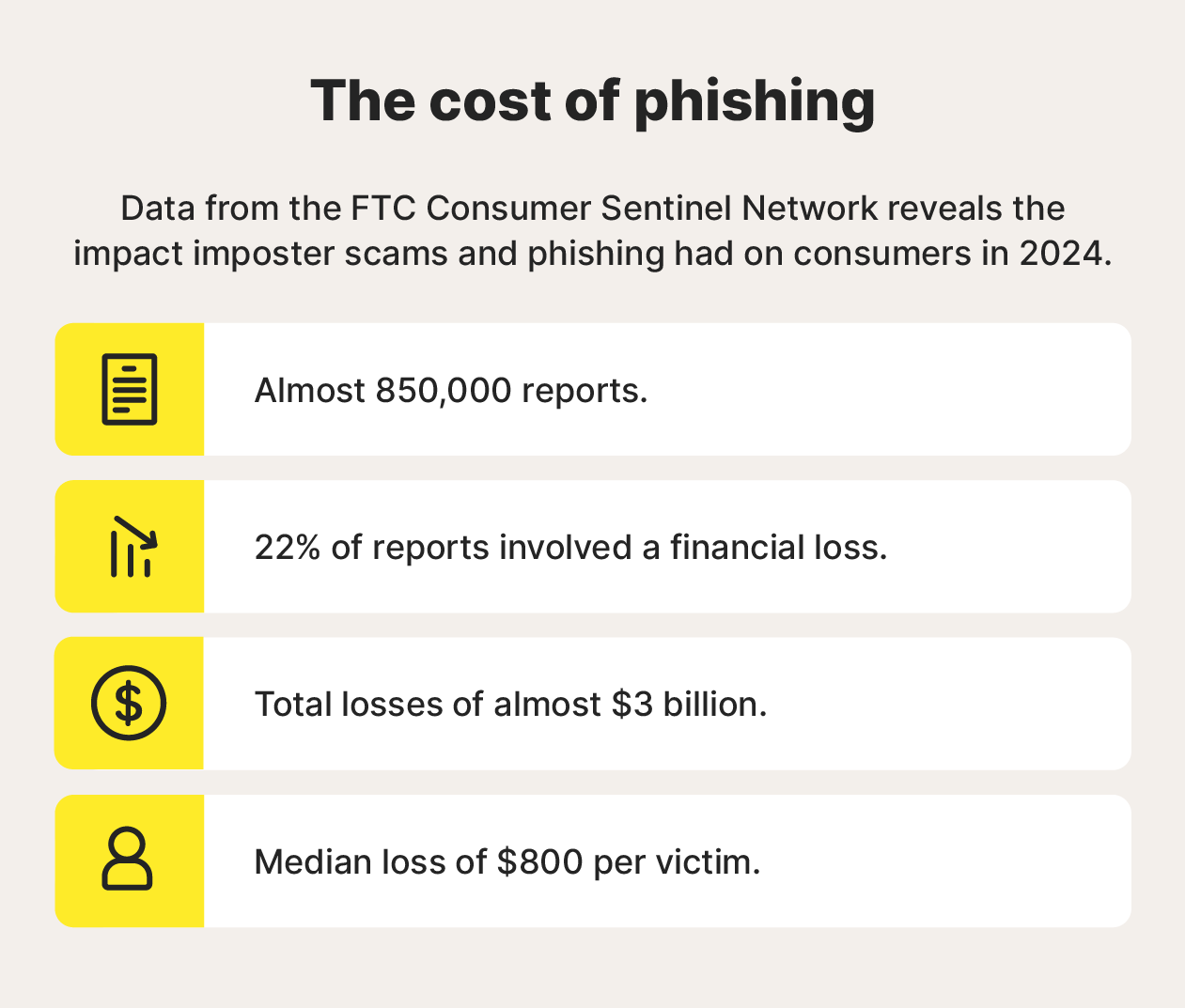
A visual representation of some shocking phishing statistics.
Scammers running a phishing scheme might contact victims directly, pretending to be a trusted individual or organization in an email, text, or direct message. But some phishing attacks also involve the use of fake websites that imitate real ones or compromised email attachments that infect the victim’s device with data-stealing malware.
How phishing attacks work
Phishing attacks tend to follow predictable patterns: attackers identify you as a target after getting access to your contact information, reach out with a fake story or pretext, use social engineering techniques to gain your trust, and then encourage you to share information directly, click a fake link, or download an infected attachment.
Regardless of their specific tactics, most phishers have the same end goal: to get access to sensitive information that they can use in account takeovers, financial fraud, or identity theft.
Here’s a more detailed look at the main steps in a phishing attack:
- Target selection: Attackers may focus on individuals, groups, or entire organizations, often using contact information exposed in data breaches or available on public people-search or social media sites.
- Initial contact: A phisher contacts you by text, email, call, or social media while posing as someone you trust. They invent a believable story and often tailor messages using details they’ve learned about you.
- Engagement: The scammer pushes you to act by sharing sensitive info, clicking a spoofed link, or opening a malware-laced attachment — often using urgency to pressure you into reacting quickly.
- Follow-up: When they have access to the information they need, the scammer will exploit it to access online accounts, steal money directly from your bank, or impersonate you in further scams.
Here’s some more information about some of the key strategies scammers may use to trick you into giving up information:
- Direct request for information: Scammers pose as someone you trust and ask for sensitive details, often inventing an urgent excuse, like an account issue or emergency, to make the request seem legitimate.
- Spoofed websites: Phishing links lead to fake websites that mimic real ones and prompt you to log in or enter payment info, handing your sensitive data directly to the scammer.
- Fake invoices or payment requests: Fraudsters send convincing invoices or payment instructions, pretending to be a merchant, to trick you into transferring money straight into their account.
- Malicious attachments: Emails or texts may include attachments that look legitimate but secretly install malware, allowing attackers to steal data or remotely access your device.
Types of phishing
Scammers use lots of different methods to identify, target, and reach potential victims with phishing attacks. Knowing what each type of phishing tends to look like can help you defend against them if you get targeted.
Email phishing
If a scammer has your email address, they can target you with phishing emails disguised as legitimate updates from trusted companies. Key traits of fake emails include spoofed sender addresses, urgent subject lines that provoke quick action, and attachments or links that infect your device with malware or lead to fake websites.
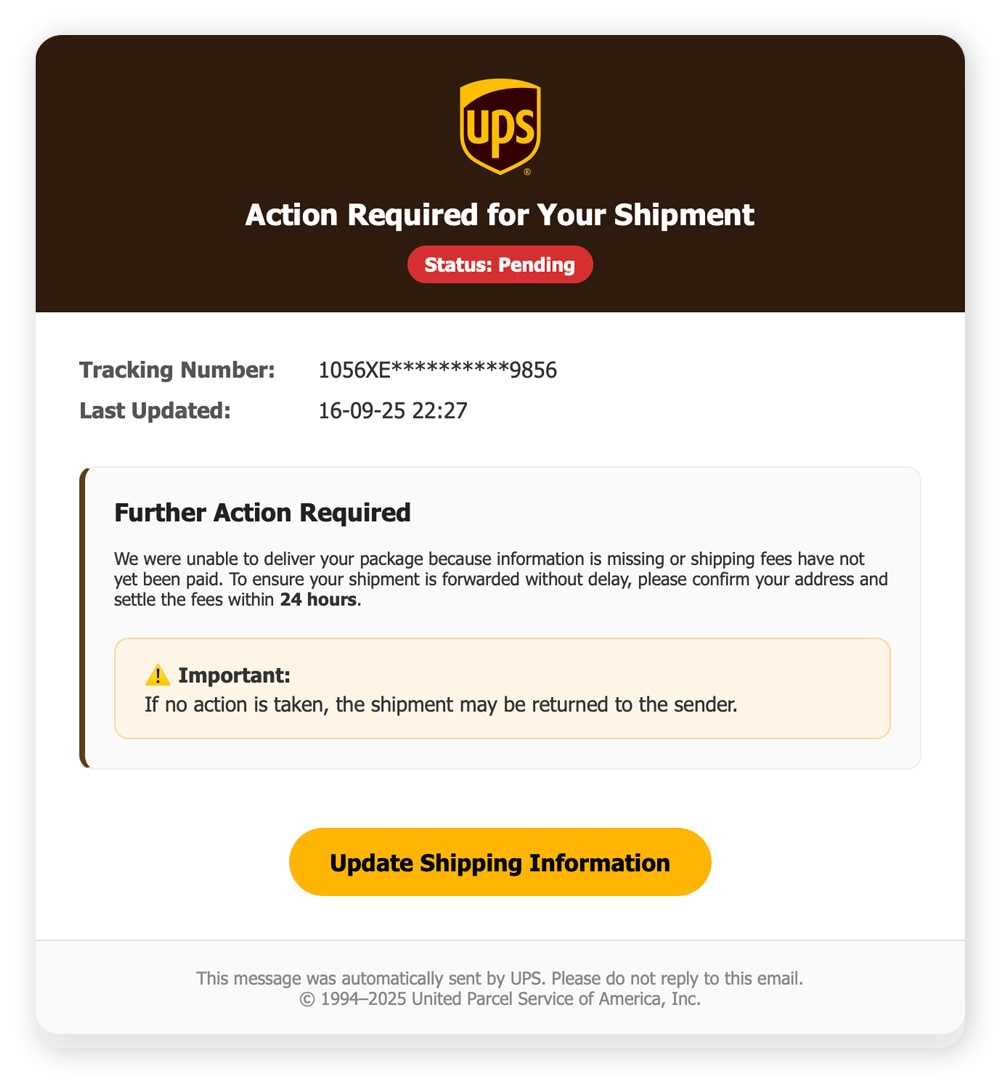
A screenshot showing an example of a UPS phishing email.
Smishing
Smishing (SMS phishing) uses text messages to lure you into replying with sensitive info or clicking a link. Smishing texts often come from spoofed phone numbers and contain shortened URLs that are hard to spot as fake. The tone is usually urgent, claiming you have a package delivery or account alert.
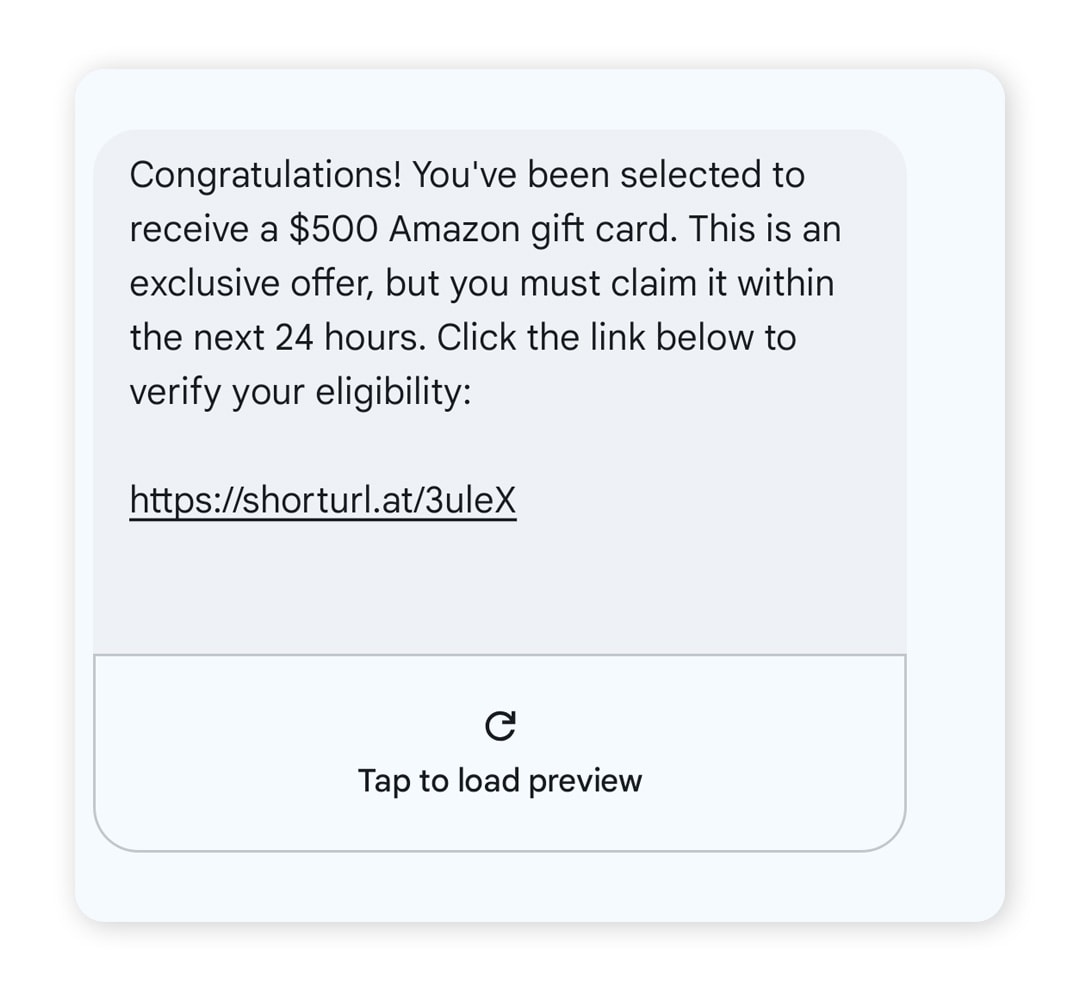
A screenshot showing an example of an Amazon phishing scam text.
Vishing
Vishing (voice phishing) is phishing carried out over the phone. Scammers with your phone number may call you impersonating banks, government agencies, or even coworkers, claiming they need info like your bank account logins or Social Security number urgently to help “protect” you from risk. Scammers will often spoof their caller ID to avoid “potential spam” warnings, making the call look more legitimate.
Quishing
Quishing (QR code phishing) involves scammers distributing malicious QR codes that lead anyone who scans them to fraudulent websites or download risky apps. They might be placed in innocuous locations, like restaurant tables, to trick you into scanning them.
Spear phishing
Spear phishing is a highly targeted form of phishing aimed at a specific individual. Attackers gather information from data breaches, social media, and public records to craft a personalized and convincing narrative that exploits your interests, routines, or vulnerabilities.
AI phishing
AI phishing is an emerging form of phishing involving the use of AI-generated text messages, cloned voices, or deepfake videos to trick you into thinking you’re speaking to someone you’re not. They’re only likely to get more realistic and convincing as AI technology develops.
How to spot a phishing attack
Many phishing attacks share common red flags that can help you identify them before you give away sensitive information or click a dangerous link. Urgent calls to action, suspicious contact details, and questionable attachments should all ring alarm bells.
Here’s a full list of methods you can use to identify scammers targeting you with phishing attacks before you fall for them:
- Check the sender’s contact details: Look closely at the sender’s email address or phone number. Subtle misspellings and strange domains (like @amaz0n.com) are both giveaways for scam email addresses, while strange country codes and spam warnings can reveal scam phone numbers.
- Verify suspicious unsolicited contact: If a message claiming to be from your bank, a delivery service, or a government agency comes out of the blue, don’t reply. Use an official contact channel to get in touch with the organization and verify the message is legitimate.
- Watch out for generic greetings and mistakes: Phishing messages often use impersonal, generic greetings like “Dear customer” and may contain spelling or grammar errors, neither of which is typical of authentic communications from legitimate organizations.
- Look for urgent or threatening language: Scammers rely on urgency tactics to get victims to act without thinking. If a message claims your account might be suspended, there’s a limited time to claim a deal, or you’re in legal trouble, don’t be fooled into taking action without investigating.
- Review too-good-to-be-true offers: Promises of unexpected refunds, prizes, or job opportunities are a common lure in phishing schemes. If it sounds unrealistic, it probably is.
- Inspect for inconsistent branding: Emails claiming to be from real brands but lacking the branding you’d expect to see, like logos, colour themes, and clean formatting, are likely to be fake.
- Hover over links before clicking them: You can check where a link will send you by hovering over it (or long-pressing on mobile devices) to inspect the destination URL. If it looks suspicious or doesn’t match the website you’d expect to be sent to, don’t click it.
- Scan suspicious attachments: Files attached to suspicious emails or texts could be disguised malware. Scan them with security software to check if they’re malicious before opening or downloading them.
Phishing attack examples
Although phishing attacks come in many forms and can be delivered in a variety of ways, like over the phone or by email, they tend to share similar characteristics that you can use to identify them.
For example, the phishing message below has some telltale signs of a tax scam. Aside from the fact that the IRS will never text you to tell you about an overdue balance, the use of urgent language and the fake URL both give this text away as inauthentic.
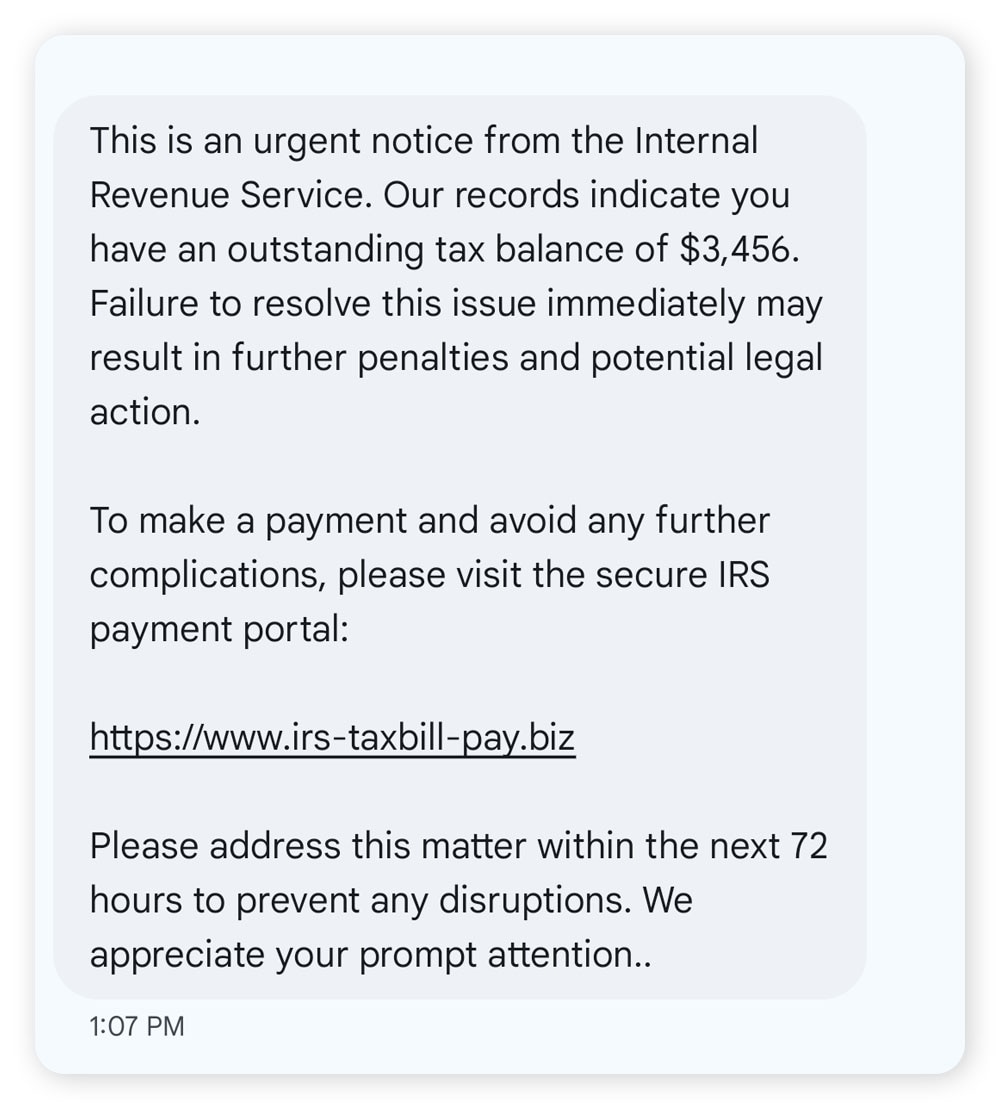
A screenshot showing a phishing example of a fake IRS text message.
The following screenshot of an Amazon scam email has similar traits, along with some extra signs of a phishing attack. It uses a generic greeting instead of a name, directly requests sensitive information, and uses the urgency tactic of including a short deadline to take action.
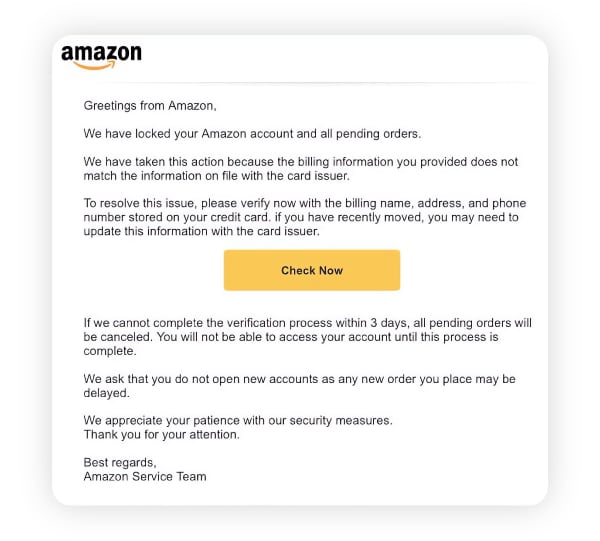
A screenshot showing a phishing email claiming to be from Amazon.
Both of these examples show how, if you don’t pay close attention, a phishing message might look convincing. But taking the time to think about it and adopting some key protective strategies can help keep you safer.
How to protect against phishing
Protecting against phishing attacks requires a combination of proactive habits and reactive actions. The goal is to minimize your exposure to scammers, recognize suspicious activity when you see it, and limit the damage if an attack slips through.
Here are some key ways you can build a better defense against phishing scammers:
- Understand common tactics: Knowing how scammers operate makes their attempts easier to spot. Learn the hallmarks of phishing messages and stay informed about emerging techniques and technologies, including AI-generated deepfakes.
- Reduce your contact information exposure: Scammers often harvest phone numbers and email addresses from public websites or find them on the dark web after a data breach. Limit where you share your contact details, and monitor the dark web for newly exposed information to shrink your digital footprint.
- Enable anti-spam features: Most email providers and phone carriers offer built-in filters that block or flag suspicious messages. Make sure these protections are enabled to reduce the number of phishing attempts that reach you.
- Be wary of unsolicited contact: Treat unexpected messages or calls with caution, especially if they request personal information or create a sense of urgency. When in doubt, contact the organization directly using a verified phone number or website.
- Refuse to provide personal information: Legitimate companies rarely ask for sensitive details such as Social Security numbers or account logins via email, text, or phone. Adopt a strict rule: don’t share personal information unless you initiated the interaction.
- Don’t click suspicious links or attachments: Phishing links often mimic real websites but lead to fraudulent pages, while attachments can hide malware. Visit websites directly through your browser instead of clicking unsolicited links.
- Use strong passwords and 2FA: Even if credentials are exposed, strong, unique passwords and two-factor authentication limit the damage. These practices help prevent one compromised account from cascading into many.
- Keep your software up to date: Outdated apps and operating systems can contain vulnerabilities that malware exploits during phishing attacks. Enable automatic updates to ensure you always have the latest security protections.
- Protect your credit and bank accounts: Monitor financial accounts for unusual activity to catch fraud early. Identity theft protection services with credit and account monitoring can add another layer of defense.
Join LifeLock for a range of powerful features that can help you protect against phishing. From dark web monitoring that warns you if your personal information is found on the dark net, to credit monitoring that alerts you to potential fraud, you’ll have end-to-end protection that helps stop scammers in their tracks.
What to do if you fall for a phishing scam
If you think you’ve fallen victim to a phishing attack, acting quickly can help limit the potential damage. Take the appropriate steps to regain access to any compromised accounts and attempt to reverse fraudulent charges. Then, protect your credit and monitor for future threats.
Here’s a step-by-step guide to follow after a phishing attack:
- Stop engaging: Once you realize you’re being targeted, cut off all contact. Don’t reply to emails, texts, or calls, and avoid clicking links or downloading attachments. Stepping away quickly limits the scammer’s ability to cause further harm.
- Change your passwords: If you shared any login details, update the passwords for those accounts right away. Use strong, unique passwords for every account to prevent one breach from cascading into multiple takeovers.
- Enable 2FA: Two-factor authentication adds a critical layer of protection by requiring a one-time code — usually sent to your phone or email — before logging in. This helps block scammers who may already have your password.
- Scan your device for malware: If you clicked a suspicious link or downloaded an attachment, run a full antivirus or malware scan. This helps detect and remove threats that could steal your data, log your keystrokes, or allow remote access to your device.
- Alert your bank or credit card issuer: If you disclosed sensitive financial information, contact your bank or card provider immediately. They can freeze affected accounts and may even be able to refund scammed money.
- Protect your credit: If scammers obtained personally identifiable information, such as your Social Security number, they may attempt to steal your identity and commit credit fraud. Placing a credit freeze or fraud alert can stop unauthorized parties from opening new accounts in your name.
- Report the attack: After the immediate risk is contained, file a report with authorities such as the Federal Trade Commission (FTC) and the Internet Crime Complaint Center (IC3). Reporting gives you access to support resources, creates a record that may help in future claims, and contributes to broader efforts to combat scammers.
- Monitor your accounts: Watch your financial accounts, credit reports, and online profiles closely in the weeks and months following an attack. An identity theft protection service like LifeLock can simplify this process by alerting you to signs of suspicious activity.
Stop phishers in their tracks
Phishing attacks might be common, but they don’t have to derail your life. Invest in the right protection to help keep your personal information private, your finances where they belong, and your identity safe and secure. Join LifeLock for dark web monitoring, credit monitoring, identity theft alerts, and more.
FAQs
What happens if I click a phishing link?
Clicking a link in a phishing message could install malware on your device or lead you to a fake website designed to trick you into entering sensitive information like login credentials or credit card numbers. Even if nothing happens right away, both of these situations could lead to fraud or identity theft down the line.
What should I do with phishing emails?
If you think you’ve received a phishing email, avoid opening it and don’t reply. Instead, mark the message as spam, block the sender, and report the message to the company or organization being impersonated. You can also forward the email to reportphishing@apwg.org to help the Anti-Phishing Working Group combat phishing schemes.
How do I report phishing attacks?
There are several ways to report phishing attacks to different organizations. You can mark it as spam to flag it to your email service provider, forward it to reportphishing@apwg.org to alert the Anti-Phishing Working Group, and report it as a scam to the FTC at reportfraud.ftc.gov.
What is the difference between scams and phishing?
A scam is any scheme designed to trick someone out of money or personal information. Phishing is a specific type of scam that involves the scammer impersonating a trusted person or organization, typically in a text message, email, or phone call, to steal sensitive information they can use in fraud or identity theft.
Editors’ note: Our articles provide educational information about identity theft, scams, financial fraud, and other topics that can put your identity or personal accounts at risk. LifeLock offerings may not cover or protect against every type of crime, fraud, scam, or threat we write about. For more details about how we write, review, and update our articles, see our Editorial Policy.
Related articles

Internet Security
What is social engineering? Types of attacks & how to spot them
February 10, 2025
·
10 min read
Internet Security
What to do if a scammer has your email address: 9 smart moves
March 06, 2025
·
8 min read


Internet Security
Accidentally opened a spam email? Here's what to do next
July 07, 2025
·
7 min read

Scams & Fraud
How to spot scam, fake, and phishing emails in 30 seconds
October 10, 2025
·
11 min read
Internet Security
What is social engineering? Types of attacks & how to spot them
February 10, 2025
·
10 min read
Internet Security
What to do if a scammer has your email address: 9 smart moves
March 06, 2025
·
8 min read
Internet Security
Accidentally opened a spam email? Here's what to do next
July 07, 2025
·
7 min read
Scams & Fraud
How to spot scam, fake, and phishing emails in 30 seconds
October 10, 2025
·
11 min read
Internet Security
What is social engineering? Types of attacks & how to spot them
February 10, 2025
·
10 min read
Internet Security
What to do if a scammer has your email address: 9 smart moves
March 06, 2025
·
8 min read
Internet Security
Accidentally opened a spam email? Here's what to do next
July 07, 2025
·
7 min read