


Has your personal data been recently exposed?
Check if information like your Social Security number, email, and passwords is exposed on the dark web.


You have reached the maximum number of scans allowed. Please come back after 24 hours.

Scanning the dark web...
Scanning public databases...
Scanning millions of records...
Narrowing down the search...
We need more information
Please enter a few more details to ensure we show you the right information.
You’re at high risk
We found your personal information on the dark web and on data broker sites.
 Up to $3M Reimbursement for identity theft, with up to $1M for Stolen Funds†††
$10K Scam Reimbursement7
Scam Support
Credit, Checking and Savings Activity Alerts: Unlimited Accounts
Credit & Payday Loan Lock2
Credit Monitoring:
3 Bureau1
Automatic Data Broker Removal8
Dark Web Monitoring
Priority 24/7 Customer Phone Support
Up to $3M Reimbursement for identity theft, with up to $1M for Stolen Funds†††
$10K Scam Reimbursement7
Scam Support
Credit, Checking and Savings Activity Alerts: Unlimited Accounts
Credit & Payday Loan Lock2
Credit Monitoring:
3 Bureau1
Automatic Data Broker Removal8
Dark Web Monitoring
Priority 24/7 Customer Phone Support
LifeLock Total

No one can prevent all cybercrime or prevent all identity theft.
- Price valid for introductory term. After that, your price will renew at the standard price.
- Your subscription begins immediately after your transaction is complete. A payment method is required at sign-up for trials, and you will be charged at the end of your trial, unless canceled first.
- Prices are subject to change and may be charged up to 35 days prior to renewal. Cancel here or contact Member Services.
- Restrictions apply. Automatically renewing subscription required. If you're a victim of identity theft and not satisfied with our resolution, you may receive a refund for the current term of your subscription. See lifelock.norton.com/guarantee for complete details.
††† Up to $1 million coverage for Lawyers and Experts included with all plans. Reimbursement and expense compensation vary according to plan. Insurance benefits are issued by third parties. See lifelock.norton.com/legal for policy info.
1 Bureau Monitoring and Monthly Credit Report and Score / 3 Bureau Monitoring and Monthly Credit Report and Score.
2 Credit Lock cannot prevent all account takeovers, unauthorized account openings, or credit file inquiries. Deactivates if you downgrade or cancel your subscription.
7 Scam protection coverage as part of identity theft benefits is currently available to all customers residing in the United States, including U.S. territories and the District of Columbia, with the exception of residents of New York. Gen Digital is not a licensed insurance producer. Benefits under the Master Policy are issued and covered by HSB Specialty Insurance Company. You can find further details and exclusions in the summary of benefits.
8 After setup, automatic data broker removal service scans and requests removal every 90 days.
You’re at medium risk
We found your personal information on data broker sites.
Up to $1.2M Reimbursement for identity theft, with up to $100K for Stolen Funds†††
$5K Scam Reimbursement7
Scam Support
Credit, Checking and Savings Activity Alerts:
5 Accounts
Credit & Payday Loan Lock2
Credit Monitoring:
3 Bureau1
Automatic Data Broker Removal8
Dark Web Monitoring
Priority 24/7 Customer Phone Support
LifeLock Advanced
No one can prevent all cybercrime or prevent all identity theft.
- Price valid for introductory term. After that, your price will renew at the standard price.
- Your subscription begins immediately after your transaction is complete. A payment method is required at sign-up for trials, and you will be charged at the end of your trial, unless canceled first.
- Prices are subject to change and may be charged up to 35 days prior to renewal. Cancel here or contact Member Services.
- Restrictions apply. Automatically renewing subscription required. If you're a victim of identity theft and not satisfied with our resolution, you may receive a refund for the current term of your subscription. See lifelock.norton.com/guarantee for complete details.
††† Up to $1 million coverage for Lawyers and Experts included with all plans. Reimbursement and expense compensation vary according to plan. Insurance benefits are issued by third parties. See lifelock.norton.com/legal for policy info.
1 Bureau Monitoring and Monthly Credit Report and Score / 3 Bureau Monitoring and Monthly Credit Report and Score.
2 Credit Lock cannot prevent all account takeovers, unauthorized account openings, or credit file inquiries. Deactivates if you downgrade or cancel your subscription.
7 Scam protection coverage as part of identity theft benefits is currently available to all customers residing in the United States, including U.S. territories and the District of Columbia, with the exception of residents of New York. Gen Digital is not a licensed insurance producer. Benefits under the Master Policy are issued and covered by HSB Specialty Insurance Company. You can find further details and exclusions in the summary of benefits.
8 After setup, automatic data broker removal service scans and requests removal every 90 days.
Good news!
We didn’t find your personal information across millions of records or on public data sources.
Up to $1.05M Reimbursement for identity theft, with up to $25K for Stolen Funds†††
Identity Restoration Specialists
Credit, Checking and Savings Activity Alerts:
2 Accounts
Credit & Payday Loan Lock2
Credit Monitoring:
2 Bureau1
Automatic Data Broker Removal8
Dark Web Monitoring
Breach Alerts
24/7 Customer Phone Support
Lifelock Core
No one can prevent all cybercrime or prevent all identity theft.
- Price valid for introductory term. After that, your price will renew at the standard price.
- Your subscription begins immediately after your transaction is complete. A payment method is required at sign-up for trials, and you will be charged at the end of your trial, unless canceled first.
- Prices are subject to change and may be charged up to 35 days prior to renewal. Cancel here or contact Member Services.
- Restrictions apply. Automatically renewing subscription required. If you're a victim of identity theft and not satisfied with our resolution, you may receive a refund for the current term of your subscription. See lifelock.norton.com/guarantee for complete details.
††† Up to $1 million coverage for Lawyers and Experts included with all plans. Reimbursement and expense compensation vary according to plan. Insurance benefits are issued by third parties. See lifelock.norton.com/legal for policy info.
1 Credit features require successful setup, identity verification, and sufficient credit history by the appropriate credit bureau. Credit monitoring features may take several days to activate after enrollment.
2 Identity Lock cannot prevent all account takeovers, unauthorized account openings, or credit file inquiries. Deactivates if you downgrade or cancel your subscription.
8 After setup, automatic data broker removal service scans and requests removal every 90 days.

 Why do we ask?
Finding your match...

10 cents
If your information is exposed or stolen in a data breach, it can end up on the dark web where it can be sold for as little as 10 cents.
100M+
LifeLock monitors hundreds of millions of data points a second.
- Up to $1.05M Reimbursement for identity theft, with up to $25K for Stolen Funds†††
- Up to $1.2M Reimbursement for identity theft, with up to $100K for Stolen Funds†††
- Up to $3M Reimbursement for identity theft, with up to $1M for Stolen Funds†††
- Up to $1.05M Reimbursement for identity theft, with up to $25K for Stolen Funds††† for each adult
- Up to $1.2M Reimbursement for identity theft, with up to $100K for Stolen Funds††† for each adult
- Up to $3M Reimbursement for identity theft, with up to $1M for Stolen Funds††† for each adult
- Up to $1.05M Reimbursement for identity theft, with up to $25K for Stolen Funds††† for each adult
- Up to $1.2M Reimbursement for identity theft, with up to $100K for Stolen Funds††† for each adult
- Up to $3M Reimbursement for identity theft, with up to $1M for Stolen Funds††† for each adult
- Credit Monitoring Coverage1
- Credit Monitoring1 each adult
- Credit Monitoring1 for family
- Credit, Checking & Savings Account Activity Alerts
- Credit, Checking and Savings Activity Alerts for each adult
- Credit, Checking and Savings Activity Alerts for family
- 401K & Investment Account Activity Alerts
- 401K/Investment Account Alerts for each adult
- 401K/Investment Account Alerts for family
- Recurring and Unusual Charge Alerts
- Unexpected & Suspicious Charge Alerts for each adult
- Unexpected & Suspicious Charge Alerts for family
- Stolen Funds Reimbursement†††
- Stolen Funds Reimbursement††† for each adult
- Stolen Funds Reimbursement††† for family
- Lawyers and Experts†††
- Lawyers & Experts††† for each adult
- Lawyers & Experts††† for family
- Automatic Data Broker Removal8
- Automatic Data Broker Removal8 for each adult
- Automatic Data Broker Removal8 for family
- Scam Reimbursement7
- Scam Reimbursement7 for each adult
- Scam Reimbursement7 for family
- Credit Reports & Scores1
- Credit Report & Score for each adult
- Credit Report & Score for family
- Social Media Monitoring
- Social Media Monitoring for each adult
- Social Media Monitoring for family


††† Up to $1 million coverage for Lawyers and Experts included with all plans. Reimbursement and expense compensation vary according to plan. Insurance benefits are issued by third parties. See LifeLock.Norton.com/legal for policy info.
1 Credit features require successful setup, identity verification and sufficient credit history by the appropriate credit bureau. Credit monitoring features may take several days to activate after enrollment.
7 Scam protection coverage as part of identity theft benefits is currently available to all customers residing in the United States, including U.S. territories and the District of Columbia, with the exception of residents of New York. Gen Digital is not a licensed insurance producer. Benefits under the Master Policy are issued and covered by HSB Specialty Insurance Company. You can find further details and exclusions in the Summary of Benefits.
8 After setup, automatic data broker removal service scans and requests removal every 90 days.
Why do we ask?
Identifying your concerns gives us the ability to recommend the right plan for your needs.
Why do we ask?
Knowing this number helps us recommend coverage that fits your needs.
Why do we ask?
Providing your email address makes you eligible for notifications of potential identity threats.
How to identify fake websites: 13 clues
Fake websites can appear so convincing you might not even realize you’re handing over your payment details to a cybercriminal. Learn how to identify fake websites, then join LifeLock for powerful identity monitoring that helps tip you off if your personal information is being abused by identity thieves.





Scammers are raking it in. Americans lost a total of $16.6 billion to cybercrime in 2024, a 33% increase from the previous year, according to the FBI. Fake websites, which can find their way to users via malicious social media ads or phishing links, are a major way scammers profit. These malicious sites can mimic banks, online retailers, or IT support pages.
Thanks in part to AI, scam sites seem to be getting more convincing every day: they often contain authentic-looking branding and design elements that give them a realistic “vibe,” leading cyberthreat researchers at Gen Digital, LifeLock’s parent company, to nickname them “Vibe Scams.”
Fortunately, there are warning signs to watch out for. Keep reading to learn how to spot the red flags of a fake website, what to do if you’ve already exposed sensitive information on a fake site, and how LifeLock can help protect your personal information from digital threats.
1. Examine the URL
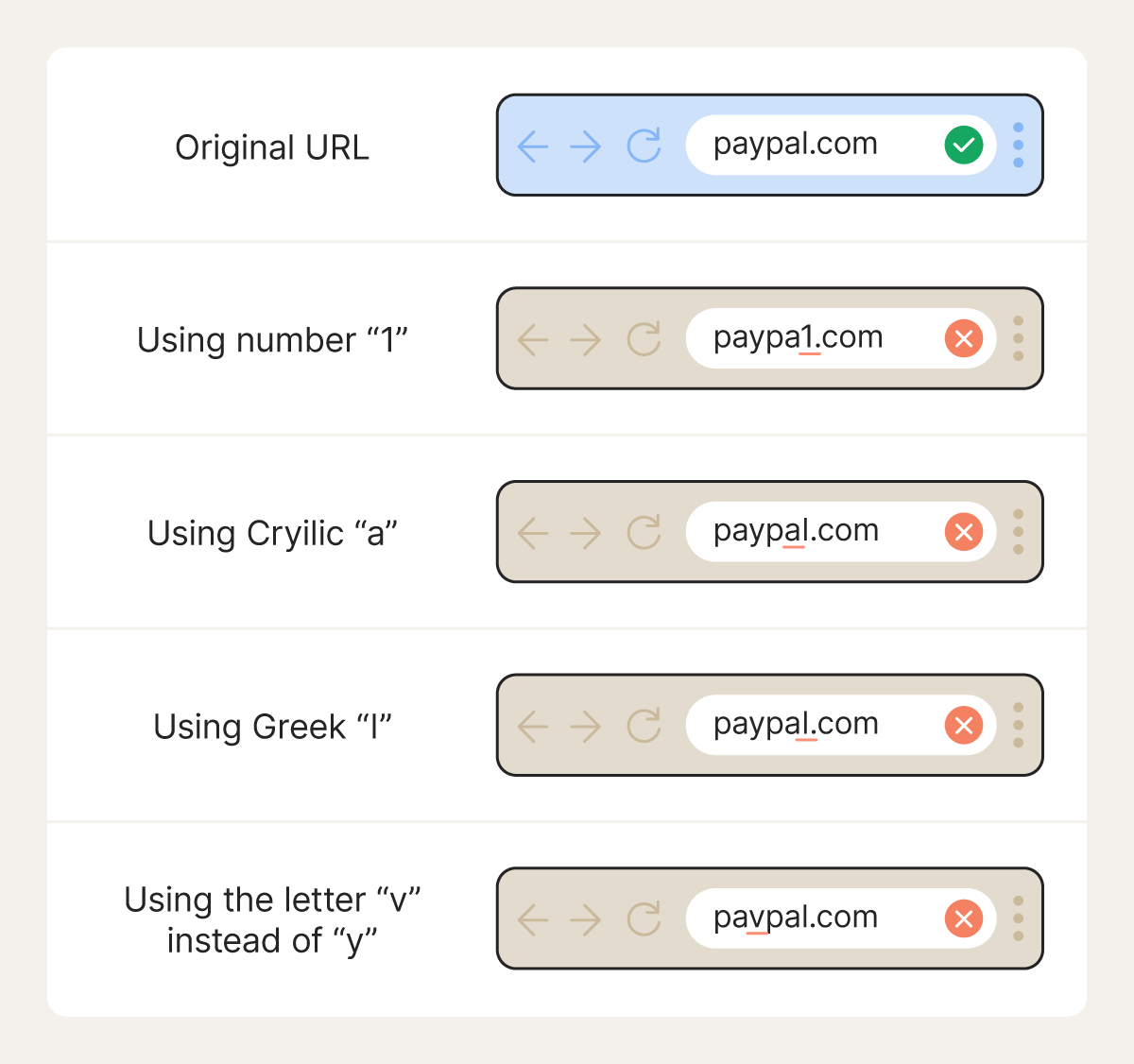
Take a close look at the website’s URL. To mimic a popular website, scammers can swap similar-looking characters, add or remove letters, replace letters with numbers, or switch alphabets entirely. Let’s take a look at a few common tricks scammers use to conceal malicious URLs.
- Swapping similar-looking characters: A scammer may direct you to paypaI.com, which uses a capital “I” instead of a lowercase “l”. Your eye reads it as “PayPal,” but it’s not. Hovering over the url should reveal that the true URL reads “paypai.”
- Adding/removing letters: Arnazon.com replaces the letter “m” with an “rn” to deceive the target. This practice is known as typosquatting.
- Using numbers instead of letters: Take app1e.com as an example, which uses the number “1” instead of an “l.” Depending on the font, this alteration may not be so obvious.
- Swapping alphabets (Cyrillic/Greek): For example, a URL that’s spelled faceboοk.com uses the Greek omicron “O” instead of the Latin version found in the English alphabet. This practice is also referred to as a homograph attack.
Check out this side-by-side comparison of how a homograph attack could look in practice below.
2. Check the domain structure
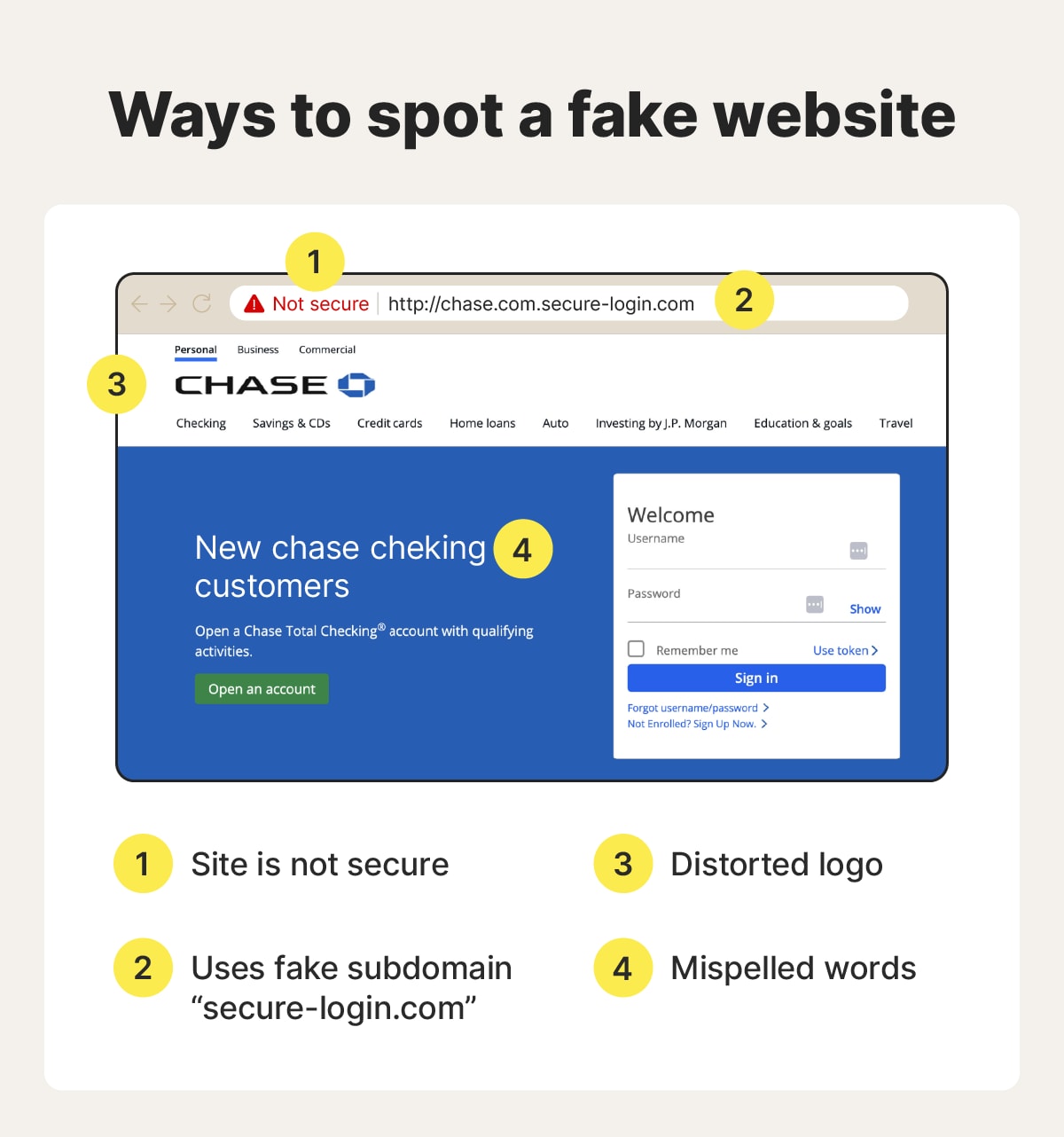
Manipulating a website’s domain structure is another common tactic that scammers behind fake websites use. The scammer may frontload the URL with something that looks real, like netflix.com, when the actual domain of the website you’re visiting is at the end (but before any forward slashes).
For instance, a fake Netflix site could have a URL that looks like netflix.com.user-login-alerts.io.
In this example, “Netflix.com” is just a subdomain. The real domain is “user-login-alerts.io.”
3. Confirm the HTTPS certificate
Confirming the HTTPS certificate is easy. If the address starts with “https://” (as opposed to “http://” without the “s”) and you see a padlock icon to the left of the URL, the connection is encrypted and secure. If you’re a Chrome user, click the tune icon to the left of the domain to check a site’s encryption.
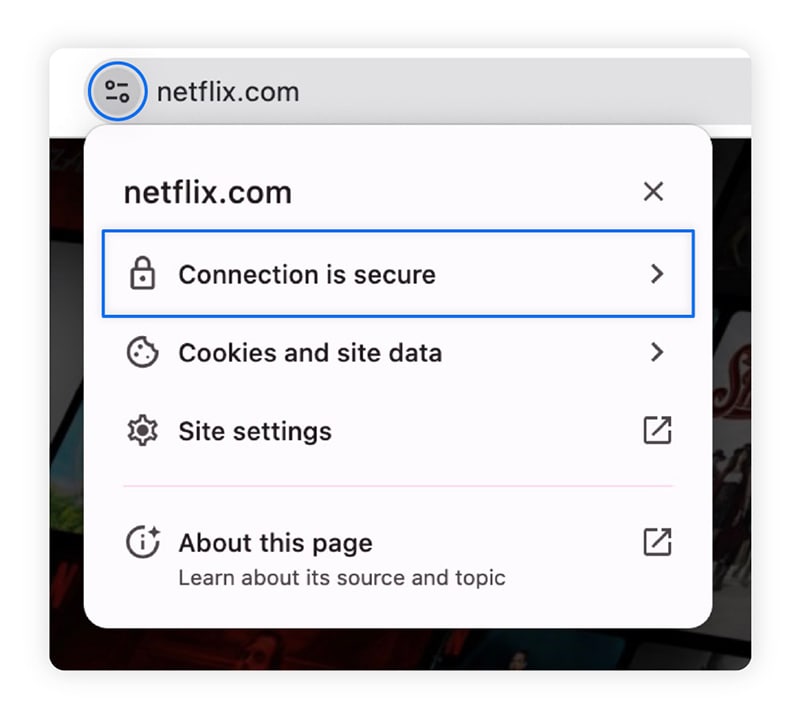
Many scam websites don’t bother with HTTPS certification because they’re designed to be short-lived and disposable. Adding encryption takes extra setup, and basic scam pages don’t need to protect user data. That makes a missing “s” a strong warning sign.
Still, this check isn’t foolproof: scammers can buy SSL/TLS certificates, and more sophisticated ones do. HTTPS helps screen out low-effort scams, but it shouldn’t be the only factor you rely on.
4. Consider how you got there
Always ask yourself one simple question: how did I land on this site? If you can’t trust where the link came from, you can’t trust where it’s sending you.
If you arrived via a sketchy email, text, or pop-up ad, that’s a major red flag. Such links are likely to be phishing attacks, where scammers use social engineering tricks to manipulate victims into clicking a malicious link that leads to a fake website or triggers a malware download.
Unfortunately, even legitimate social media platforms can host ads that lead to scam websites. According to a Reuters investigation, fraudulent ads are shockingly common on Meta platforms like Facebook, with some estimates indicating that Meta may show users 15 billion scam ads a day.
5. Look for typos and poor grammar
Typos, poor grammar, and awkward wording are another potential way to spot a scam, although generative AI is making it easier for scammers to produce website text that sounds professional.
Even when the writing looks clean, parts may not hold up if you read carefully. You might notice vague explanations, contradictions, missing text, or instructions that feel incomplete. Legitimate websites are usually clear and consistent, while scam sites rely on sounding credible at a glance in the hope that users won’t look too closely.
6. Evaluate design quality and functionality
Legit brands invest money in design, branding, and credibility. There are many visual warning signs that can tip you off as to whether a site is a fake, such as:
- Low-resolution images.
- Clunky navigation.
- Mismatched fonts.
- Misspellings on checkout pages.
- Missing website sections.
A particularly common sign of a fake website is broken or non-functional elements. Links may lead nowhere, buttons might not work, pages may fail to load, or forms may behave strangely. Scam sites are often thrown together quickly and aren’t maintained over time, so basic functionality issues are more likely to slip through than on legitimate websites.
Click around various parts of the website to double check whether everything is really there. If many pages are missing, you may be dealing with a “Potemkin website.”
7. Check the domain age and registration
One way to look for signs of a fake website is by checking the domain’s age and registration details. That’s where domain lookup tools like whois.com come in handy.
Enter a web address to see when the domain was registered, which registrar it uses, and other basic ownership details. If what you find raises red flags, such as a very recent registration or ownership details that don’t match the brand’s history, the site may be a scam.
Some reverse domain lookup tools can also reveal other websites linked to the same registrant. If a single owner is connected to multiple questionable or scam-like domains, that’s a strong warning sign.
8. Search for external reviews
Scammers can fake a website, but they can’t rid the world of angry customers. If a fake site is impersonating a well-known brand, a quick search can reveal warning signs. Start by Googling the website’s name along with words like “scam,” “reviews,” or “complaints.” If enough people have had bad experiences, you’ll usually find them.
Next, check reputable review platforms and Reddit. These sites often require more effort to manipulate than testimonials posted directly on a scam website.
Category |
Review Site |
Best for |
|---|---|---|
SaaS |
Reviews from verified business users |
|
Side-by-side software comparisons |
||
Enterprise-focused, vetted reviews |
||
Service Businesses |
Restaurants, salons, and small businesses |
|
Contractors, home services, and repairs |
||
Credibility checks, complaints, and dispute history |
||
E-commerce |
Global review platform for online retailers |
|
Marketplaces, apps, and shopping sites |
||
Consumer feedback on online stores |
Just be cautious of overwhelmingly positive reviews that sound the same: that’s another common scam tactic. If the praise feels generic, repetitive, or oddly polished, it may be manufactured rather than earned.
9. Look for complete contact and policy info
A legitimate business should make it easy to get in touch. Scam sites often do the opposite. Look for multiple ways to reach the company, such as a phone number, address, or named contacts.
If a site does list contact details, take a moment to verify them. You can check physical addresses on Google Maps and confirm phone numbers with a validator like Messente. Missing or unverifiable details are a warning sign.
Policies matter too. Real companies clearly explain their shipping, return, and privacy policies. Scam sites may skip these pages entirely or reuse vague, generic templates. If you cannot verify who you’re dealing with or how your data will be handled, don’t share personal or payment information.
10. Examine the checkout process
Payment methods can reveal a lot about a website’s legitimacy. For safer online shopping, be cautious if a site only accepts payment options that offer little or no buyer protection. Such methods are normally irreversible, and there will likely be no refund from your bank.
High-risk payment methods include:
- Gift cards.
- Cryptocurrencies.
- Direct bank transfers.
- Wire transfers.
A legitimate business should make it simple for you to pay for their products or services. That’s why credit cards and PayPal are common methods of payment accepted around the world.
11. Watch for aggressive pop-up ads
Aggressive pop-up ads are often a warning sign that a fake website is trying to rush you into action. Malicious sites may use pop-ups that claim your device is infected, your account is compromised, or a limited-time offer is about to expire. Or, they may lead to phony login pages from your bank, PayPal, or email provider.
The goal is to create urgency, distract you from checking details, and push you toward a quick decision before you can spot the scam. If you see a pop-up ad, avoid clicking it and close the browser tab immediately.
12. Check the company’s social media presence
A company’s social media presence can offer useful clues about whether a website is legitimate. Real businesses usually maintain active profiles on platforms like Facebook, Instagram, LinkedIn, or X, where they post updates, respond to questions, and interact with customers. In many cases, they will have been doing so for a long time.
Be cautious if a site links to social media pages that are missing, newly created, inactive, or filled with generic posts and fake-looking engagement. Broken links, copied content, or accounts with no real interaction can signal that the website exists only to run a short-term scam.
13. Be wary of massive discounts
Massive discounts can be another red flag. Scam sites often advertise prices that are far lower than anything you would find from reputable retailers, hoping the deal itself will override common sense and push you to buy quickly.
Legitimate businesses run sales, but they usually make sense within the context of the product, season, or brand. If a website claims to offer luxury items, in-demand electronics, or brand-name products at steep, no-questions-asked discounts, take a step back. When a deal looks too good to be true, it often is.
Examples of fake websites
Here are three examples of fake websites to be on the lookout for.
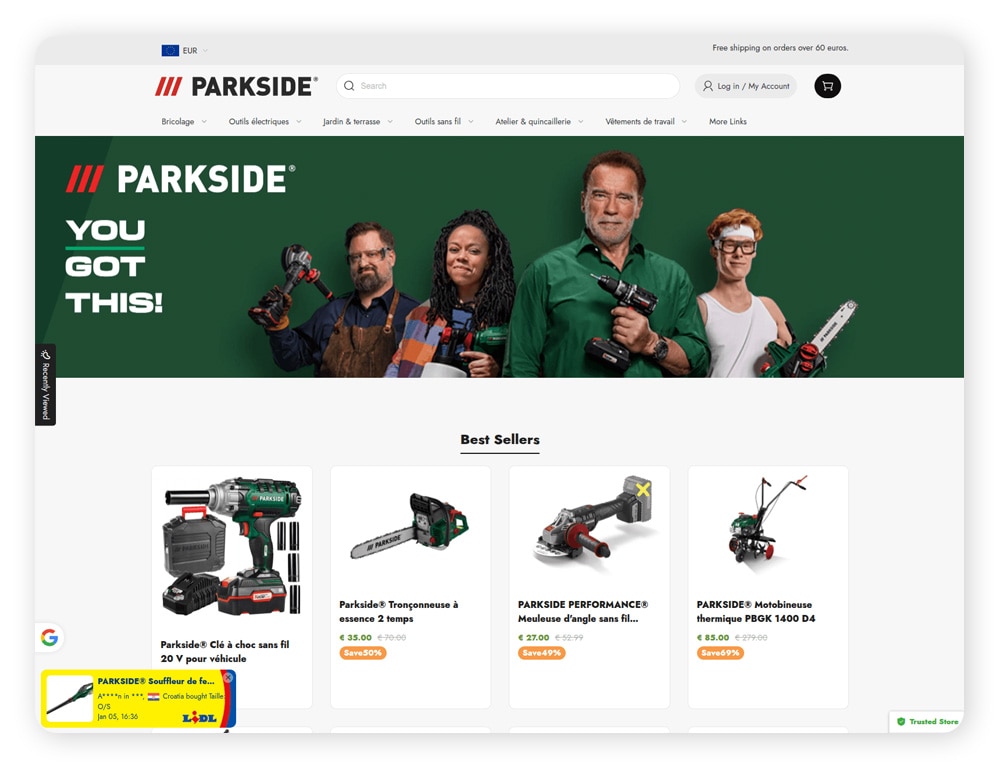
Fake storefronts
The fake storefront below, spotted “in the wild” by threat researchers at Gen Digital, LifeLock’s parent company, targets EU customers. It featured suspiciously steep discounts, navigational text in both English and French, and an oddly minimal design.
Fake Apple support websites
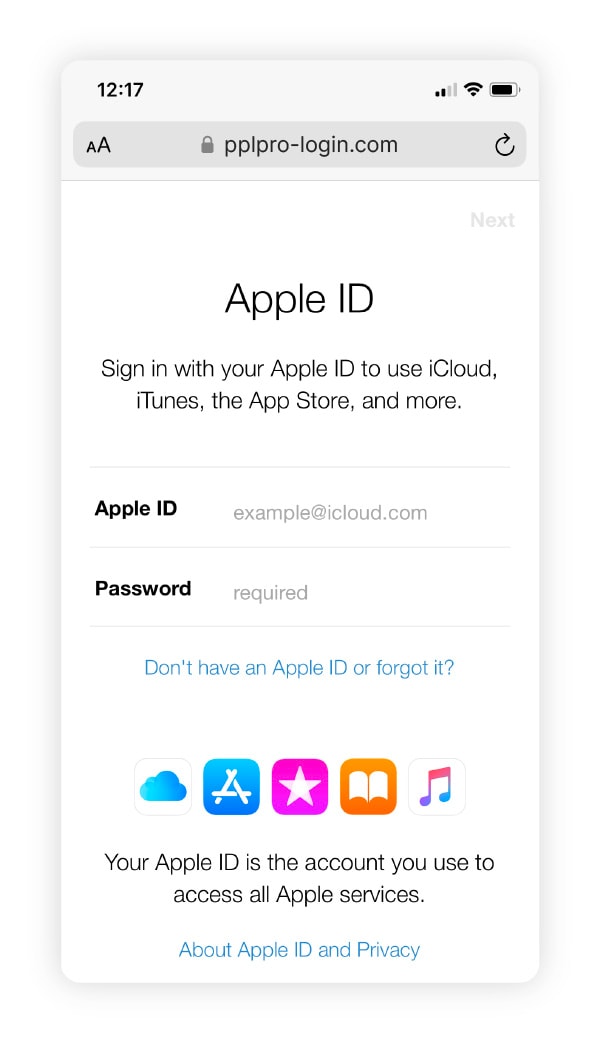
Fake Apple support sites can trick you into revealing your Apple ID through a fake login portal. The example below, sourced from Trend Micro, looks like a realistic copy at first glance, but the mismatched domain in the URL reveals it is a fake website.
Fake U.S. government websites
Scammers are impersonating official U.S. government sites. These scams are particularly dangerous because spoofed government websites may trick users into exposing their Social Security number, allowing scammers to leak it to the dark web or sell it to identity thieves.
To help avoid fake government websites, bookmark the sites you frequent the most.
Scam ad campaigns leading to fake websites
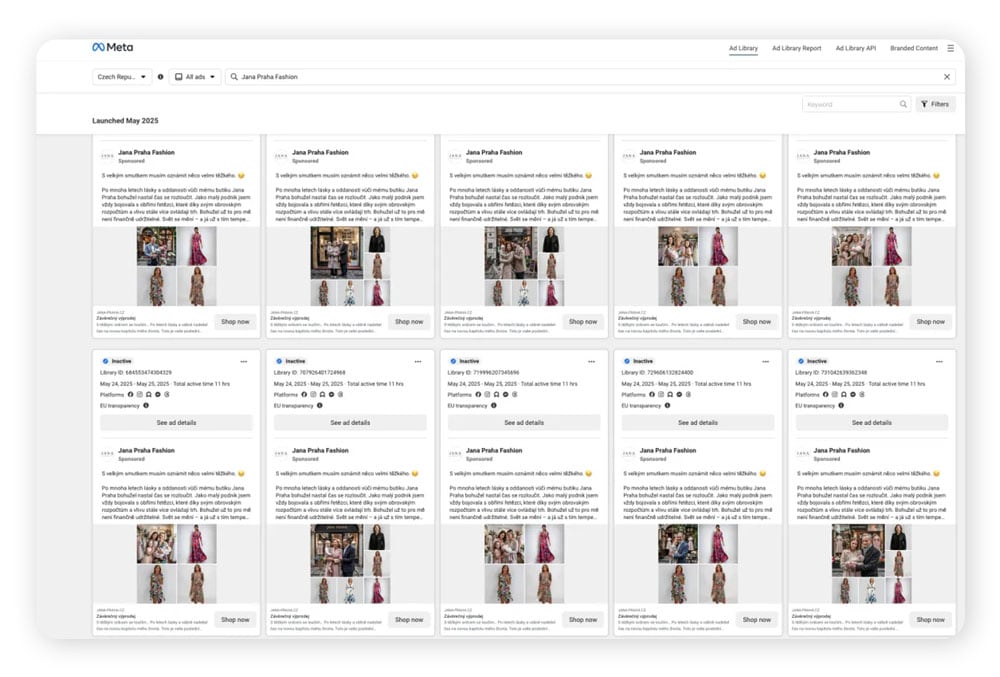
In a scam ad campaign uncovered by threat researchers at Gen Digital, fraudsters used Facebook ads to promote a fake online boutique masquerading as a local business in Czechia. The ads relied on AI-generated people, storefront images, and personal stories to build credibility and drive users to a fraudulent e-commerce website designed to steal money and personal details.
Warning signs included a newly registered domain, no verifiable physical location or business history, and an absence of legitimate reviews.
What to do if you entered your information on a fake site
If you entered sensitive information on a fake website, change your affected passwords, monitor your accounts for suspicious transactions, and potentially freeze your credit. Let’s take a deeper dive:
- Change affected passwords: If you entered your login information, create new unique passwords for all the accounts that use the password you exposed.
- Turn on 2FA: Protect your accounts with two-factor or multi-factor authentication. This way, even if your password is exposed, hackers won’t be able to get into your accounts easily.
- Dispute charges and freeze your card: If you entered your payment details on a scam website, dispute any charges immediately and ask your bank to freeze or block the card in question.
- Freeze your credit: If scammers have your Social Security number or personal details, freeze your credit with all three bureaus and monitor it daily. This can help stop scammers from opening new accounts in your name.
- Consider identity theft protection: Professional identity theft protection services can help you monitor for signs of identity theft, send alerts if your personal information is found on the dark web, and help you restore your identity.
- Run an antivirus scan: If you downloaded anything from a fake website, your computer could be compromised by malware. Run a full system scan with trusted antivirus software.
How to report a fake website
You can report a fake website to the FTC, IC3, or the BBB. Filing a report creates an official record that helps organizations track fraud patterns and increases the chances the malicious site will be flagged, blocked, or investigated. Here’s a list of organizations you can contact:
- Federal Trade Commission (FTC): The FTC collects scam reports to identify trends, investigate fraud, and share cases with law enforcement. It plays a central role in coordinating consumer fraud enforcement.
- Internet Crime Complaint Center (IC3): Run by the FBI, IC3 collects cybercrime reports and forwards relevant cases to appropriate law enforcement agencies, including local, state, and federal authorities.
- BBB Scam Tracker: The Better Business Bureau’s free Scam Tracker lets consumers report scams and search existing reports, helping warn others and categorize scams by type, such as tax, pet, or consumer fraud.
Protect your personal information with LifeLock
Even prudent people can be fooled by fake websites if they’re tired, distracted, or stressed. Then, all it takes is a few clicks or keystrokes to reveal payment details to a fraudster. LifeLock can help mitigate the financial fallout from scams and identity theft.
With robust identity theft protection and monitoring tools, you’ll get alerts when LifeLock finds that your personal information is used fraudulently, so you can act quickly to protect your identity. And, if your identity is compromised, you’ll get personalized support from a U.S.-based restoration specialist to help you get back on your feet.
FAQs
How do I know if I ordered from a fake website?
You may have ordered from a fake website if you never receive a confirmation email, the charges on your card look unfamiliar, customer support doesn’t respond, or the site suddenly goes offline. Other warning signs include poor-quality product pages, prices seemed too good to be true, and payment issues shortly after checkout.
Can fake websites rank in Google search results?
Yes, fake websites can rank in Google, but not for long. While scammers can use SEO poisoning to manipulate search engines’ algorithms to appear in top spots in search results, such sites are normally uncovered quickly.
Are fake websites common on social media?
Yes, ads for fake websites are very common on social media. Such ad campaigns can be used to run phishing scams, steal identities, and sell users poor quality products.
Editors’ note: Our articles offer educational information and are written to raise awareness about important topics in Cyber Safety. Norton products and services may not protect against every type of threat, fraud, or crime we write about. For more details about how we research, write, and review our articles, see our Editorial Policy.
This article contains
- 1. Examine the URL
- 2. Check the domain structure
- 3. Confirm the HTTPS certificate
- 4. Consider how you got there
- 5. Look for typos and poor grammar
- 6. Evaluate design quality and functionality
- 7. Check the domain age and registration
- 8. Search for external reviews
- 9. Look for complete contact and policy info
- 10. Examine the checkout process
- 11. Watch for aggressive pop-up ads
- 12. Check the company’s social media presence
- 13. Be wary of massive discounts
- Examples of fake websites
- What to do if you entered your information on a fake site
- How to report a fake website
- Protect your personal information with LifeLock
- FAQs
Related articles