

Has your personal data been recently exposed?
Check if information like your Social Security number, email, and passwords is exposed on the dark web.


You have reached the maximum number of scans allowed. Please come back after 24 hours.

Scanning the dark web...
Scanning public databases...
Scanning millions of records...
Narrowing down the search...
We need more information
Please enter a few more details to ensure we show you the right information.
You’re at high risk
We found your personal information on the dark web and on data broker sites.
 Up to $3M Reimbursement for identity theft, with up to $1M for Stolen Funds†††
$10K Scam Reimbursement7
Scam Support
Credit, Checking and Savings Activity Alerts: Unlimited Accounts
Credit & Payday Loan Lock2
Credit Monitoring:
3 Bureau1
Automatic Data Broker Removal8
Dark Web Monitoring
Priority 24/7 Customer Phone Support
Up to $3M Reimbursement for identity theft, with up to $1M for Stolen Funds†††
$10K Scam Reimbursement7
Scam Support
Credit, Checking and Savings Activity Alerts: Unlimited Accounts
Credit & Payday Loan Lock2
Credit Monitoring:
3 Bureau1
Automatic Data Broker Removal8
Dark Web Monitoring
Priority 24/7 Customer Phone Support
LifeLock Total

No one can prevent all cybercrime or prevent all identity theft.
- Price valid for introductory term. After that, your price will renew at the standard price.
- Your subscription begins immediately after your transaction is complete. A payment method is required at sign-up for trials, and you will be charged at the end of your trial, unless canceled first.
- Prices are subject to change and may be charged up to 35 days prior to renewal. Cancel here or contact Member Services.
- Restrictions apply. Automatically renewing subscription required. If you're a victim of identity theft and not satisfied with our resolution, you may receive a refund for the current term of your subscription. See lifelock.norton.com/guarantee for complete details.
††† Up to $1 million coverage for Lawyers and Experts included with all plans. Reimbursement and expense compensation vary according to plan. Insurance benefits are issued by third parties. See lifelock.norton.com/legal for policy info.
1 Bureau Monitoring and Monthly Credit Report and Score / 3 Bureau Monitoring and Monthly Credit Report and Score.
2 Credit Lock cannot prevent all account takeovers, unauthorized account openings, or credit file inquiries. Deactivates if you downgrade or cancel your subscription.
7 Scam protection coverage as part of identity theft benefits is currently available to all customers residing in the United States, including U.S. territories and the District of Columbia, with the exception of residents of New York. Gen Digital is not a licensed insurance producer. Benefits under the Master Policy are issued and covered by HSB Specialty Insurance Company. You can find further details and exclusions in the summary of benefits.
8 After setup, automatic data broker removal service scans and requests removal every 90 days.
You’re at medium risk
We found your personal information on data broker sites.
Up to $1.2M Reimbursement for identity theft, with up to $100K for Stolen Funds†††
$5K Scam Reimbursement7
Scam Support
Credit, Checking and Savings Activity Alerts:
5 Accounts
Credit & Payday Loan Lock2
Credit Monitoring:
3 Bureau1
Automatic Data Broker Removal8
Dark Web Monitoring
Priority 24/7 Customer Phone Support
LifeLock Advanced
No one can prevent all cybercrime or prevent all identity theft.
- Price valid for introductory term. After that, your price will renew at the standard price.
- Your subscription begins immediately after your transaction is complete. A payment method is required at sign-up for trials, and you will be charged at the end of your trial, unless canceled first.
- Prices are subject to change and may be charged up to 35 days prior to renewal. Cancel here or contact Member Services.
- Restrictions apply. Automatically renewing subscription required. If you're a victim of identity theft and not satisfied with our resolution, you may receive a refund for the current term of your subscription. See lifelock.norton.com/guarantee for complete details.
††† Up to $1 million coverage for Lawyers and Experts included with all plans. Reimbursement and expense compensation vary according to plan. Insurance benefits are issued by third parties. See lifelock.norton.com/legal for policy info.
1 Bureau Monitoring and Monthly Credit Report and Score / 3 Bureau Monitoring and Monthly Credit Report and Score.
2 Credit Lock cannot prevent all account takeovers, unauthorized account openings, or credit file inquiries. Deactivates if you downgrade or cancel your subscription.
7 Scam protection coverage as part of identity theft benefits is currently available to all customers residing in the United States, including U.S. territories and the District of Columbia, with the exception of residents of New York. Gen Digital is not a licensed insurance producer. Benefits under the Master Policy are issued and covered by HSB Specialty Insurance Company. You can find further details and exclusions in the summary of benefits.
8 After setup, automatic data broker removal service scans and requests removal every 90 days.
Good news!
We didn’t find your personal information across millions of records or on public data sources.
Up to $1.05M Reimbursement for identity theft, with up to $25K for Stolen Funds†††
Identity Restoration Specialists
Credit, Checking and Savings Activity Alerts:
2 Accounts
Credit & Payday Loan Lock2
Credit Monitoring:
2 Bureau1
Automatic Data Broker Removal8
Dark Web Monitoring
Breach Alerts
24/7 Customer Phone Support
Lifelock Core
No one can prevent all cybercrime or prevent all identity theft.
- Price valid for introductory term. After that, your price will renew at the standard price.
- Your subscription begins immediately after your transaction is complete. A payment method is required at sign-up for trials, and you will be charged at the end of your trial, unless canceled first.
- Prices are subject to change and may be charged up to 35 days prior to renewal. Cancel here or contact Member Services.
- Restrictions apply. Automatically renewing subscription required. If you're a victim of identity theft and not satisfied with our resolution, you may receive a refund for the current term of your subscription. See lifelock.norton.com/guarantee for complete details.
††† Up to $1 million coverage for Lawyers and Experts included with all plans. Reimbursement and expense compensation vary according to plan. Insurance benefits are issued by third parties. See lifelock.norton.com/legal for policy info.
1 Credit features require successful setup, identity verification, and sufficient credit history by the appropriate credit bureau. Credit monitoring features may take several days to activate after enrollment.
2 Identity Lock cannot prevent all account takeovers, unauthorized account openings, or credit file inquiries. Deactivates if you downgrade or cancel your subscription.
8 After setup, automatic data broker removal service scans and requests removal every 90 days.

 Why do we ask?
Finding your match...

10 cents
If your information is exposed or stolen in a data breach, it can end up on the dark web where it can be sold for as little as 10 cents.
100M+
LifeLock monitors hundreds of millions of data points a second.
- Up to $1.05M Reimbursement for identity theft, with up to $25K for Stolen Funds†††
- Up to $1.2M Reimbursement for identity theft, with up to $100K for Stolen Funds†††
- Up to $3M Reimbursement for identity theft, with up to $1M for Stolen Funds†††
- Up to $1.05M Reimbursement for identity theft, with up to $25K for Stolen Funds††† for each adult
- Up to $1.2M Reimbursement for identity theft, with up to $100K for Stolen Funds††† for each adult
- Up to $3M Reimbursement for identity theft, with up to $1M for Stolen Funds††† for each adult
- Up to $1.05M Reimbursement for identity theft, with up to $25K for Stolen Funds††† for each adult
- Up to $1.2M Reimbursement for identity theft, with up to $100K for Stolen Funds††† for each adult
- Up to $3M Reimbursement for identity theft, with up to $1M for Stolen Funds††† for each adult
- Credit Monitoring Coverage1
- Credit Monitoring1 each adult
- Credit Monitoring1 for family
- Credit, Checking & Savings Account Activity Alerts
- Credit, Checking and Savings Activity Alerts for each adult
- Credit, Checking and Savings Activity Alerts for family
- 401K & Investment Account Activity Alerts
- 401K/Investment Account Alerts for each adult
- 401K/Investment Account Alerts for family
- Recurring and Unusual Charge Alerts
- Unexpected & Suspicious Charge Alerts for each adult
- Unexpected & Suspicious Charge Alerts for family
- Stolen Funds Reimbursement†††
- Stolen Funds Reimbursement††† for each adult
- Stolen Funds Reimbursement††† for family
- Lawyers and Experts†††
- Lawyers & Experts††† for each adult
- Lawyers & Experts††† for family
- Automatic Data Broker Removal8
- Automatic Data Broker Removal8 for each adult
- Automatic Data Broker Removal8 for family
- Scam Reimbursement7
- Scam Reimbursement7 for each adult
- Scam Reimbursement7 for family
- Credit Reports & Scores1
- Credit Report & Score for each adult
- Credit Report & Score for family
- Social Media Monitoring
- Social Media Monitoring for each adult
- Social Media Monitoring for family


††† Up to $1 million coverage for Lawyers and Experts included with all plans. Reimbursement and expense compensation vary according to plan. Insurance benefits are issued by third parties. See LifeLock.Norton.com/legal for policy info.
1 Credit features require successful setup, identity verification and sufficient credit history by the appropriate credit bureau. Credit monitoring features may take several days to activate after enrollment.
7 Scam protection coverage as part of identity theft benefits is currently available to all customers residing in the United States, including U.S. territories and the District of Columbia, with the exception of residents of New York. Gen Digital is not a licensed insurance producer. Benefits under the Master Policy are issued and covered by HSB Specialty Insurance Company. You can find further details and exclusions in the Summary of Benefits.
8 After setup, automatic data broker removal service scans and requests removal every 90 days.
Why do we ask?
Identifying your concerns gives us the ability to recommend the right plan for your needs.
Why do we ask?
Knowing this number helps us recommend coverage that fits your needs.
Why do we ask?
Providing your email address makes you eligible for notifications of potential identity threats.
What is spoofing? How it works and how to avoid it
Spoofing scams are designed to look or sound like real communications, using familiar names, phone numbers, and email addresses to earn your trust before stealing your information or money. Learn about the different types and get tips to help spot spoofing attacks.


Spoofing attacks use advanced tools, including AI, to convincingly imitate trusted sources and trick you. They’re highly effective, with spoofing and phishing among the most common forms of cybercrime, according to the FBI. If you’ve ever received a message purporting to come from your bank, a government agency, or even your boss — but something didn’t seem quite right with the content, timing, or actual source — then you might have encountered spoofing.
Understanding how these scams work is key to avoiding them. Here’s a closer look at what spoofing is, how it’s used, and how to recognize an attack if you’re targeted.
What is spoofing?
Spoofing is the act of disguising the source of a fraudulent communication, such as an email address, caller ID, website URL, or IP address, so it appears to come from or represent a legitimate sender. Scammers often use spoofing techniques to pose as trusted individuals, companies, or organizations.
For example, a spoofed website may mimic a real bank’s login page to capture financial credentials from victims, or a fraudster might spoof an actual government phone number to send convincing fake text messages.
By imitating familiar sources, malicious spoofing helps build false trust and makes phishing attempts used in scams, identity theft, and other forms of online fraud more effective.
How spoofing works
Spoofing works by hiding the true origin of a message, call, or other communication. This is achieved technically by emulating phone numbers, mimicking IP addresses, copying email headers, or even creating fake websites.
These techniques make it seem that communications come from a source you trust, such as a bank, company, or official service. The scammer can then use these apparent credentials as the basis for a convincing social engineering play, designed to reel you in.
In a spoofing attack, you might receive a phone call that displays your bank’s caller ID or an email which appears to come from an address associated with an authentic website. But if you engage with the fake communication, you’re at risk of being scammed.
Spoofing vs. phishing
Spoofing and phishing are closely related, and they’re often used in tandem — but they’re not the same thing. Spoofing involves disguising identifying information, like an email address or phone number, so it looks like someone else. Phishing is a type of scam, typically designed to trick you into revealing sensitive details or clicking on a dangerous link.
Spoofing techniques are often used to build trust in phishing scams. For example, in an IRS tax scam, a fraudster might spoof the IRS logo, branding, and email design to make a message look authentic. This spoofed email is then used in phishing attacks, tricking victims into clicking a link to a fake website that asks for their Social Security number or other personal details.
But phishing attacks can also be launched without spoofing tactics — plenty of fake messages come from clearly suspicious email addresses. These less sophisticated attacks instead rely solely on urgency and pressure to push recipients into acting quickly and compromising their own security.
Common types of spoofing attacks
From emails to websites, spoofing attacks can be launched across many different types of communication channels. Let’s explore some of the more common spoofing routes below.
Email spoofing
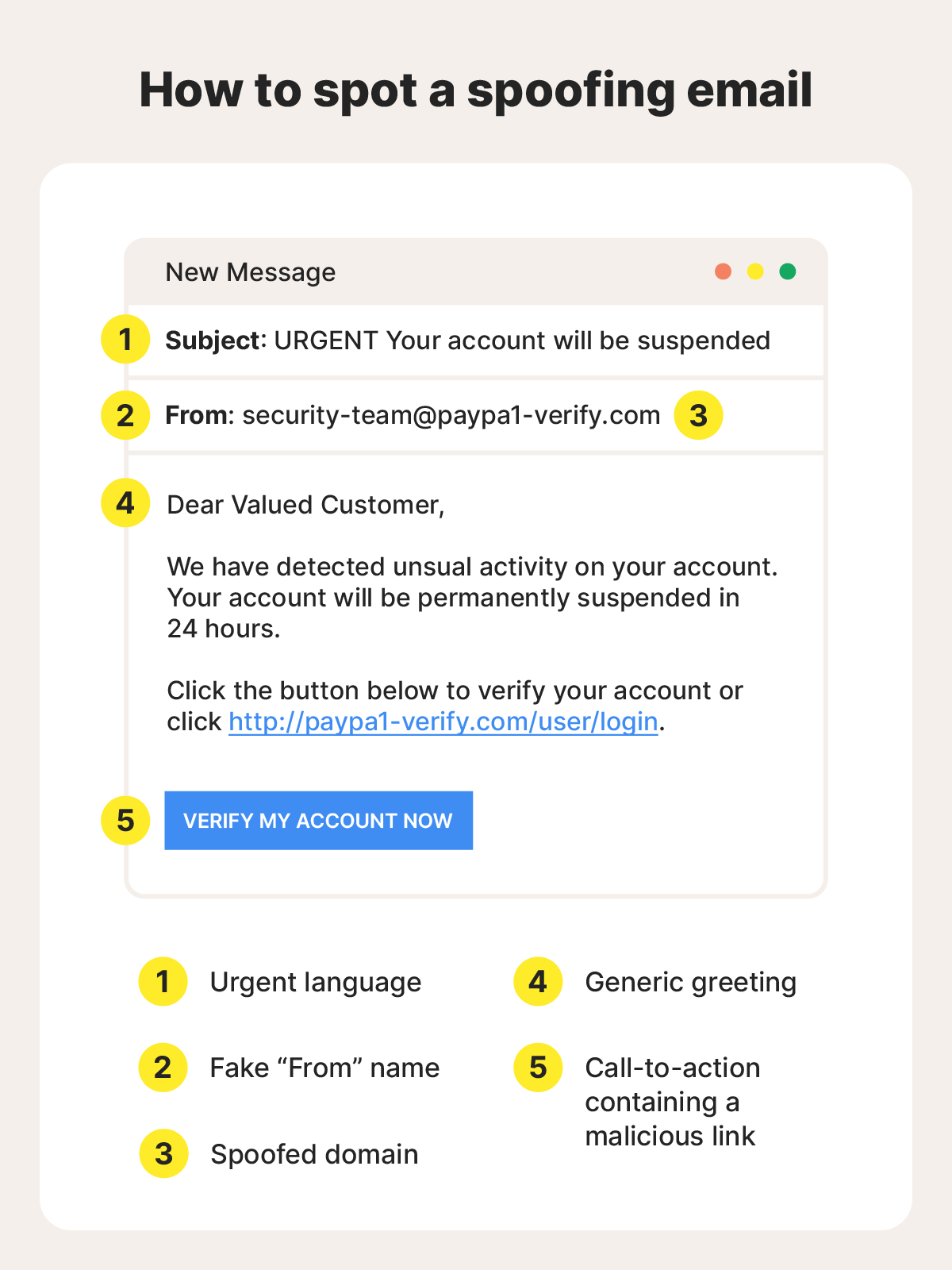
Email spoofing involves falsifying the sender’s address or name so a fake email appears to come from a trusted source. For example, a scammer pretending to be Walmart might send an email from an address like customerservicewalmart@gmail.com.
This is a red flag, as legitimate emails from large companies typically come from official domains (e.g., @walmart.com), rather than dedicated email clients like Gmail or Outlook.
However, not all spoofed emails are this easy to spot. In some cases, attackers even manipulate email headers to make messages appear as though they were sent from a legitimate domain, making them much more convincing.
According to the FBI, phishing and business email compromise (BEC) attacks cost U.S. businesses $2.7 billion in 2024, highlighting how effective spoofing-assisted ploys can be.
Your email can be used in spoofing attacks too. If contacts report receiving suspicious messages from you, it may be that a scammer has your email address and is spoofing it to target friends and relatives.
There’s not much you can do to stop an actual spoofing attack using your details, beyond warning your contacts to ignore such messages. But people receiving emails from you that you didn’t really send could also mean a hacker has gained access to your account, so take appropriate precautions by changing your password and enabling two-factor authentication.
Caller ID and phone spoofing
By using VoIP services, scammers can falsify the incoming caller ID information that appears on your phone, making it look like a call is coming from a trusted number that you associate with your bank, a government agency, or a well-known company.
For example, in one common scam, fraudsters pose as law enforcement or government officials, claiming your financial accounts have been compromised. They may pressure you to move money using unconventional methods like gift cards or cryptocurrency, only for the funds to be stolen.
To reduce the risk that you fall for a phone scam, be extra cautious with unexpected calls — especially those where the caller tries to create a sense of urgency. If you don’t recognize the number, you can let the call go to voicemail and verify its authenticity independently using official contact details.
If a scammer has your phone number, they may attempt to spoof you to get your loved ones to pass along sensitive details. If you suspect your number is being used this way, contact your mobile carrier and consider additional safeguards, such as account PINs or call-blocking features.
Text message (SMS) spoofing
Similar to caller ID spoofing, SMS spoofing is a technique used to make a text message appear as though it was sent from a different number. It’s usually involved in phishing schemes — often called smishing when they involve SMS messages — where scammers impersonate a bank, delivery service, or government agency.
But even if the number an SMS was apparently sent from checks out, there are often warning signs that indicate something’s off. Look out for hallmarks of SMS phishing such as shortened or unfamiliar links and language that creates an undue sense of urgency or pressure.
To reduce your risk of being scammed, avoid clicking on links in unexpected text messages. Instead, go directly to the company’s official website or app to verify that the communication is authentic.
Website or URL spoofing
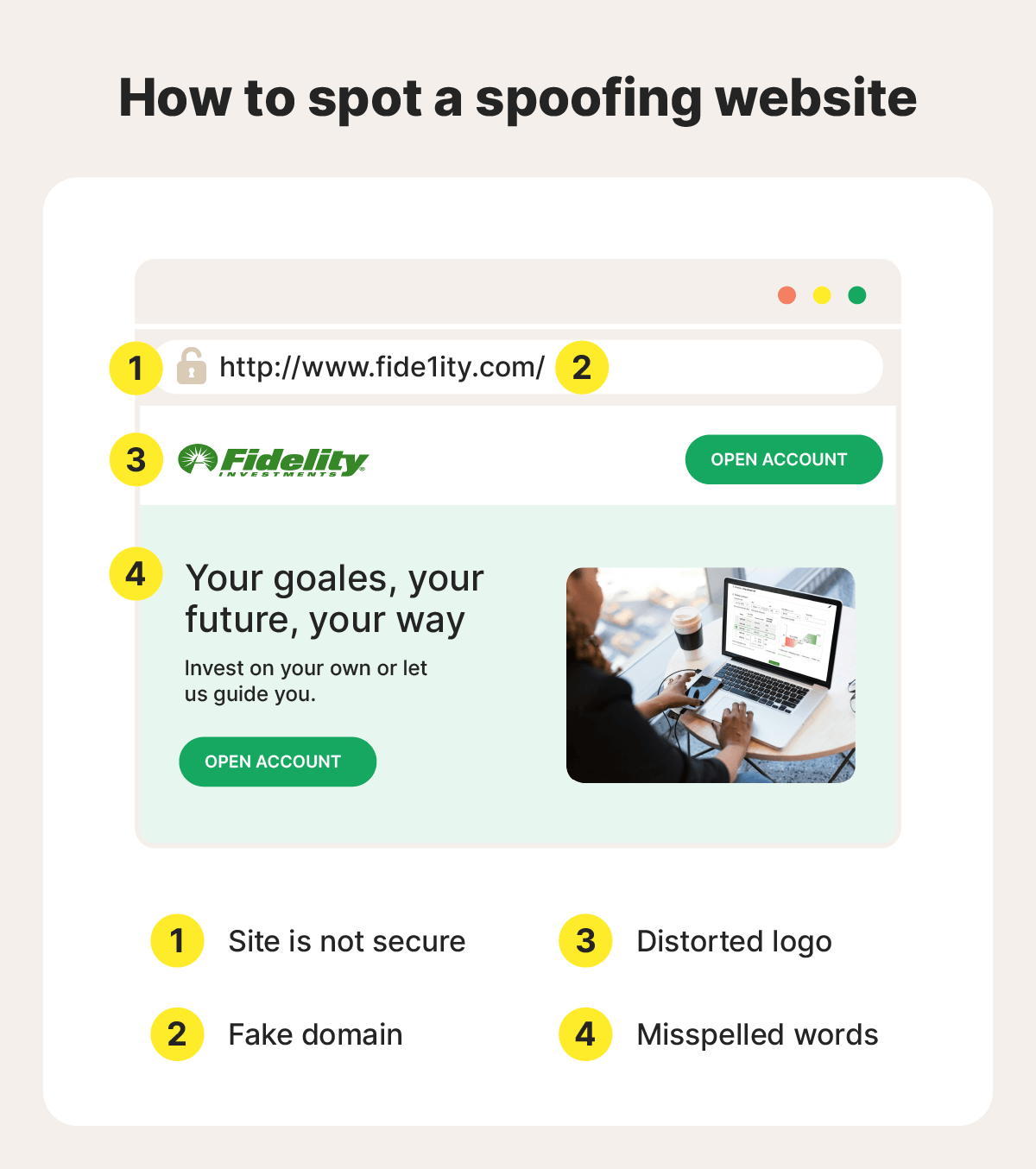
Website spoofing involves creating fake websites that mimic legitimate brands to trick users into entering sensitive information, such as login credentials or payment details.
There are several methods of URL spoofing, including:
- Typosquatting, where scammers register misspelled or lookalike domain names. For example, a fake delivery site might use a URL like Fedrx.com instead of Fedex.com.
- Pharming, where attackers redirect users from a legitimate website to a malicious one — sometimes without their knowledge — by exploiting vulnerabilities in DNS systems or devices.
These techniques are often used alongside email phishing or smishing attacks, with victims directed to the fraudulent site from a link in the scam message.
To protect yourself, always check URLs carefully before clicking, and make sure you’re on the correct website before entering any sensitive information. If something feels off, find the official site you’re looking for using a trustworthy search engine instead of following a link.
IP and DNS spoofing
IP spoofing involves falsifying the source IP address of network traffic to make it appear as if it’s coming from a trusted device or system. It’s often used to support more complex attacks — such as bypassing weak IP-based trust systems, intercepting data, or enabling large-scale disruptions like DDoS attacks.
DNS spoofing involves redirecting users to fraudulent websites. It manipulates the system that translates domain names into IP addresses, sending you to a fake site even when you enter a legitimate URL. For example, you might try to visit your insurer’s website but land on a convincing imitation designed to steal your information.
To help mitigate the risk of these more advanced forms of spoofing, use secure networks, keep your connected devices and routers updated, and avoid relying on outdated protections like IP-based authentication alone. Trusted DNS services and modern security tools can also help detect or block suspicious activity.
MAC spoofing
MAC spoofing is the practice of changing a device’s Media Access Control (MAC) address — an ID number assigned to a device’s network hardware — to mimic another device on a network. This can be used for legitimate purposes, but it’s also sometimes exploited by attackers to steal sensitive data.
On networks that rely on MAC address filtering for access control, an attacker could use a trusted device’s spoofed MAC address to bypass restrictions and gain unauthorized access. Once connected, the attacker may be able to monitor traffic, intercept unencrypted data, or move further within the network, depending on how it’s secured.
To reduce this risk,try not to rely on MAC addresses alone for network authentication. Stronger safeguards, such as device authentication, network encryption, and access controls, provide more effective protection.
ARP spoofing
ARP (Address Resolution Protocol) is a basic network process that helps devices on the same local network find each other by matching an IP address to a physical MAC address. ARP spoofing exploits this process by sending forged ARP messages that associate the attacker’s MAC address with a legitimate device’s IP address. As a result, your data is mistakenly sent to the attacker instead of its intended destination.
Once in that position, the attacker can intercept, monitor, or even alter the data being transmitted, making ARP spoofing a form of man-in-the-middle attack. These attacks are most common on unsecured or public networks, where protections are weaker. Using private, password-protected Wi-Fi, enabling encrypted connections (HTTPS), and keeping devices updated can all make ARP spoofing attacks less likely.
GPS and geolocation spoofing
GPS spoofing involves manipulating a device’s location data by sending false satellite signals or using software to override coordinates. This can make a device appear to be somewhere it isn’t, enabling activities like bypassing location-based restrictions, falsifying app data, or evading tracking systems used in navigation, logistics, or security.
Geolocation spoofing is a broader concept that includes altering location data through other methods like VPNs, proxy servers, or device settings. Instead of faking satellite signals, it masks your IP address and reroutes your internet traffic through a remote server, making it seem as though you’re browsing from a different region.
While mostly used legitimately for privacy or accessing global content, location spoofing can also facilitate dating or romance scams and other deceptive practices.
AI deepfakes and facial spoofing
AI-generated deepfakes are a form of facial spoofing that mimics a real person’s appearance to impersonate them. In one recently reported case, scammers created a deepfake of Elton John to convince a victim to open bank accounts and credit cards, ultimately racking up $20,000 in charges.
Common techniques include face swapping, which overlays another person’s face in real time, and voice cloning, which replicates speech patterns to sound convincing. Some attackers also use fully synthetic faces that don’t mimic a real person, making them harder to identify.
While detecting this type of spoofing can be challenging, emerging AI-based detection tools effectively fight fire with fire by harnessing the power of AI to flag subtle inconsistencies in AI-generated video, like unnatural movements or timing.
How spoofing leads to identity theft
Spoofing is often the starting point for attacks leading to identity theft. By convincingly posing as a trusted source, cybercriminals may find it easier to trick you into revealing personal information. Once they have enough data, they may be able to take over existing accounts, open new ones, or carry out fraud in your name.
For example, if you’re applying for a car loan, a scammer might spoof the email address of your bank, impersonate a loan officer, and send a message saying you’ve been approved with a link leading to a fake site that asks you to enter sensitive details. The scammer could then use any sensitive information you provide to apply for fraudulent loans, potentially damaging your credit.
And these kinds of scams are widespread, with 72% of phishing attacks involving some form of brand impersonation. Fortunately, identity protection tools can help you monitor your personal data and alert you to suspicious activity, giving you a chance to respond quickly to potential identity threats.
How to spot spoofing attempts
By design, spoofing attacks are supposed to look legitimate and evade detection. But small inconsistencies often give them away as scams. Pay close attention to details like email addresses, phone numbers, or URLs that appear familiar at first glance but could include subtle misspellings or unusual domains. Hover over links before clicking to see where they actually lead, and treat unexpected messages with caution, even if they appear to come from a trusted source.
Even when details like an address or caller ID look correct, other red flags can signal deception. Messages that create a sense of urgency, using threats of account suspension or alerts about suspicious activity, for example, are often meant to make you act without thinking. And be especially wary of any request for sensitive information, payments, or device access that comes out of the blue.
How to protect yourself from spoofing
Beyond learning how to spot a spoofing attack, there are additional steps you can take to help shield yourself against identity theft and other consequences stemming from maliciously spoofed communications.
- Monitor your identity and the dark web: Use monitoring tools to detect early signs that your personal information has been exposed or is being misused.
- Secure your accounts: Choose strong, unique passwords for all of your accounts and enable multi-factor authentication to limit unauthorized access.
- Limit what you share: Avoid giving out personal information in response to unsolicited messages, unless you’re certain that the request is legitimate and warranted.
- Enable spam filters: Set up tighter restrictions on your inboxes to reduce the chance of spoofed messages reaching you in the first place.
- Use a VPN: Add a layer of protection on unsecured networks by enabling a virtual private network, helping reduce your exposure to network-based attacks.
- Install security software: Install an advanced scam detection and antivirus app on your devices to help detect and block malicious messages, links, or websites in real time.
- Stay informed: Keep up with the latest tactics that scammers use to make it easier to recognize and avoid spoofing attacks that leverage the latest techniques.
What to do if you think you’ve been scammed
Anyone can fall for a spoofed email, message, or website, given the right circumstances. But acting quickly can help limit the damage and protect you against the lasting effects of identity theft.
If you think you’ve been targeted, here are the steps to take:
- Stop engaging immediately: End communication with the sender and avoid clicking any further links or downloading attachments. Blocking the number or email address can help, but stay alert for follow-up attempts from new accounts.
- Secure your accounts: If you’ve shared login details, change your passwords right away — especially for sensitive email, banking, or shopping accounts. Enable two-factor authentication (2FA) where possible.
- Scan your device: If you clicked a suspicious link or downloaded any files, run a security scan with trusted antivirus software to check for malware or spyware on your device.
- Report the incident: Notify the relevant service (e.g., your bank, email provider, or the impersonated company) and consider filing a report with the Federal Trade Commission (FTC) if your identity was stolen.
- Monitor your credit: Check your credit reports and consider placing a fraud alert or credit freeze with the three major bureaus (Equifax, Experian, TransUnion) to help protect against credit fraud.
Spoofing attacks can lead to serious financial fraud or identity theft, but quick action can significantly reduce the impact. If you’re concerned about ongoing risks, identity monitoring or fraud protection services can provide an extra layer of security.
Stay one step ahead of spoofing threats
With advanced spoofing techniques and other sophisticated scam tactics, staying protected takes more than awareness alone. LifeLock can help, with a scam support feature you can use to detect fake messages, monitoring features that help you detect online exposure, and expert restoration if you fall victim to identity theft.
FAQs
What is the most common type of spoofing?
Spoofing methods that leverage common communication channels, like email spoofing and caller ID spoofing, are some of the most common types. These techniques are used in phishing attacks to make messages appear as though they come from a trusted source. More technical types of spoofing, like IP spoofing, seem less common overall, but can be used in network-based attacks.
Is spoofing illegal?
Spoofing itself isn’t always illegal — it depends on how it’s used. If it’s part of a scam or used in an attempt to commit fraud, spoofing is illegal in most countries, including the U.S. However, some legitimate services use spoofing techniques for privacy purposes, such as masking phone numbers in ridesharing or delivery apps.
Can spoofing happen through social media?
Yes, spoofing and impersonation are common on social media platforms like Facebook, Instagram, and Snapchat. Attackers may create fake profiles or mimic real accounts to build trust, often as part of phishing or scam campaigns.
Can you tell if your phone is spoofed?
There’s no guaranteed way to verify that your phone number has been spoofed, but a major warning sign would be receiving calls or messages from strangers who say you contacted them when you didn’t. A sudden increase in these reports may indicate your number is being spoofed.
Can my email address be spoofed?
Yes. Scammers can spoof your email address without accessing your account by forging the sender details or using a similar-looking address. This can make messages appear as if they were sent by you, even though they were not.
Editors’ note: Our articles provide educational information about identity theft, scams, financial fraud, and other topics that can put your identity or personal accounts at risk. LifeLock offerings may not cover or protect against every type of crime, fraud, scam, or threat we write about. For more details about how we write, review, and update our articles, see our Editorial Policy.
Related articles