

Has your personal data been recently exposed?
Check if information like your Social Security number, email, and passwords is exposed on the dark web.


You have reached the maximum number of scans allowed. Please come back after 24 hours.

Scanning the dark web...
Scanning public databases...
Scanning millions of records...
Narrowing down the search...
We need more information
Please enter a few more details to ensure we show you the right information.
You’re at high risk
We found your personal information on the dark web and on data broker sites.
 Up to $3M Reimbursement for identity theft, with up to $1M for Stolen Funds†††
$10K Scam Reimbursement7
Scam Support
Credit, Checking and Savings Activity Alerts: Unlimited Accounts
Credit & Payday Loan Lock2
Credit Monitoring:
3 Bureau1
Automatic Data Broker Removal8
Dark Web Monitoring
Priority 24/7 Customer Phone Support
Up to $3M Reimbursement for identity theft, with up to $1M for Stolen Funds†††
$10K Scam Reimbursement7
Scam Support
Credit, Checking and Savings Activity Alerts: Unlimited Accounts
Credit & Payday Loan Lock2
Credit Monitoring:
3 Bureau1
Automatic Data Broker Removal8
Dark Web Monitoring
Priority 24/7 Customer Phone Support
LifeLock Total

No one can prevent all cybercrime or prevent all identity theft.
- Price valid for introductory term. After that, your price will renew at the standard price.
- Your subscription begins immediately after your transaction is complete. A payment method is required at sign-up for trials, and you will be charged at the end of your trial, unless canceled first.
- Prices are subject to change and may be charged up to 35 days prior to renewal. Cancel here or contact Member Services.
- Restrictions apply. Automatically renewing subscription required. If you're a victim of identity theft and not satisfied with our resolution, you may receive a refund for the current term of your subscription. See lifelock.norton.com/guarantee for complete details.
††† Up to $1 million coverage for Lawyers and Experts included with all plans. Reimbursement and expense compensation vary according to plan. Insurance benefits are issued by third parties. See lifelock.norton.com/legal for policy info.
1 Bureau Monitoring and Monthly Credit Report and Score / 3 Bureau Monitoring and Monthly Credit Report and Score.
2 Credit Lock cannot prevent all account takeovers, unauthorized account openings, or credit file inquiries. Deactivates if you downgrade or cancel your subscription.
7 Scam protection coverage as part of identity theft benefits is currently available to all customers residing in the United States, including U.S. territories and the District of Columbia, with the exception of residents of New York. Gen Digital is not a licensed insurance producer. Benefits under the Master Policy are issued and covered by HSB Specialty Insurance Company. You can find further details and exclusions in the summary of benefits.
8 After setup, automatic data broker removal service scans and requests removal every 90 days.
You’re at medium risk
We found your personal information on data broker sites.
Up to $1.2M Reimbursement for identity theft, with up to $100K for Stolen Funds†††
$5K Scam Reimbursement7
Scam Support
Credit, Checking and Savings Activity Alerts:
5 Accounts
Credit & Payday Loan Lock2
Credit Monitoring:
3 Bureau1
Automatic Data Broker Removal8
Dark Web Monitoring
Priority 24/7 Customer Phone Support
LifeLock Advanced
No one can prevent all cybercrime or prevent all identity theft.
- Price valid for introductory term. After that, your price will renew at the standard price.
- Your subscription begins immediately after your transaction is complete. A payment method is required at sign-up for trials, and you will be charged at the end of your trial, unless canceled first.
- Prices are subject to change and may be charged up to 35 days prior to renewal. Cancel here or contact Member Services.
- Restrictions apply. Automatically renewing subscription required. If you're a victim of identity theft and not satisfied with our resolution, you may receive a refund for the current term of your subscription. See lifelock.norton.com/guarantee for complete details.
††† Up to $1 million coverage for Lawyers and Experts included with all plans. Reimbursement and expense compensation vary according to plan. Insurance benefits are issued by third parties. See lifelock.norton.com/legal for policy info.
1 Bureau Monitoring and Monthly Credit Report and Score / 3 Bureau Monitoring and Monthly Credit Report and Score.
2 Credit Lock cannot prevent all account takeovers, unauthorized account openings, or credit file inquiries. Deactivates if you downgrade or cancel your subscription.
7 Scam protection coverage as part of identity theft benefits is currently available to all customers residing in the United States, including U.S. territories and the District of Columbia, with the exception of residents of New York. Gen Digital is not a licensed insurance producer. Benefits under the Master Policy are issued and covered by HSB Specialty Insurance Company. You can find further details and exclusions in the summary of benefits.
8 After setup, automatic data broker removal service scans and requests removal every 90 days.
Good news!
We didn’t find your personal information across millions of records or on public data sources.
Up to $1.05M Reimbursement for identity theft, with up to $25K for Stolen Funds†††
Identity Restoration Specialists
Credit, Checking and Savings Activity Alerts:
2 Accounts
Credit & Payday Loan Lock2
Credit Monitoring:
2 Bureau1
Automatic Data Broker Removal8
Dark Web Monitoring
Breach Alerts
24/7 Customer Phone Support
Lifelock Core
No one can prevent all cybercrime or prevent all identity theft.
- Price valid for introductory term. After that, your price will renew at the standard price.
- Your subscription begins immediately after your transaction is complete. A payment method is required at sign-up for trials, and you will be charged at the end of your trial, unless canceled first.
- Prices are subject to change and may be charged up to 35 days prior to renewal. Cancel here or contact Member Services.
- Restrictions apply. Automatically renewing subscription required. If you're a victim of identity theft and not satisfied with our resolution, you may receive a refund for the current term of your subscription. See lifelock.norton.com/guarantee for complete details.
††† Up to $1 million coverage for Lawyers and Experts included with all plans. Reimbursement and expense compensation vary according to plan. Insurance benefits are issued by third parties. See lifelock.norton.com/legal for policy info.
1 Credit features require successful setup, identity verification, and sufficient credit history by the appropriate credit bureau. Credit monitoring features may take several days to activate after enrollment.
2 Identity Lock cannot prevent all account takeovers, unauthorized account openings, or credit file inquiries. Deactivates if you downgrade or cancel your subscription.
8 After setup, automatic data broker removal service scans and requests removal every 90 days.

 Why do we ask?
Finding your match...

10 cents
If your information is exposed or stolen in a data breach, it can end up on the dark web where it can be sold for as little as 10 cents.
100M+
LifeLock monitors hundreds of millions of data points a second.
- Up to $1.05M Reimbursement for identity theft, with up to $25K for Stolen Funds†††
- Up to $1.2M Reimbursement for identity theft, with up to $100K for Stolen Funds†††
- Up to $3M Reimbursement for identity theft, with up to $1M for Stolen Funds†††
- Up to $1.05M Reimbursement for identity theft, with up to $25K for Stolen Funds††† for each adult
- Up to $1.2M Reimbursement for identity theft, with up to $100K for Stolen Funds††† for each adult
- Up to $3M Reimbursement for identity theft, with up to $1M for Stolen Funds††† for each adult
- Up to $1.05M Reimbursement for identity theft, with up to $25K for Stolen Funds††† for each adult
- Up to $1.2M Reimbursement for identity theft, with up to $100K for Stolen Funds††† for each adult
- Up to $3M Reimbursement for identity theft, with up to $1M for Stolen Funds††† for each adult
- Credit Monitoring Coverage1
- Credit Monitoring1 each adult
- Credit Monitoring1 for family
- Credit, Checking & Savings Account Activity Alerts
- Credit, Checking and Savings Activity Alerts for each adult
- Credit, Checking and Savings Activity Alerts for family
- 401K & Investment Account Activity Alerts
- 401K/Investment Account Alerts for each adult
- 401K/Investment Account Alerts for family
- Recurring and Unusual Charge Alerts
- Unexpected & Suspicious Charge Alerts for each adult
- Unexpected & Suspicious Charge Alerts for family
- Stolen Funds Reimbursement†††
- Stolen Funds Reimbursement††† for each adult
- Stolen Funds Reimbursement††† for family
- Lawyers and Experts†††
- Lawyers & Experts††† for each adult
- Lawyers & Experts††† for family
- Automatic Data Broker Removal8
- Automatic Data Broker Removal8 for each adult
- Automatic Data Broker Removal8 for family
- Scam Reimbursement7
- Scam Reimbursement7 for each adult
- Scam Reimbursement7 for family
- Credit Reports & Scores1
- Credit Report & Score for each adult
- Credit Report & Score for family
- Social Media Monitoring
- Social Media Monitoring for each adult
- Social Media Monitoring for family


††† Up to $1 million coverage for Lawyers and Experts included with all plans. Reimbursement and expense compensation vary according to plan. Insurance benefits are issued by third parties. See LifeLock.Norton.com/legal for policy info.
1 Credit features require successful setup, identity verification and sufficient credit history by the appropriate credit bureau. Credit monitoring features may take several days to activate after enrollment.
7 Scam protection coverage as part of identity theft benefits is currently available to all customers residing in the United States, including U.S. territories and the District of Columbia, with the exception of residents of New York. Gen Digital is not a licensed insurance producer. Benefits under the Master Policy are issued and covered by HSB Specialty Insurance Company. You can find further details and exclusions in the Summary of Benefits.
8 After setup, automatic data broker removal service scans and requests removal every 90 days.
Why do we ask?
Identifying your concerns gives us the ability to recommend the right plan for your needs.
Why do we ask?
Knowing this number helps us recommend coverage that fits your needs.
Why do we ask?
Providing your email address makes you eligible for notifications of potential identity threats.
How do hackers get passwords? 9 tactics exposed
Methods hackers use to try and steal passwords include credential stuffing, data breach harvesting, and social engineering. Learn more about these password-stealing tactics and what you can do to help protect yourself. Then, get LifeLock to help monitor online exposure of your sensitive data, including passwords.





Passwords are one of the most important lines of defense against cybercriminals accessing sensitive information like your financial data, contact details, and Social Security number. This makes them prime targets for hackers, who constantly try to steal passwords directly from users or by orchestrating large-scale data breaches that can compromise millions of login credentials at once.
Safeguarding your passwords requires a good understanding of how they might be vulnerable. We’ve put together a list of nine of the most common password hacking tactics and how you can help defend against them to boost your online security.
1. Social engineering and phishing
Social engineering is the name for a common tactic cybercriminals and fraudsters use to exploit human behavior and vulnerabilities. There are many types of social engineering, but phishing is a particularly common variety used by scammers and hackers.
In a phishing attack, a cybercriminal will reach out to you pretending to be someone else, like a friend, family member, or representative of a trusted organization (such as your employer or the customer service team for a reputable company). They might ask you to share sensitive information under false pretenses, direct you to a fake website designed to steal your data, or encourage you to download an attachment that infects your device.
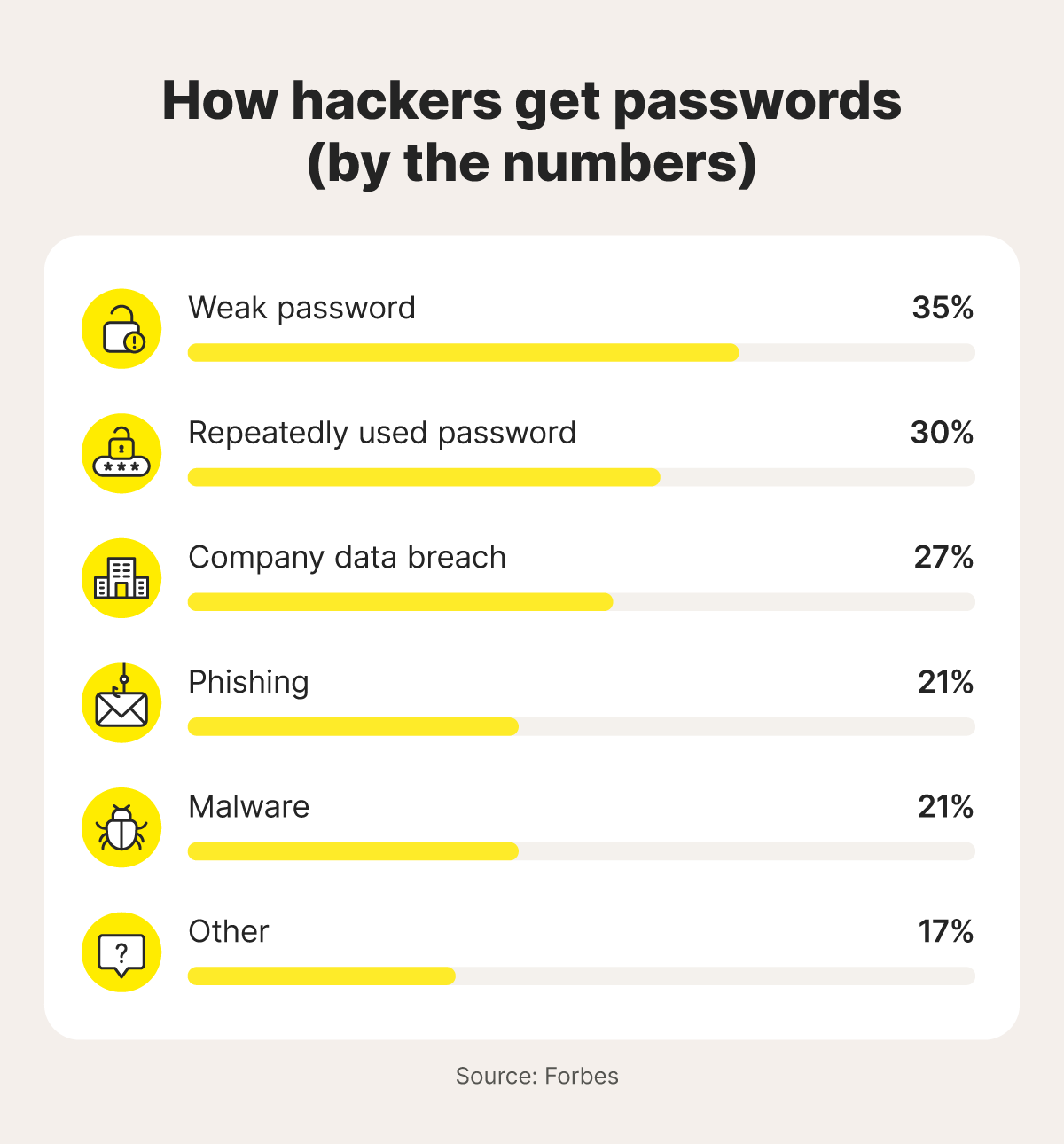
Phishing messages often use urgent language, trying to trick you into acting quickly without thinking about the potential consequences. And it’s clearly an effective strategy, with research from Forbes finding that up to 21% of successful password hacks in 2024 were the result of phishing.
But other types of social engineering attacks can also be a threat to your password security. They include:
- Baiting: These attacks attempt to lure you in with fake ads, links, or offers — like “free” software, music, or gift cards — to try and trick you into giving up your login credentials or downloading password-stealing malware.
- Pretexting: Scammers invent a scenario (or pretext) to gain your trust and convince you to reveal sensitive or personally identifiable information (PII). For example, someone may call pretending to be from your bank, claiming there’s suspicious activity on your account, asking for your password so that they can resolve it.
- Watering hole attacks: Hackers identify websites frequently visited by their target group — like blogs or industry forums — and infect them with malware or create a fake, compromised variant. This malware then attempts to silently capture login credentials when users visit these sites.
How to stay secure: Be wary of suspicious emails, texts, calls, or social media messages, checking for unusual sender details, unexpected attachments, and sketchy links to potentially fake websites. Never comply with requests to share your password.
2. Malware and keylogging
Malware, short for malicious software, is used by hackers and other cybercriminals to infect devices. Different types of malware serve different purposes, from damaging device performance to giving hackers remote access. But many of them exist to steal data, like passwords, and transmit it back to the hacker. These types are broadly classified as “spyware” and include malware like keyloggers, which can record your keystrokes as you log in to websites.
Malware can infiltrate your device in various ways, often without you noticing. Here are some of the most common tactics cybercriminals use to infect computers or phones:
- Fake websites or apps: Visiting malicious sites or downloading phony apps may trigger automatic malware downloads.
- Phishing scams: Emails, texts, or social media messages that trick you into clicking a link or downloading an attachment that can install malware.
- Pop-up ads: Fake ads that are part of malvertising schemes can infect your device with malware if you click them.
- External devices: Plugging infected devices, such as USB drives, SD cards, and hard drives, into a device can transmit malware.
How to stay secure: Avoid downloading suspicious files, programs, or apps listed on third-party websites, by sticking to official sources. Don’t click questionable links if you don’t know where they lead. And, for device-level protection, use antivirus software to identify threats in real time.
3. Data breaches
Data breaches happen when hackers break into a company or website’s databases and extract vast amounts of sensitive or confidential data. This stolen data can include passwords, along with other information like email addresses or financial data.
In mid-2025, news broke of a record-breaking data breach that exposed 16 billion passwords. Unfortunately, data breaches are becoming more common, with Gen Digital reporting a 21% increase in breach events from April to June 2025 compared to the previous quarter. The following quarter saw an even sharper jump — a 76% rise in breach events — and the nature of what's being stolen is shifting too. Over 83% of detected breaches contained passwords rather than just contact details, meaning the data reaching criminals is increasingly useful for taking over accounts.
If your password is compromised in a data breach, it can leave you vulnerable to account takeover attacks, where hackers use your stolen credentials to access your online accounts. Even if your password isn’t compromised, exposed data like your email address or Social Security number can lead to other threats, such as financial fraud or identity theft.
How to stay secure: Monitor for data breaches that could compromise your information. If you become aware of a breach, immediately change your passwords for any impacted accounts. Also, enable multi-factor authentication to add an extra layer of security against hackers with your password.
4. Credential stuffing
Also called password stuffing, credential stuffing involves using already stolen information to hack into other accounts. If your email address, username, and password for one account have been exposed in a data breach, a credential stuffer might find it on a dark web website and use a bot to attempt to log in to other websites using the same credentials.
This tactic’s success relies on you having poor password security. If you use the same username and password across different accounts, you’ll be vulnerable to credential stuffing. But if you use unique passwords for every account, you don’t have to worry about it.
It’s not just data breaches that put you at risk, either. Scammers who trick you into revealing your password through a phishing attack might use the same credential stuffing tactic to maximize their access to your data.
How to stay secure: Use a unique password for every new account you create and never reuse them — otherwise, if one of your passwords gets leaked, other accounts could be vulnerable. You can use a password manager to generate strong, random passwords for each account and store them securely.
5. Brute-force attacks
A brute-force attack is essentially a trial-and-error password-cracking tactic. It involves testing one possible password after another until the right sequence of characters is found. But hackers don’t have to do this process manually — they can use bots to test potential passwords at rapid speeds.
Simple brute force attacks might test common passwords, such as “1234” or “password,” with known usernames or email addresses. More complicated approaches, like dictionary attacks, rely on adding characters to the end of a common password. Hackers might start with a name (like “Thomas”) and add numbers, hoping to find the right password (for example, “Thomas2025”).
Many websites have technology in place to help prevent brute-force password cracking methods, like “rate-limiting” systems that prevent bots from making hundreds of attempts a minute.
However, hackers have adapted their tactics to bypass these defenses. One method, known as password spraying, involves spreading login attempts across multiple accounts to avoid triggering lockouts.
How to stay secure: Make your passwords at least 15 characters long and hard to crack by combining random letters, numbers, and special characters, or using passphrases. Avoid simply appending numbers to the end of a dictionary word. Some password managers provide estimates of how long a password would take to crack, which can help you improve their security.
6. Fake websites or apps
Commonly used in phishing attacks, fake websites and apps are designed to look legitimate, cloning the design and functionality of the real version. But, if you visit a fake website or app and attempt to log in, your credentials will be sent directly to the hacker who can use them to access your real account.
These fake properties fit right into scams. For example, you might receive an email notification saying you’ve missed a package, prompting you to click a link to reschedule a delivery. But clicking that link will lead you to a fake version of the courier service’s website, prompting you to enter sensitive information.
To make fake websites look more legitimate, cybercriminals use a tactic called typosquatting, hosting their imitation site on URLs that look similar to real ones, such as “Facebok.com” or “Amzon.com.”
How to stay secure: Closely inspect the URL of any link you’re about to click, and be cautious if a familiar app or website suddenly looks or functions differently. If you’re ever in doubt about a site’s legitimacy, avoid entering information and search for the official website on Google instead.
7. Man-in-the-middle attacks
Man-in-the-middle attacks are like cyber-eavesdropping. They involve a cyberattacker positioning themselves between two communicating parties, like a user and a website server, intercepting data that’s being transmitted.
One common method, known as an “evil twin attack,” involves the hacker creating a fake Wi-Fi network, often in a public space like a cafe. When someone connects to this network, any data they send, including passwords for accounts they log in to, may be exposed to the cybercriminal.
Attackers can also use techniques like HTTPS stripping to compromise the security of legitimate websites, allowing them to read data that’s transmitted without the victim knowing.
How to stay secure: Avoid untrusted public Wi-Fi networks to help protect you against evil twin attacks. If connecting is unavoidable, use a VPN to encrypt the data you transmit online.
8. Shoulder surfing
Shoulder surfing is an old-fashioned tactic, but can be effective. Shoulder surfers operate in public, looking for people using their phones or laptops who aren’t paying attention to their surroundings. They’ll watch as you type in your password or PIN, and then simply use the same credentials to access your account.
How to stay secure: Remain aware of your surroundings. If you’re at the ATM, shield the keypad. When using a device in public, don’t enter sensitive data or login credentials when others are nearby.
9. SIM swap attacks
SIM swap attacks are a form of social engineering where a cybercriminal convinces your mobile carrier to give them control of your phone number. First, they exploit a data breach or use a phishing attack to steal your personal details. Then they impersonate you and go through the process to transfer your phone number to a SIM card they control.
Once they have your number, the hacker can intercept SMS messages, including two-factor authentication (2FA) codes and password reset messages. This access lets them log into your accounts, change your passwords, and lock you out, giving them control over email, banking, or social media accounts.
How to stay secure: Create a secure account PIN with your mobile carrier, and use an identity theft protection service with phone takeover monitoring to help protect you against SIM swap attacks.
LifeLock Total comes with Phone Takeover Monitoring, Social Media Monitoring, and many other features that help monitor and protect your identity. With its mobile app and web dashboard, you can enjoy on-the-go tracking and support wherever you are.
Red flags that your password has been stolen
In a 2025 survey by FIDO Alliance, 36% of respondents reported having at least one account compromised due to a weak or stolen password. That’s more than one in three people, not even counting people who haven’t noticed. Even with the best password safety and cybersecurity practices, it only takes one slip up to be vulnerable.
But there are some warning signs of a stolen password you can look out for, giving you early warning that your accounts might be at risk, so you can take action to protect yourself:
- Unexpected logouts: When you repeatedly get logged off an app or website, it could be a sign that someone else is actively logging in.
- Password no longer works: A password that suddenly stops working could be a sign that a hacker has gained access and successfully changed your password.
- Unfamiliar devices or locations: If you get notifications about unknown devices trying to log in to your account, or attempts originating from another country or city, someone might have gotten hold of your login information.
- 2FA alerts: If you receive unexpected 2FA notifications asking you to confirm a login attempt you didn’t initiate, it likely means someone is trying to log into your account with your password.
- Accounts sending spam: If your friends and contacts suddenly start receiving spam texts, messages, or emails from you, your account has probably been hacked.
- Changes to account recovery info: If your security questions or backup email accounts suddenly change, they might have been altered by a hacker with access to your account.
- Unauthorized charges: If you suddenly get charges or order confirmation emails from an online store, a hacker may have used your account to place fraudulent orders.
- Dark web exposure: If you get an alert from your dark web monitoring service that your password or email was found on the dark web, you might be vulnerable to account takeover attacks.
What to do if a hacker steals your password
If your password has been hacked, leaked, or stolen through a social engineering scheme, there are a few basic steps you can take to help prevent the cybercriminal responsible from causing chaos.
Here’s what to do when you realize your password is compromised:
- Change your password: Update the compromised password, and your password for any other accounts where you may have reused it. Take the opportunity to make each of your new passwords unique.
- Turn on 2FA: Add this extra layer of protection to make it much harder for hackers to access your accounts in the future. Even if they steal your password, they would need a code sent to your phone or email.
- Monitor your financial accounts: If your exposed password was for a financial account, keep a close eye on your bank statements, credit card activity, and any other financial accounts that could be affected.
- Protect your credit: Consider credit monitoring services for alerts about suspicious activity on your credit report. You can also think about freezing your credit to help prevent new accounts from being opened in your name.
- Scan your device for malware: Use an antivirus program or malware scanner to check for hidden threats on your device, like keyloggers or spyware.
- Notify affected parties: Notify your contacts if somebody hacked your email or social media account. If a hack has compromised your financial info, it's important to let your bank know.
- Secure your identity: Identity theft protection services can alert you if they find your passwords or other personal info on the dark web, so you can take action to secure impacted accounts.
How to protect your passwords from hackers
Cybercriminals constantly adjust and update their tactics, but simple steps like practicing good password security and adding 2FA to your accounts can help keep you safer, even as threats evolve.
Here are some useful methods to help protect your passwords and other sensitive information:
- Use strong passwords: For the best password security, opt for 15+ random characters or use passphrases. Consider a trustworthy password manager to create unique passwords and store them securely.
- Avoid reusing passwords: Use a unique password for each of your online accounts to help prevent hackers from using credential stuffing attacks to compromise multiple accounts at a time.
- Enable 2FA: Turn on 2FA to enhance account security and help protect against unauthorized access, even if your password is stolen.
- Spot phishing attempts: Learn how to spot fake emails and fraudulent texts with malicious links to help avoid accidentally sharing sensitive information or downloading malware.
- Keep software updated: Regular updates to programs, apps, and operating systems help fix vulnerabilities that hackers could exploit, keeping your devices better protected against malware and other cyberthreats.
- Be cautious on public Wi-Fi: Avoid logging into accounts on unsecured or public networks that you don’t trust completely. If you have to connect to public Wi-Fi, use a VPN for added security.
- Monitor your accounts regularly: Check for suspicious activity or unauthorized logins, and pay attention to strange login notifications when you receive them.
- Change passwords after a breach: Update any compromised or potentially exposed passwords immediately after learning they were involved in a data breach.
- Sign up for dark web monitoring: Get alerts if your personal information appears in online data breaches, so you can act quicker to protect your accounts.
Stay one step ahead of password stealers
Technology is evolving, and with it, hackers are constantly coming up with new, more sophisticated tactics to cause data breaches, launch convincing phishing attacks, and compromise devices with password-stealing malware.
LifeLock offers tools that can help you reduce your vulnerability online, with dark web monitoring and data breach notifications making it easier to spot threats to your security. You’ll also be better protected against some of the worst consequences of a hacked password, like financial fraud or identity theft.
FAQs
What is the most commonly hacked password?
While there’s no definitive data on what the most commonly hacked password is, predictable passwords are particularly vulnerable to credential stuffing or brute force attacks, such as “123456,” “admin,” and “password.”
How long would it take a hacker to guess my password?
The answer depends on how secure your password is. For instance, a short password, under eight characters, could take only a few minutes to crack. But a 16-character password could take centuries to hack.
Can malware steal passwords?
Yes, malware can steal your passwords. It often does this by logging your keystrokes or directly capturing passwords saved in your browser or cookies.
Will changing my password stop hackers?
If a hacker already has your password, you should change it immediately to help prevent them from accessing your account. But as a general rule, regularly changing passwords isn’t recommended. Instead, using strong, unique passwords and enabling 2FA are the best ways to protect your accounts against hackers.
Editors’ note: Our articles provide educational information about identity theft, scams, financial fraud, and other topics that can put your identity or personal accounts at risk. LifeLock offerings may not cover or protect against every type of crime, fraud, scam, or threat we write about. For more details about how we write, review, and update our articles, see our Editorial Policy.
This article contains
- 1. Social engineering and phishing
- 2. Malware and keylogging
- 3. Data breaches
- 4. Credential stuffing
- 5. Brute-force attacks
- 6. Fake websites or apps
- 7. Man-in-the-middle attacks
- 8. Shoulder surfing
- 9. SIM swap attacks
- Red flags that your password has been stolen
- What to do if a hacker steals your password
- How to protect your passwords from hackers
- Stay one step ahead of password stealers
- FAQs
Related articles