

Has your personal data been recently exposed?
Check if information like your Social Security number, email, and passwords is exposed on the dark web.


You have reached the maximum number of scans allowed. Please come back after 24 hours.

Scanning the dark web...
Scanning public databases...
Scanning millions of records...
Narrowing down the search...
We need more information
Please enter a few more details to ensure we show you the right information.
You’re at high risk
We found your personal information on the dark web and on data broker sites.
 Up to $3M Reimbursement for identity theft, with up to $1M for Stolen Funds†††
$10K Scam Reimbursement7
Scam Support
Credit, Checking and Savings Activity Alerts: Unlimited Accounts
Credit & Payday Loan Lock2
Credit Monitoring:
3 Bureau1
Automatic Data Broker Removal8
Dark Web Monitoring
Priority 24/7 Customer Phone Support
Up to $3M Reimbursement for identity theft, with up to $1M for Stolen Funds†††
$10K Scam Reimbursement7
Scam Support
Credit, Checking and Savings Activity Alerts: Unlimited Accounts
Credit & Payday Loan Lock2
Credit Monitoring:
3 Bureau1
Automatic Data Broker Removal8
Dark Web Monitoring
Priority 24/7 Customer Phone Support
LifeLock Total

No one can prevent all cybercrime or prevent all identity theft.
- Price valid for introductory term. After that, your price will renew at the standard price.
- Your subscription begins immediately after your transaction is complete. A payment method is required at sign-up for trials, and you will be charged at the end of your trial, unless canceled first.
- Prices are subject to change and may be charged up to 35 days prior to renewal. Cancel here or contact Member Services.
- Restrictions apply. Automatically renewing subscription required. If you're a victim of identity theft and not satisfied with our resolution, you may receive a refund for the current term of your subscription. See lifelock.norton.com/guarantee for complete details.
††† Up to $1 million coverage for Lawyers and Experts included with all plans. Reimbursement and expense compensation vary according to plan. Insurance benefits are issued by third parties. See lifelock.norton.com/legal for policy info.
1 Bureau Monitoring and Monthly Credit Report and Score / 3 Bureau Monitoring and Monthly Credit Report and Score.
2 Credit Lock cannot prevent all account takeovers, unauthorized account openings, or credit file inquiries. Deactivates if you downgrade or cancel your subscription.
7 Scam protection coverage as part of identity theft benefits is currently available to all customers residing in the United States, including U.S. territories and the District of Columbia, with the exception of residents of New York. Gen Digital is not a licensed insurance producer. Benefits under the Master Policy are issued and covered by HSB Specialty Insurance Company. You can find further details and exclusions in the summary of benefits.
8 After setup, automatic data broker removal service scans and requests removal every 90 days.
You’re at medium risk
We found your personal information on data broker sites.
Up to $1.2M Reimbursement for identity theft, with up to $100K for Stolen Funds†††
$5K Scam Reimbursement7
Scam Support
Credit, Checking and Savings Activity Alerts:
5 Accounts
Credit & Payday Loan Lock2
Credit Monitoring:
3 Bureau1
Automatic Data Broker Removal8
Dark Web Monitoring
Priority 24/7 Customer Phone Support
LifeLock Advanced
No one can prevent all cybercrime or prevent all identity theft.
- Price valid for introductory term. After that, your price will renew at the standard price.
- Your subscription begins immediately after your transaction is complete. A payment method is required at sign-up for trials, and you will be charged at the end of your trial, unless canceled first.
- Prices are subject to change and may be charged up to 35 days prior to renewal. Cancel here or contact Member Services.
- Restrictions apply. Automatically renewing subscription required. If you're a victim of identity theft and not satisfied with our resolution, you may receive a refund for the current term of your subscription. See lifelock.norton.com/guarantee for complete details.
††† Up to $1 million coverage for Lawyers and Experts included with all plans. Reimbursement and expense compensation vary according to plan. Insurance benefits are issued by third parties. See lifelock.norton.com/legal for policy info.
1 Bureau Monitoring and Monthly Credit Report and Score / 3 Bureau Monitoring and Monthly Credit Report and Score.
2 Credit Lock cannot prevent all account takeovers, unauthorized account openings, or credit file inquiries. Deactivates if you downgrade or cancel your subscription.
7 Scam protection coverage as part of identity theft benefits is currently available to all customers residing in the United States, including U.S. territories and the District of Columbia, with the exception of residents of New York. Gen Digital is not a licensed insurance producer. Benefits under the Master Policy are issued and covered by HSB Specialty Insurance Company. You can find further details and exclusions in the summary of benefits.
8 After setup, automatic data broker removal service scans and requests removal every 90 days.
Good news!
We didn’t find your personal information across millions of records or on public data sources.
Up to $1.05M Reimbursement for identity theft, with up to $25K for Stolen Funds†††
Identity Restoration Specialists
Credit, Checking and Savings Activity Alerts:
2 Accounts
Credit & Payday Loan Lock2
Credit Monitoring:
2 Bureau1
Automatic Data Broker Removal8
Dark Web Monitoring
Breach Alerts
24/7 Customer Phone Support
Lifelock Core
No one can prevent all cybercrime or prevent all identity theft.
- Price valid for introductory term. After that, your price will renew at the standard price.
- Your subscription begins immediately after your transaction is complete. A payment method is required at sign-up for trials, and you will be charged at the end of your trial, unless canceled first.
- Prices are subject to change and may be charged up to 35 days prior to renewal. Cancel here or contact Member Services.
- Restrictions apply. Automatically renewing subscription required. If you're a victim of identity theft and not satisfied with our resolution, you may receive a refund for the current term of your subscription. See lifelock.norton.com/guarantee for complete details.
††† Up to $1 million coverage for Lawyers and Experts included with all plans. Reimbursement and expense compensation vary according to plan. Insurance benefits are issued by third parties. See lifelock.norton.com/legal for policy info.
1 Credit features require successful setup, identity verification, and sufficient credit history by the appropriate credit bureau. Credit monitoring features may take several days to activate after enrollment.
2 Identity Lock cannot prevent all account takeovers, unauthorized account openings, or credit file inquiries. Deactivates if you downgrade or cancel your subscription.
8 After setup, automatic data broker removal service scans and requests removal every 90 days.

 Why do we ask?
Finding your match...

10 cents
If your information is exposed or stolen in a data breach, it can end up on the dark web where it can be sold for as little as 10 cents.
100M+
LifeLock monitors hundreds of millions of data points a second.
- Up to $1.05M Reimbursement for identity theft, with up to $25K for Stolen Funds†††
- Up to $1.2M Reimbursement for identity theft, with up to $100K for Stolen Funds†††
- Up to $3M Reimbursement for identity theft, with up to $1M for Stolen Funds†††
- Up to $1.05M Reimbursement for identity theft, with up to $25K for Stolen Funds††† for each adult
- Up to $1.2M Reimbursement for identity theft, with up to $100K for Stolen Funds††† for each adult
- Up to $3M Reimbursement for identity theft, with up to $1M for Stolen Funds††† for each adult
- Up to $1.05M Reimbursement for identity theft, with up to $25K for Stolen Funds††† for each adult
- Up to $1.2M Reimbursement for identity theft, with up to $100K for Stolen Funds††† for each adult
- Up to $3M Reimbursement for identity theft, with up to $1M for Stolen Funds††† for each adult
- Credit Monitoring Coverage1
- Credit Monitoring1 each adult
- Credit Monitoring1 for family
- Credit, Checking & Savings Account Activity Alerts
- Credit, Checking and Savings Activity Alerts for each adult
- Credit, Checking and Savings Activity Alerts for family
- 401K & Investment Account Activity Alerts
- 401K/Investment Account Alerts for each adult
- 401K/Investment Account Alerts for family
- Recurring and Unusual Charge Alerts
- Unexpected & Suspicious Charge Alerts for each adult
- Unexpected & Suspicious Charge Alerts for family
- Stolen Funds Reimbursement†††
- Stolen Funds Reimbursement††† for each adult
- Stolen Funds Reimbursement††† for family
- Lawyers and Experts†††
- Lawyers & Experts††† for each adult
- Lawyers & Experts††† for family
- Automatic Data Broker Removal8
- Automatic Data Broker Removal8 for each adult
- Automatic Data Broker Removal8 for family
- Scam Reimbursement7
- Scam Reimbursement7 for each adult
- Scam Reimbursement7 for family
- Credit Reports & Scores1
- Credit Report & Score for each adult
- Credit Report & Score for family
- Social Media Monitoring
- Social Media Monitoring for each adult
- Social Media Monitoring for family


††† Up to $1 million coverage for Lawyers and Experts included with all plans. Reimbursement and expense compensation vary according to plan. Insurance benefits are issued by third parties. See LifeLock.Norton.com/legal for policy info.
1 Credit features require successful setup, identity verification and sufficient credit history by the appropriate credit bureau. Credit monitoring features may take several days to activate after enrollment.
7 Scam protection coverage as part of identity theft benefits is currently available to all customers residing in the United States, including U.S. territories and the District of Columbia, with the exception of residents of New York. Gen Digital is not a licensed insurance producer. Benefits under the Master Policy are issued and covered by HSB Specialty Insurance Company. You can find further details and exclusions in the Summary of Benefits.
8 After setup, automatic data broker removal service scans and requests removal every 90 days.
Why do we ask?
Identifying your concerns gives us the ability to recommend the right plan for your needs.
Why do we ask?
Knowing this number helps us recommend coverage that fits your needs.
Why do we ask?
Providing your email address makes you eligible for notifications of potential identity threats.
Spoiler alert: That message from Netflix might be a scam
Netflix is a staple subscription for millions, which makes it a prime target for phishing scams. Cybercriminals impersonate the service to trick targets into revealing sensitive information. Learn how to spot common Netflix scams and help protect yourself from the consequences of falling victim.

You might not think your Netflix account is a valuable target for scammers, but Netflix scams are a real and growing threat. The platform’s popularity makes it easy for cybercriminals to impersonate a familiar, trusted brand — so a convincing message may not seem out of place.
Most Netflix scams initially come in the form of a phishing attack, in which attackers send emails, texts, or social media messages that appear legitimate, aiming to trick you into sharing login credentials, personal information, or payment details.
Remembering that Netflix will never ask for your password, Social Security number, or other sensitive information through unsolicited texts or emails is the best way to avoid falling for these scams. But here’s a more detailed breakdown of ploys used by Netflix scammers to help you recognize them in the wild.
1. “Account suspended” or “Payment issue” Netflix scams
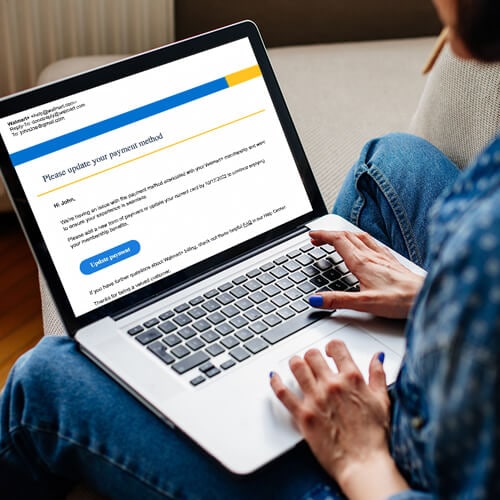
In this type of phishing scam, cybercriminals send fake emails or texts claiming your Netflix account has been suspended or that a payment has failed. These messages are designed to create urgency — pressuring you to “update your payment information now” or risk losing access — so you act without verifying the request.
The links typically lead to a convincing fake site that mimics Netflix’s login or billing pages, often using lookalike URLs or slight misspellings. Any information you enter, such as your email, password, or credit card details, is sent directly to the scammers, who can then hijack your account or commit financial fraud.
2. Fake Netflix "Unusual login activity" alerts
Scammers may send fake alerts claiming someone has signed in to your Netflix account from an unfamiliar device or location. These messages play on the fear of a potential account takeover, urging you to “verify your login” or “secure your account” through a link.
The link typically leads to a convincing but fraudulent website designed to capture your login details. Once entered, scammers can access your account, change credentials, or reuse your password on other services if it’s been used elsewhere.
Legitimate Netflix security alerts won’t ask for sensitive information via email or text. If you’re unsure, don’t click any links — open the Netflix app or type Netflix.com directly into your browser to check your account safely.
3. Netflix job scams
Fake Netflix job postings or “work-from-home” offers often circulate on social media and job boards, but they can also arrive via SMS messages or phishing emails from impersonated recruiters. These scams are designed to look legitimate, sometimes using official logos, branding, and realistic job descriptions.

Scammers may ask for upfront payments for training, equipment, or background checks — an immediate red flag. They might also try to collect sensitive information like Social Security numbers, bank details, or copies of ID documents for identity theft.
Legitimate Netflix roles are only listed on the official Netflix careers site or verified profiles on trusted platforms like LinkedIn, and they won’t require payment at any stage of the hiring process.
4. Fake Netflix surveys
Scammers may send fake Netflix “surveys” promising rewards like gift cards or free subscriptions in exchange for answering a few questions. After you complete the survey, you’re often asked to provide personal or credit card details for “shipping,” “verification,” or “processing,” but the real goal is to steal your information.
These scams may use convincing branding and redirect you through multiple pages to appear legitimate. In some cases, they also sign you up for hidden subscription charges.
While Netflix may occasionally offer legitimate surveys, it won’t require payment to claim a reward. If you’re unsure, avoid clicking links, check Netflix’s official guidance, and access Netflix via the official site or app instead.
5. Discounted or free Netflix membership scams
Some Netflix phishing emails or texts claim you’ve won a free or heavily discounted Netflix membership, urging you to click a link to claim the offer. These messages often use official-looking branding and limited-time language to create urgency, but Netflix doesn’t offer free subscriptions through unsolicited messages.
In reality, the links lead to spoofed websites that steal your login or payment details, or prompt you to download malicious software disguised as a “verification” step. In some cases, you may also be asked to complete surveys or share personal information to unlock the deal.
Remember: if an offer seems too good to be true, it usually is.
How can you tell if a Netflix email is real?
Scam emails can look convincing, but a few simple checks can help you separate legitimate messages from fraud.
- Evaluate the request: Netflix will never ask for sensitive information like your password or payment details via email, or direct you to third-party payment apps. Urgent, high-pressure language is a red flag.
- Verify the sender’s address: Check the domain after the “@” symbol for signs of a spoofed Netflix email. While “support@netflix.com” is legitimate, variations like “support@netflix.help.com” are fake.
- Look for personalization: Legitimate emails typically address you by name. Generic greetings like “Hello” or “Dear Friend” are signs it’s from a scammer.
- Inspect links: On desktop, you can hover over links to preview the full URL. If it looks unusual or mismatched, don’t click.
- Check for errors: While AI-generated scam messages are more polished today, inconsistencies or odd phrasing can still signal fraud.
- Confirm through your account: If you’re unsure, don’t use links in the email. Log in directly via the Netflix app or by typing Netflix.com into your browser.
Steps to take if you fell for a Netflix scam
Anyone can fall for a scam — what matters is acting quickly. If you think your Netflix account or personal information has been compromised, take these steps right away:
- Change your Netflix password: Go directly to the official Netflix website or app and set a new password. Make it long (15+ characters is best) and unique to this account.
- Remove unfamiliar devices: Log out of all active sessions and review your account’s associated devices. Remove anything you don’t recognize to block unauthorized access.
- Contact your bank or payment provider: If you shared payment details, notify your bank or credit card provider immediately. They can monitor for fraud or issue a replacement card.
- Report the scam: Forward phishing emails or report suspicious messages and websites to phishing@netflix.com to help prevent further attacks.
- Monitor your accounts: Keep a close eye on your Netflix account, bank statements, and email for signs of unauthorized access or charges.
- Consider identity theft protection: If sensitive information was exposed, an identity theft protection service like LifeLock can help monitor your identity and alert you to potential misuse.
Don’t let scammers steal the show
Dealing with scams and the risk of identity theft can be overwhelming — but you don’t have to handle it alone. LifeLock offers scam support, including reimbursement of up to $5,000 for eligible losses, and sends alerts if your information is detected in potentially fraudulent activity.
Plus, if your identity is compromised, you’ll get dedicated recovery support and identity theft reimbursement coverage, helping cover stolen funds, legal costs, and other related expenses.
FAQs
Why is Netflix asking me to update my payment method?
While this request is often used as a scam tactic, there are legitimate reasons Netflix may prompt you to update your payment details, such as an expiring card or a declined payment. To stay safe, log in directly through Netflix’s official website or app to check your account, rather than using links in messages.
Does Netflix typically send emails?
Yes, Netflix sends emails for account verification, password resets, billing updates, and marketing. However, it will never ask for sensitive information like your password, full credit card number, bank details, or Social Security number.
Are Netflix accounts being hacked?
Yes, cybercriminals target Netflix and other streaming accounts because access can be resold or exploited. Compromised accounts may also expose personal data that can be used for broader financial or identity fraud.
How can I protect my account from Netflix scams?
Secure your account with a strong, unique password and enable two-factor authentication (2FA) where available. Adding a second verification step — such as an authentication app or biometric check — helps protect your account even if your password is compromised.
Editors’ note: Our articles offer educational information and are written to raise awareness about important topics in Cyber Safety. Norton products and services may not protect against every type of threat, fraud, or crime we write about. For more details about how we research, write, and review our articles, see our Editorial Policy.
This article contains
- 1. “Account suspended” or “Payment issue” Netflix scams
- 2. Fake Netflix "Unusual login activity" alerts
- 3. Netflix job scams
- 4. Fake Netflix surveys
- 5. Discounted or free Netflix membership scams
- How can you tell if a Netflix email is real?
- Steps to take if you fell for a Netflix scam
- Don’t let scammers steal the show
- FAQs
Related articles