





 Why do we ask?


In the news: In 2024, a malicious actor exposed up to 2.9 billion records belonging to 170 million people on the dark web. The information was stolen from National Public Data, a background checking service, and included names, SSNs, mailing addresses, email addresses, and phone numbers.
Has your personal data been recently exposed?
Check if information like your Social Security number, email, and passwords is exposed on the dark web.

You have reached the maximum number of scans allowed. Please come back after 24 hours.

Scanning the dark web...
Scanning public databases...
Scanning millions of records...
Narrowing down the search...
We need more information
Please enter a few more details to ensure we show you the right information.
Risk level:
High
You’re at high risk
We found your personal information on the dark web and on data broker sites.
Your personalized protection plan
Product Benefits:
 Up to $3M Reimbursement for identity theft, with up to $1M for Stolen Funds†††
$10K Scam Reimbursement7
Scam Support
Credit, Checking and Savings Activity Alerts: Unlimited Accounts
Credit & Payday Loan Lock2
Credit Monitoring:
3 Bureau1
Automatic Data Broker Removal8
Dark Web Monitoring
Priority 24/7 Customer Phone Support
Up to $3M Reimbursement for identity theft, with up to $1M for Stolen Funds†††
$10K Scam Reimbursement7
Scam Support
Credit, Checking and Savings Activity Alerts: Unlimited Accounts
Credit & Payday Loan Lock2
Credit Monitoring:
3 Bureau1
Automatic Data Broker Removal8
Dark Web Monitoring
Priority 24/7 Customer Phone Support
LifeLock Total
Your price:
$
349.99
Your price:
$
34.99
60-day money back guarantee with an annual plan
24/7 Live Member Support
No one can prevent all cybercrime or prevent all identity theft.
- Price valid for introductory term. After that, your price will renew at the standard price.
- Your subscription begins immediately after your transaction is complete. A payment method is required at sign-up for trials, and you will be charged at the end of your trial, unless canceled first.
- Prices are subject to change and may be charged up to 35 days prior to renewal. Cancel here or contact Member Services.
- Restrictions apply. Automatically renewing subscription required. If you're a victim of identity theft and not satisfied with our resolution, you may receive a refund for the current term of your subscription. See lifelock.norton.com/guarantee for complete details.
††† Up to $1 million coverage for Lawyers and Experts included with all plans. Reimbursement and expense compensation vary according to plan. Insurance benefits are issued by third parties. See lifelock.norton.com/legal for policy info.
1 Bureau Monitoring and Monthly Credit Report and Score / 3 Bureau Monitoring and Monthly Credit Report and Score.
2 Credit Lock cannot prevent all account takeovers, unauthorized account openings, or credit file inquiries. Deactivates if you downgrade or cancel your subscription.
7 Scam protection coverage as part of identity theft benefits is currently available to all customers residing in the United States, including U.S. territories and the District of Columbia, with the exception of residents of New York. Gen Digital is not a licensed insurance producer. Benefits under the Master Policy are issued and covered by HSB Specialty Insurance Company. You can find further details and exclusions in the summary of benefits.
8 After setup, automatic data broker removal service scans and requests removal every 90 days.
Risk level:
Medium
You’re at medium risk
We found your personal information on data broker sites.
Your personalized protection plan
Product Benefits:
Up to $1.2M Reimbursement for identity theft, with up to $100K for Stolen Funds†††
$5K Scam Reimbursement7
Scam Support
Credit, Checking and Savings Activity Alerts:
5 Accounts
Credit & Payday Loan Lock2
Credit Monitoring:
3 Bureau1
Automatic Data Broker Removal8
Dark Web Monitoring
Priority 24/7 Customer Phone Support
LifeLock Advanced
Your price:
$
199.99
Your price:
$
19.99
60-day money back guarantee with an annual plan
24/7 Live Member Support
No one can prevent all cybercrime or prevent all identity theft.
- Price valid for introductory term. After that, your price will renew at the standard price.
- Your subscription begins immediately after your transaction is complete. A payment method is required at sign-up for trials, and you will be charged at the end of your trial, unless canceled first.
- Prices are subject to change and may be charged up to 35 days prior to renewal. Cancel here or contact Member Services.
- Restrictions apply. Automatically renewing subscription required. If you're a victim of identity theft and not satisfied with our resolution, you may receive a refund for the current term of your subscription. See lifelock.norton.com/guarantee for complete details.
††† Up to $1 million coverage for Lawyers and Experts included with all plans. Reimbursement and expense compensation vary according to plan. Insurance benefits are issued by third parties. See lifelock.norton.com/legal for policy info.
1 Bureau Monitoring and Monthly Credit Report and Score / 3 Bureau Monitoring and Monthly Credit Report and Score.
2 Credit Lock cannot prevent all account takeovers, unauthorized account openings, or credit file inquiries. Deactivates if you downgrade or cancel your subscription.
7 Scam protection coverage as part of identity theft benefits is currently available to all customers residing in the United States, including U.S. territories and the District of Columbia, with the exception of residents of New York. Gen Digital is not a licensed insurance producer. Benefits under the Master Policy are issued and covered by HSB Specialty Insurance Company. You can find further details and exclusions in the summary of benefits.
8 After setup, automatic data broker removal service scans and requests removal every 90 days.
Risk level:
Low
Good news!
We didn’t find your personal information across millions of records or on public data sources.
Your personalized protection plan
Product Benefits:
Up to $1.05M Reimbursement for identity theft, with up to $25K for Stolen Funds†††
Identity Restoration Specialists
Credit, Checking and Savings Activity Alerts:
2 Accounts
Credit & Payday Loan Lock2
Credit Monitoring:
2 Bureau1
Automatic Data Broker Removal8
Dark Web Monitoring
Breach Alerts
24/7 Customer Phone Support
Lifelock Core
Your price:
$
124.99
Your price:
$
12.49
60-day money back guarantee with an annual plan
24/7 Live Member Support
No one can prevent all cybercrime or prevent all identity theft.
- Price valid for introductory term. After that, your price will renew at the standard price.
- Your subscription begins immediately after your transaction is complete. A payment method is required at sign-up for trials, and you will be charged at the end of your trial, unless canceled first.
- Prices are subject to change and may be charged up to 35 days prior to renewal. Cancel here or contact Member Services.
- Restrictions apply. Automatically renewing subscription required. If you're a victim of identity theft and not satisfied with our resolution, you may receive a refund for the current term of your subscription. See lifelock.norton.com/guarantee for complete details.
††† Up to $1 million coverage for Lawyers and Experts included with all plans. Reimbursement and expense compensation vary according to plan. Insurance benefits are issued by third parties. See lifelock.norton.com/legal for policy info.
1 Credit features require successful setup, identity verification, and sufficient credit history by the appropriate credit bureau. Credit monitoring features may take several days to activate after enrollment.
2 Identity Lock cannot prevent all account takeovers, unauthorized account openings, or credit file inquiries. Deactivates if you downgrade or cancel your subscription.
8 After setup, automatic data broker removal service scans and requests removal every 90 days.
1/2
Finding your match...

DID YOU KNOW?
10 cents
If your information is exposed or stolen in a data breach, it can end up on the dark web where it can be sold for as little as 10 cents.
100M+
LifeLock monitors hundreds of millions of data points a second.
Based on your concerns, the best plan for you is:
LifeLock Core
(Individual)
LifeLock Advanced
(Individual)
LifeLock Total
(Individual)
LifeLock Core
(2 adults)
LifeLock Advanced
(2 adults)
LifeLock Total
(2 adults)
LifeLock Core
(2 adults + up to 10 kids)
LifeLock Advanced
(2 adults + up to 10 kids)
LifeLock Total
(2 adults + up to 10 kids)
Pricing details below*
Pricing details below*
Pricing details below*
Pricing details below*
Pricing details below*
Pricing details below*
Pricing details below*
Pricing details below*
Pricing details below*
- Up to $1.05M Reimbursement for identity theft, with up to $25K for Stolen Funds†††
- Up to $1.2M Reimbursement for identity theft, with up to $100K for Stolen Funds†††
- Up to $3M Reimbursement for identity theft, with up to $1M for Stolen Funds†††
- Up to $1.05M Reimbursement for identity theft, with up to $25K for Stolen Funds††† for each adult
- Up to $1.2M Reimbursement for identity theft, with up to $100K for Stolen Funds††† for each adult
- Up to $3M Reimbursement for identity theft, with up to $1M for Stolen Funds††† for each adult
- Up to $1.05M Reimbursement for identity theft, with up to $25K for Stolen Funds††† for each adult
- Up to $1.2M Reimbursement for identity theft, with up to $100K for Stolen Funds††† for each adult
- Up to $3M Reimbursement for identity theft, with up to $1M for Stolen Funds††† for each adult
- Credit Monitoring Coverage1
- Credit Monitoring1 each adult
- Credit Monitoring1 for family
- Credit, Checking & Savings Account Activity Alerts
- Credit, Checking and Savings Activity Alerts for each adult
- Credit, Checking and Savings Activity Alerts for family
- 401K & Investment Account Activity Alerts
- 401K/Investment Account Alerts for each adult
- 401K/Investment Account Alerts for family
- Recurring and Unusual Charge Alerts
- Unexpected & Suspicious Charge Alerts for each adult
- Unexpected & Suspicious Charge Alerts for family
- Stolen Funds Reimbursement†††
- Stolen Funds Reimbursement††† for each adult
- Stolen Funds Reimbursement††† for family
- Lawyers and Experts†††
- Lawyers & Experts††† for each adult
- Lawyers & Experts††† for family
- Automatic Data Broker Removal8
- Automatic Data Broker Removal8 for each adult
- Automatic Data Broker Removal8 for family
- Scam Reimbursement7
- Scam Reimbursement7 for each adult
- Scam Reimbursement7 for family
- Credit Reports & Scores1
- Credit Report & Score for each adult
- Credit Report & Score for family
- Social Media Monitoring
- Social Media Monitoring for each adult
- Social Media Monitoring for family

We have more plans to choose from.
See all plans

Have questions?
Contact sales
*Your subscription begins immediately after payment and automatically renews unless cancelled. Discount for annual plans are compared to monthly billing. Prices subject to change and may be charged up to 35 days before current term ends. Cancel here or contact Member Services.
††† Up to $1 million coverage for Lawyers and Experts included with all plans. Reimbursement and expense compensation vary according to plan. Insurance benefits are issued by third parties. See LifeLock.Norton.com/legal for policy info.
1 Credit features require successful setup, identity verification and sufficient credit history by the appropriate credit bureau. Credit monitoring features may take several days to activate after enrollment.
7 Scam protection coverage as part of identity theft benefits is currently available to all customers residing in the United States, including U.S. territories and the District of Columbia, with the exception of residents of New York. Gen Digital is not a licensed insurance producer. Benefits under the Master Policy are issued and covered by HSB Specialty Insurance Company. You can find further details and exclusions in the Summary of Benefits.
8 After setup, automatic data broker removal service scans and requests removal every 90 days.
Why do we ask?
Identifying your concerns gives us the ability to recommend the right plan for your needs.
Return to quiz
Why do we ask?
Knowing this number helps us recommend coverage that fits your needs.
Return to quiz
Why do we ask?
Providing your email address makes you eligible for notifications of potential identity threats.
Return to quiz
How to find out if your information is on the dark web
Your personal info can be sold for as little as 10 cents on the dark web, but the lasting impact can cost you so much more. Learn how to check if your information is on the dark web, and how identity theft protection with dark web monitoring can help you safeguard your personal data.


The dark web is a hidden part of the internet that isn’t accessible through standard search engines. It includes nefarious online marketplaces where cybercriminals buy and sell personal data, such as tax records, addresses, and Social Security numbers. These illicit trades can expose victims to targeted phishing campaigns, scams, and identity theft.
According to Sixgill, identity theft is the leading crime on the dark web, accounting for more than 65% of monitored activity. Victims of ID theft may face ruined credit, emptied bank accounts, and emotional turmoil.
The good news: you can check if your information is exposed with simple tools. In this guide, you’ll learn how to check for your info, what to do if it’s on the dark web, and how to detect future leaks.
How to check if your information is on the dark web
You can quickly check if your personal information has leaked on the dark web by using a dedicated dark web exposure checker. These tools scan for your info on hidden marketplaces, forums, and sites selling stolen data.
LifeLock data breach checker
LifeLock offers a free data breach checker that searches for your info on the dark web. Just enter your email address and it scans for 120 related data points, including your credit card information and driver’s license. LifeLock plans also include ongoing dark web monitoring, providing alerts if your data is detected in the future.
Have I been Pwned
Have I Been Pwned is a simple monitoring tool that scans known data breaches on the dark web for exposed emails and passwords. If you provide your email address, it’ll tell you where your personal information might have been made public. You can also sign up for alerts if your information appears in a future data breach.
Google’s free dark web checker
You can set up dark web monitoring via your Google account for free on the Google Dark Web Report page. To qualify for dark web scanning, you must have a regular consumer Google account, as opposed to a Google Workspace or supervised account.
Experian’s free checker
Experian® offers one free dark web scan for your SSN, email, and phone number. To get your one-time report, you’ll need to sign up for an Experian account, then start your scan. If you want continuous monitoring, you can sign up for a paid plan.
Mozilla Monitor
Mozilla Monitor searches known data breaches for your exposed data. You can also set up notifications to stay informed about future breaches where it finds your information.
What do I do if my information is on the dark web?
If your information is on the dark web, start by identifying what was exposed. Then, immediately change credentials for compromised accounts and contact any relevant financial institutions and the credit bureaus to help protect your identity and finances.
Here’s a step-by-step guide to follow if your information is exposed on the dark web:
- Identify what was exposed: Find out exactly what information was compromised and what accounts it may have put at risk, so you can decide whether you should prioritize securing your accounts, credit file, or personal records first.
- Change affected passwords: If your login credentials for online accounts have been exposed, immediately change passwords for affected accounts. Use strong, unique passwords for each account, and never reuse old passwords.
- Turn on multi-factor authentication: Enable MFA wherever possible. Consider using an authenticator app, as cybercriminals can intercept text message codes if they steal your number in a SIM swapping attack.
- Lock your SIM: If your phone number has been compromised, you should contact your cellular provider or use your phone’s settings to lock your SIM card with a PIN. This helps prevent criminals from transferring your number to their device.
- Consider a credit freeze or fraud alert: If sensitive details like your SSN were found on the dark web, consider placing a credit freeze with all three credit bureaus to help block new credit accounts from being opened in your name. Alternatively, you can set up a fraud alert to prompt creditors to verify your identity when new credit applications are made.
- Contact financial institutions: Notify your bank if any account details were compromised. They can monitor for fraud and implement protective measures, such as temporarily freezing your account or providing new cards.
- Monitor financial accounts: Continue to monitor your accounts for any suspicious activity. If available, enable notifications in your banking app to receive alerts about unusual transactions.
- Report the incident: Report data breaches to the Federal Trade Commission (FTC) and the Internet Crimes Complaint Center (IC3). While this won’t remove your data from the dark web, it helps with tracking, trend analysis, and your own recovery process.
- Invest in identity theft protection: Consider investing in an identity theft protection service to continue monitoring marketplaces, forums, and other sites across the dark web for your personal information and receive alerts if your info is found. That can help you take action to secure your accounts and finances.
How does information end up on the dark web?
Information often reaches the dark web following data leaks, cyberattacks, and phishing scams. Cybercriminals collect and sell this info on online marketplaces or forums to fellow criminals.
Here’s some more detail on how your personal data could end up on the dark web:
- Data leaks or breaches: Large data leaks or breaches, often stolen from website databases, expose treasure troves of information all at once. This can happen due to hacks, insider threats, poorly secured servers, or human errors.
- Unsecured Wi-Fi networks: Public Wi-Fi networks often have weak security. This leaves them vulnerable to man-in-the-middle attacks, where cybercriminals steal in-transit data.
- Account takeovers: When criminals take over online accounts, they can steal and sell any information stored there. They can also impersonate you, using social engineering tactics to scam your contacts and steal their data.
- Infostealing malware: Malicious software can infect your device and silently capture your activity. For example, spyware can collect everything you type, including your bank logins and credit card details.
- Cloned websites: Fake websites mimic real ones to trick you into entering login credentials and personal details, which can then be sold on the dark web.
- Improper device disposal: Discarded devices, even broken ones, can expose personal information on old SD cards and hard drives. Be sure to wipe them properly before recycling or giving them away.
- Phishing scams: In a phishing scam, criminals impersonate legitimate organizations or individuals to trick victims into disclosing private information. Examples include fake job offers, romance scams, or government impersonation.
What kind of information is traded on the dark web
Criminals trade personal information on the dark web that they can use to target you with scams, steal your identity, or sell for a profit. That could include your address, email, phone number, name, Social Security number, financial data, medical info, and even your medical data.
Here’s a list of different types of information traded on the dark web:
- Contact info: Your email, phone number, and mailing address.
- Online account credentials: Your social media, online banking, shopping website, and other online account credentials.
- Personally identifiable information: PII includes your full name, SSN, driver’s license number, passport number, date of birth, and any other data that can be used for identity verification.
- Financial info: Credit card numbers, bank account numbers, and investment account information.
- Medical information: Your medical history, health insurance details, or patient identifiers.
- Employment data: Information about your workplace and colleagues, or your employee login credentials.
A cybercriminal’s goal is to collect enough of your personal information to commit fraud or identity theft, or sell it online. Cybercriminals refer to packages of a person’s “full information” as their “fullz.” This contains a collection of data, such as a full name, Social Security number, address, and date of birth.
It’s also relatively cheap for criminals to get this information. According to the 2025 Dark Web Pricing Index, a person’s name, SSN, and date of birth sell for $20 and up.
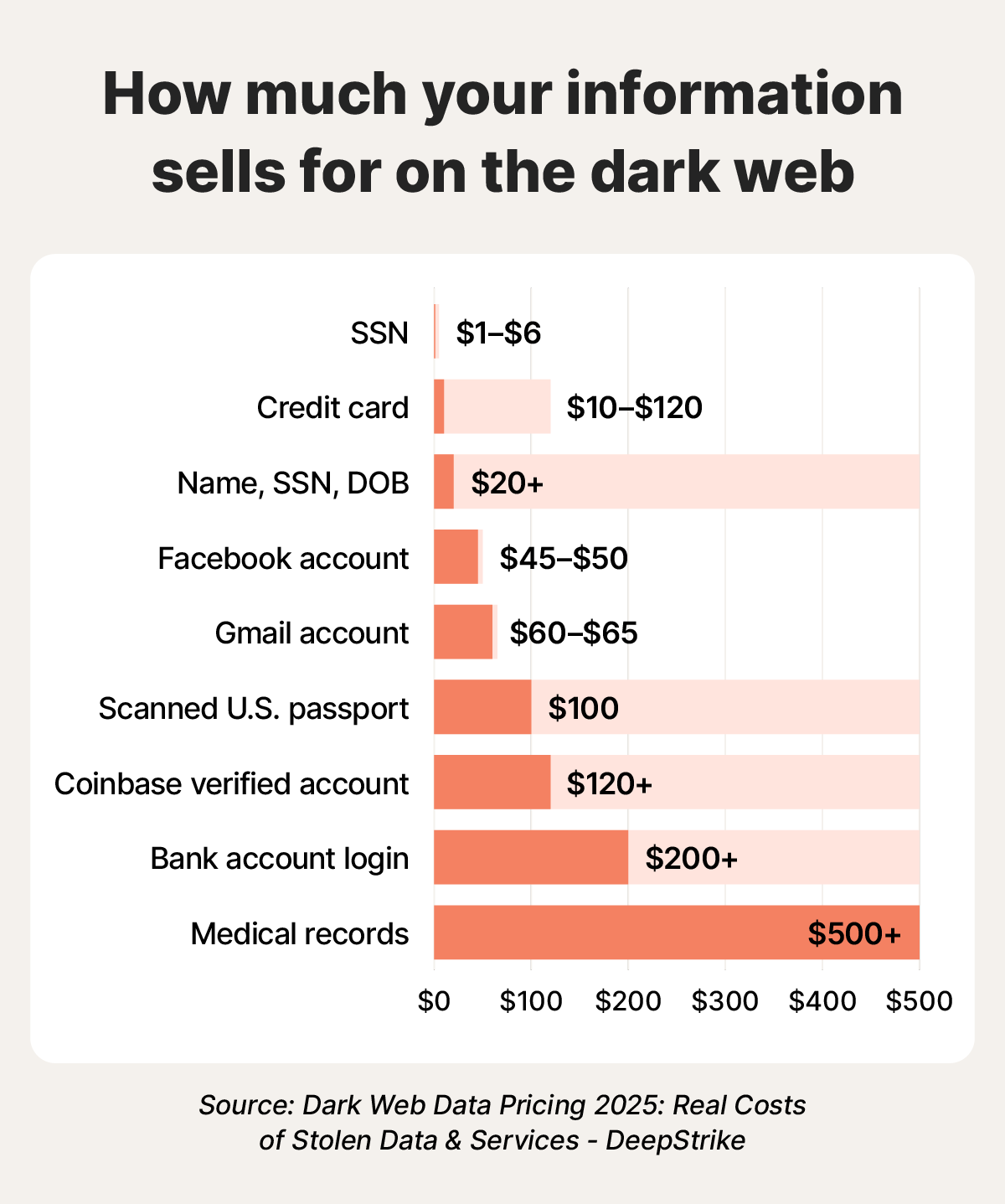
A bar graph showing how much it costs to buy different types of stolen information on the dark web.
How to protect yourself against dark web risks
Protecting yourself against dark web risks begins with limiting what you share, strengthening your online privacy, and keeping your devices updated and secure.
Here’s how to stay safer from dark web threats and protect your data:
- Create a my Social Security account: Set up a my Social Security account so criminals can’t register one in your name. This also helps you monitor for government benefits fraud and catch suspicious activity sooner.
- Limit information sharing: Avoid oversharing on social media and posting personal information on forums. The less you share, the harder it is for criminals to piece together your identity and tailor scams to target you.
- Use strong passwords: Choose long, unique passwords for every account. Consider a password manager that generates strong passwords and stores them for easy access.
- Be aware of phishing: Keep an eye out for signs of phishing attacks like urgent language, suspicious links, or generic greetings. Sophisticated attackers can even spoof your friends’ emails or texts, making it appear as though they come from people you know.
- Enable multi-factor authentication: Turn on MFA to make it difficult for criminals to access accounts, even if they have your password. Consider an authentication app to prevent criminals from intercepting text or email codes through SIM swapping attacks.
- Remove your data from the internet: Proactively remove your information from data broker sites and other people search sites to limit your public online exposure.
- Avoid public Wi-Fi: Don’t send sensitive data over public Wi-Fi. If you have to use it, always have a trusted VPN enabled before connecting, to encrypt your in-transit traffic.
- Secure your home Wi-Fi: Update your home router’s name, password, and admin credentials so criminals can’t easily access your network with the default credentials routers come with. Also, enable WPA2 or WPA3 encryption for stronger security against wardriving attacks, where hackers drive through neighborhoods to find unsecured networks.
- Turn off Wi-Fi Protected Setup: WPS was designed to make sharing access to your Wi-Fi easy, with friends and family in mind. But, it also makes it much easier for hackers to gain network access.
- Update your software: Keep device software and apps updated to help close security vulnerabilities that criminals may exploit.
- Monitor the dark web: Use dark web monitoring tools to actively scan the dark web for your info and receive alerts whenever your data might be exposed.
- Use antivirus software: Install real-time antivirus protection on your devices to help block malware and protect your personal information.

The layers of defense protecting you from dark web threats.
Defend yourself against dark web threats
Criminals on the dark web hope to collect enough information to sell it or steal your identity, but you can catch them in the act with the right tools. LifeLock offers identity theft protection, including dark web monitoring that alerts you if it finds your personal data so you can take steps to secure your identity. It can also help you find your details on public people search sites so you can reduce your exposure on the surface web, too.
FAQs
What is the dark web?
The dark web is a hidden part of the internet that requires special software, such as the Tor Browser, to access it. While many dark web websites offer illegal products or services (such as drugs or hacked data), others serve legitimate purposes (such as providing a platform for journalists to exchange information anonymously).
Do monitoring tools catch all information on the dark web?
No, no monitoring tool can catch all information on the dark web. The dark web is intentionally designed to be anonymous and difficult to search. Many criminal forums and marketplaces are private, encrypted, invitation-only, or constantly moving to avoid detection.
Does having my information on the dark web guarantee I’ll be an identity theft victim?
No, having your information on the dark web doesn’t guarantee identity theft. But it does mean you’re at a higher risk than you were before. The faster you act to secure compromised accounts and protect your identity, the better chance you have of minimizing damage.
Can you remove your email from the dark web?
No. Once your information is leaked on the dark web, there’s no way to delete it. Even if you could, it may already have been sold or shared on another dark web site. If you find your data on the dark web, you need to take steps to reduce the risk of fraud and protect any associated accounts.
Editors’ note: Our articles provide educational information about identity theft, scams, financial fraud, and other topics that can put your identity or personal accounts at risk. LifeLock offerings may not cover or protect against every type of crime, fraud, scam, or threat we write about. For more details about how we write, review, and update our articles, see our Editorial Policy.
Related articles
Internet Security
What to do if your Social Security number is on the dark web
May 05, 2026
·
9 min read
![How to remove your information from the internet [11 free ways]](/content/dam/lifelock/learn/thumbnails/remove-personal-information-from-the-internet-thumb-2025.jpg)
Identity Theft
How to remove your information from the internet [11 free ways]
August 25, 2026
·
11 min read
Internet Security
What to do if a scammer has your email address: 9 smart moves
March 06, 2025
·
8 min read


Internet Security
What is a data leak? Risks of data exposure and how to prevent it
November 05, 2024
·
7 min read

Internet Security
What to do if your Social Security number is on the dark web
May 05, 2026
·
9 min read
Identity Theft
How to remove your information from the internet [11 free ways]
August 25, 2026
·
11 min read
Internet Security
What to do if a scammer has your email address: 9 smart moves
March 06, 2025
·
8 min read
Internet Security
What is a data leak? Risks of data exposure and how to prevent it
November 05, 2024
·
7 min read
Internet Security
What to do if your Social Security number is on the dark web
May 05, 2026
·
9 min read
Identity Theft
How to remove your information from the internet [11 free ways]
August 25, 2026
·
11 min read
Internet Security
What to do if a scammer has your email address: 9 smart moves
March 06, 2025
·
8 min read