

Has your personal data been recently exposed?
Check if information like your Social Security number, email, and passwords is exposed on the dark web.


You have reached the maximum number of scans allowed. Please come back after 24 hours.

Scanning the dark web...
Scanning public databases...
Scanning millions of records...
Narrowing down the search...
We need more information
Please enter a few more details to ensure we show you the right information.
You’re at high risk
We found your personal information on the dark web and on data broker sites.
 Up to $3M Reimbursement for identity theft, with up to $1M for Stolen Funds†††
$10K Scam Reimbursement7
Scam Support
Credit, Checking and Savings Activity Alerts: Unlimited Accounts
Credit & Payday Loan Lock2
Credit Monitoring:
3 Bureau1
Automatic Data Broker Removal8
Dark Web Monitoring
Priority 24/7 Customer Phone Support
Up to $3M Reimbursement for identity theft, with up to $1M for Stolen Funds†††
$10K Scam Reimbursement7
Scam Support
Credit, Checking and Savings Activity Alerts: Unlimited Accounts
Credit & Payday Loan Lock2
Credit Monitoring:
3 Bureau1
Automatic Data Broker Removal8
Dark Web Monitoring
Priority 24/7 Customer Phone Support
LifeLock Total

No one can prevent all cybercrime or prevent all identity theft.
- Price valid for introductory term. After that, your price will renew at the standard price.
- Your subscription begins immediately after your transaction is complete. A payment method is required at sign-up for trials, and you will be charged at the end of your trial, unless canceled first.
- Prices are subject to change and may be charged up to 35 days prior to renewal. Cancel here or contact Member Services.
- Restrictions apply. Automatically renewing subscription required. If you're a victim of identity theft and not satisfied with our resolution, you may receive a refund for the current term of your subscription. See lifelock.norton.com/guarantee for complete details.
††† Up to $1 million coverage for Lawyers and Experts included with all plans. Reimbursement and expense compensation vary according to plan. Insurance benefits are issued by third parties. See lifelock.norton.com/legal for policy info.
1 Bureau Monitoring and Monthly Credit Report and Score / 3 Bureau Monitoring and Monthly Credit Report and Score.
2 Credit Lock cannot prevent all account takeovers, unauthorized account openings, or credit file inquiries. Deactivates if you downgrade or cancel your subscription.
7 Scam protection coverage as part of identity theft benefits is currently available to all customers residing in the United States, including U.S. territories and the District of Columbia, with the exception of residents of New York. Gen Digital is not a licensed insurance producer. Benefits under the Master Policy are issued and covered by HSB Specialty Insurance Company. You can find further details and exclusions in the summary of benefits.
8 After setup, automatic data broker removal service scans and requests removal every 90 days.
You’re at medium risk
We found your personal information on data broker sites.
Up to $1.2M Reimbursement for identity theft, with up to $100K for Stolen Funds†††
$5K Scam Reimbursement7
Scam Support
Credit, Checking and Savings Activity Alerts:
5 Accounts
Credit & Payday Loan Lock2
Credit Monitoring:
3 Bureau1
Automatic Data Broker Removal8
Dark Web Monitoring
Priority 24/7 Customer Phone Support
LifeLock Advanced
No one can prevent all cybercrime or prevent all identity theft.
- Price valid for introductory term. After that, your price will renew at the standard price.
- Your subscription begins immediately after your transaction is complete. A payment method is required at sign-up for trials, and you will be charged at the end of your trial, unless canceled first.
- Prices are subject to change and may be charged up to 35 days prior to renewal. Cancel here or contact Member Services.
- Restrictions apply. Automatically renewing subscription required. If you're a victim of identity theft and not satisfied with our resolution, you may receive a refund for the current term of your subscription. See lifelock.norton.com/guarantee for complete details.
††† Up to $1 million coverage for Lawyers and Experts included with all plans. Reimbursement and expense compensation vary according to plan. Insurance benefits are issued by third parties. See lifelock.norton.com/legal for policy info.
1 Bureau Monitoring and Monthly Credit Report and Score / 3 Bureau Monitoring and Monthly Credit Report and Score.
2 Credit Lock cannot prevent all account takeovers, unauthorized account openings, or credit file inquiries. Deactivates if you downgrade or cancel your subscription.
7 Scam protection coverage as part of identity theft benefits is currently available to all customers residing in the United States, including U.S. territories and the District of Columbia, with the exception of residents of New York. Gen Digital is not a licensed insurance producer. Benefits under the Master Policy are issued and covered by HSB Specialty Insurance Company. You can find further details and exclusions in the summary of benefits.
8 After setup, automatic data broker removal service scans and requests removal every 90 days.
Good news!
We didn’t find your personal information across millions of records or on public data sources.
Up to $1.05M Reimbursement for identity theft, with up to $25K for Stolen Funds†††
Identity Restoration Specialists
Credit, Checking and Savings Activity Alerts:
2 Accounts
Credit & Payday Loan Lock2
Credit Monitoring:
2 Bureau1
Automatic Data Broker Removal8
Dark Web Monitoring
Breach Alerts
24/7 Customer Phone Support
Lifelock Core
No one can prevent all cybercrime or prevent all identity theft.
- Price valid for introductory term. After that, your price will renew at the standard price.
- Your subscription begins immediately after your transaction is complete. A payment method is required at sign-up for trials, and you will be charged at the end of your trial, unless canceled first.
- Prices are subject to change and may be charged up to 35 days prior to renewal. Cancel here or contact Member Services.
- Restrictions apply. Automatically renewing subscription required. If you're a victim of identity theft and not satisfied with our resolution, you may receive a refund for the current term of your subscription. See lifelock.norton.com/guarantee for complete details.
††† Up to $1 million coverage for Lawyers and Experts included with all plans. Reimbursement and expense compensation vary according to plan. Insurance benefits are issued by third parties. See lifelock.norton.com/legal for policy info.
1 Credit features require successful setup, identity verification, and sufficient credit history by the appropriate credit bureau. Credit monitoring features may take several days to activate after enrollment.
2 Identity Lock cannot prevent all account takeovers, unauthorized account openings, or credit file inquiries. Deactivates if you downgrade or cancel your subscription.
8 After setup, automatic data broker removal service scans and requests removal every 90 days.

 Why do we ask?
Finding your match...

10 cents
If your information is exposed or stolen in a data breach, it can end up on the dark web where it can be sold for as little as 10 cents.
100M+
LifeLock monitors hundreds of millions of data points a second.
- Up to $1.05M Reimbursement for identity theft, with up to $25K for Stolen Funds†††
- Up to $1.2M Reimbursement for identity theft, with up to $100K for Stolen Funds†††
- Up to $3M Reimbursement for identity theft, with up to $1M for Stolen Funds†††
- Up to $1.05M Reimbursement for identity theft, with up to $25K for Stolen Funds††† for each adult
- Up to $1.2M Reimbursement for identity theft, with up to $100K for Stolen Funds††† for each adult
- Up to $3M Reimbursement for identity theft, with up to $1M for Stolen Funds††† for each adult
- Up to $1.05M Reimbursement for identity theft, with up to $25K for Stolen Funds††† for each adult
- Up to $1.2M Reimbursement for identity theft, with up to $100K for Stolen Funds††† for each adult
- Up to $3M Reimbursement for identity theft, with up to $1M for Stolen Funds††† for each adult
- Credit Monitoring Coverage1
- Credit Monitoring1 each adult
- Credit Monitoring1 for family
- Credit, Checking & Savings Account Activity Alerts
- Credit, Checking and Savings Activity Alerts for each adult
- Credit, Checking and Savings Activity Alerts for family
- 401K & Investment Account Activity Alerts
- 401K/Investment Account Alerts for each adult
- 401K/Investment Account Alerts for family
- Recurring and Unusual Charge Alerts
- Unexpected & Suspicious Charge Alerts for each adult
- Unexpected & Suspicious Charge Alerts for family
- Stolen Funds Reimbursement†††
- Stolen Funds Reimbursement††† for each adult
- Stolen Funds Reimbursement††† for family
- Lawyers and Experts†††
- Lawyers & Experts††† for each adult
- Lawyers & Experts††† for family
- Automatic Data Broker Removal8
- Automatic Data Broker Removal8 for each adult
- Automatic Data Broker Removal8 for family
- Scam Reimbursement7
- Scam Reimbursement7 for each adult
- Scam Reimbursement7 for family
- Credit Reports & Scores1
- Credit Report & Score for each adult
- Credit Report & Score for family
- Social Media Monitoring
- Social Media Monitoring for each adult
- Social Media Monitoring for family


††† Up to $1 million coverage for Lawyers and Experts included with all plans. Reimbursement and expense compensation vary according to plan. Insurance benefits are issued by third parties. See LifeLock.Norton.com/legal for policy info.
1 Credit features require successful setup, identity verification and sufficient credit history by the appropriate credit bureau. Credit monitoring features may take several days to activate after enrollment.
7 Scam protection coverage as part of identity theft benefits is currently available to all customers residing in the United States, including U.S. territories and the District of Columbia, with the exception of residents of New York. Gen Digital is not a licensed insurance producer. Benefits under the Master Policy are issued and covered by HSB Specialty Insurance Company. You can find further details and exclusions in the Summary of Benefits.
8 After setup, automatic data broker removal service scans and requests removal every 90 days.
Why do we ask?
Identifying your concerns gives us the ability to recommend the right plan for your needs.
Why do we ask?
Knowing this number helps us recommend coverage that fits your needs.
Why do we ask?
Providing your email address makes you eligible for notifications of potential identity threats.
Dark web scans: How they work and the best tools
While you go about your day, cybercriminals could be buying and selling your personal information on the dark web — from email addresses and passwords to Social Security numbers. Learn how a LifeLock dark web scan can help uncover potential exposure and support your recovery if your identity is stolen.





Some estimates suggest the dark web makes up just 0.01% of the internet, yet it’s the epicenter of online identity theft–related fraud. Dark web marketplaces host many identity-related listings that can enable identity theft, from “fullz” (or full identity profiles) to individual Social Security numbers, passports, or credit card details. On top of that, billions of stolen account credentials have been leaked and traded in these marketplaces.
Read on to learn what types of information dark web scans can find, how they find it, and which dark web scanners you should use.
What is a dark web scan?
A dark web scan is a security feature that searches known dark web forums, marketplaces, and breach databases to see whether your personal information has been exposed or traded. It typically looks for data like email addresses, passwords, Social Security numbers, and credit card details that may have been leaked through data breaches or malware infections.
While you can’t remove information from the dark web once it’s been shared, a dark web scan can help you spot exposure early, so you can take timely steps to reduce the risk of identity theft or fraud, such as changing passwords or freezing your credit.
Dark web scanning vs. dark web monitoring
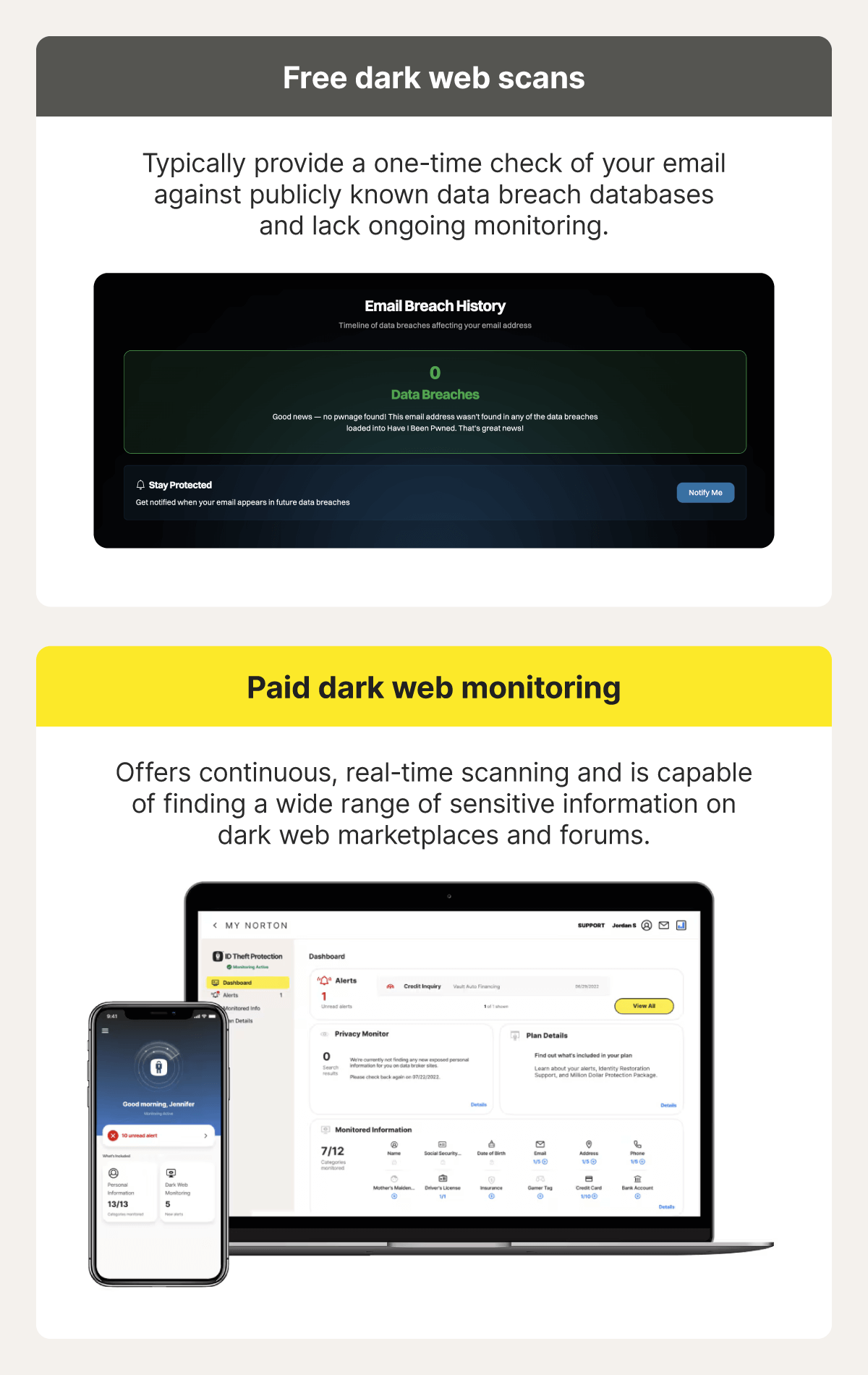
A dark web scan is typically a one-time or occasional check that you trigger manually, and it lets you know if your information is already exposed. Dark web monitoring is a similar feature that runs continuous scans to alert you as soon as your information is detected on the dark web, potentially after being exposed in a data breach.
Here’s a side-by-side comparison to help you understand the difference:
Dark web scan |
Dark web monitoring |
|
|---|---|---|
Frequency |
A single, on-demand lookup. |
24/7 ongoing monitoring. |
How it works |
Scans the dark web, forums, and breach databases at the time you prompt the check. |
Continuously scans the dark web, forums, and breach databases. |
Good for |
Quick checks to see if your information is currently exposed. |
Early notification and proactive protection. |
How do dark web scans work?
Dark web scanners use a mix of automated web crawlers, pattern matching, and AI-assisted analysis to search known dark web sites, such as breach dumps, paste sites, forums, and marketplaces, for exposed personally identifiable information (PII), account credentials, and other sensitive details linked to you.
However, dark web sites frequently change addresses, shut down, or block bots with CAPTCHAs. Many forums are private or invitation-only, and some data is shared briefly before disappearing. As a result, dark web scans can reduce risk and improve visibility, but they can’t guarantee complete coverage.
How to choose a dark web scanning service
A worthy dark web scanning service should monitor multiple types of personal data, deliver timely alerts with clear guidance, fit your budget, and offer reliable customer support. Ideally, your chosen service will also include identity theft protection and recovery features.
So, before you subscribe, confirm that your chosen dark web scanner:
- Monitors for a wide range of data: It should search for your name, Social Security number, driver’s license number, physical and email addresses, phone numbers, bank account numbers, credit card numbers, and more.
- Provides guidance: If a scanner detects exposed data, it should clearly explain what it found and share actionable next steps to help you secure your accounts and data.
- Is secure: Because you have to provide sensitive data so the scanner knows what to search for, you should confirm it has strong encryption and safe data handling practices.
- Strikes a balance between price and value: Free dark web scanning tools can offer limited insight, but they’re often less reliable and comprehensive. Paid services typically use more advanced technology, allowing them to scan a wider range of sources and identify newer exposures.
- Bundles features: Look for add-ons like credit monitoring, stolen funds and expense reimbursement coverage, and restoration assistance that can help you if your exposed data is used by cybercriminals to commit identity theft.
- Provides customer support: Choose a service with accessible, 24/7 support, ideally offering options like phone and chat that provide fast, clear assistance.
Dark web scanners you should use to stay on top of threats
There are several reputable dark web scanning tools around, each with its own strengths. Here are some of the best free and paid options, starting with the most comprehensive.
LifeLock dark web scanner: Best for continuous monitoring and alerts
LifeLock is much more than a dark web scanner, offering comprehensive dark web monitoring, which continuously scans hidden sites and forums for more than 120 types of personal information and identity elements, including:
- Your name
- Mother’s maiden name
- Social Security number
- Birth date
- Driver’s license number
- Physical addresses
- Email addresses
- Phone numbers
- Bank account numbers
- Credit card numbers
- Insurance
- Gamer tags
This makes it a strong option for proactive users who want to be made aware of data exposure as soon as it’s detected so they can take preventive steps before somebody misuses their information.
Some other benefits you get with LifeLock include data breach notifications, digital footprint monitoring, identity theft restoration support, and a reimbursement package which can help cover losses and expenses resulting from identity theft.
Have I Been Pwned: Best for identifying email address exposure
Have I Been Pwned (HIBP) is one of the most trusted free data breach checkers available. While it doesn't directly scan the dark web, it cross-references your information against a vast database, flagging accounts compromised in known breaches.
HIBP is best used to quickly and easily detect the exposure of specific sensitive data, such as email addresses and passwords, that cybercriminals are likely to trade on the dark web.
Google dark web report: Best for free and basic checks
Built into Google accounts, the Google dark web report provided a quick assessment of data on the dark web associated with your email address or other information you shared with your monitoring profile, such as:
- Your name
- Address
- Phone number
- Username
- Password
It was free, fast, and useful for basic exposure checks, but doesn’t offer in-depth, ongoing monitoring. However, the decision was made to discontinue the free tool early in 2026, and it’s unavailable as of February 16th 2026.
How to run a dark web scan
Running a dark web scan is a similar process across most tools. You create an account and enter the details you want to check, such as your email address, Social Security number, or credit card information. Depending on the service, the tool will either deliver a one-time assessment or continuously monitor for signs that your information has been exposed.
LifeLock’s dark web monitoring feature is a comprehensive and reliable option that can do both. As well as repeatedly scouring the dark web for subscribers’ compromised data, you can also run a free one-time, deep-dive personal data exposure scan right now by following these simple steps:
- Enter your email: Type your email address into our free personal data exposure scanner and click “Run your free scan.”
- Share identifying details: Input your full name, city, and state to enable a more complete exposure scan.
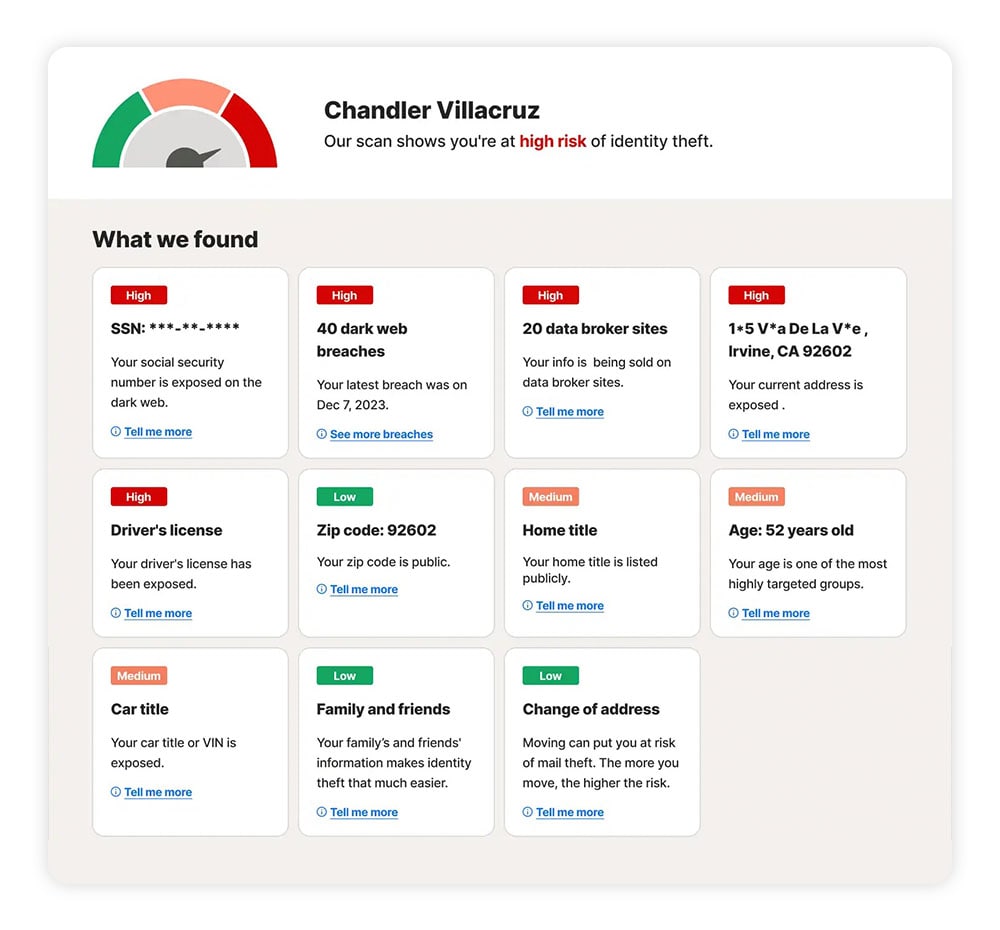
From there, you’ll receive a personalized risk assessment and a detailed breakdown of the scanner’s findings. This report will clearly show if sensitive identifiers, such as your SSN, address, driver’s license number, home or car title, or ZIP code, have been exposed.
The report also clarifies whether your information is on the dark web or on data broker websites used for targeted marketing, background checks, and identity profiling.
What to do if your personal information is on the dark web
If a scan shows your information circulating on the dark web, act quickly to reduce the risk of identity theft and fraud. A quality dark web monitoring service will usually provide tailored recommendations, but these immediate steps can help strengthen your protection right away:
- Change passwords: Update passwords for exposed accounts and other accounts that use similar credentials, starting with your email and financial accounts. Create strong, unique passwords for each account, and consider using a reputable password manager to store them securely and reduce the risk of future breaches.
- Enable identity authentication: Turn on two-factor authentication (2FA) or multi-factor authentication (MFA) for all sensitive accounts, including email, banking, and social media. This adds a critical layer of protection even if attackers already have your password.
- Alert financial institutions: Contact your bank, credit card issuer, or brokerage to report the exposure. Ask them to close compromised accounts, issue new account numbers, and monitor for suspicious activity.
- Report to authorities: If you find evidence of identity theft (like unauthorized account openings), file a report at IdentityTheft.gov to create an official recovery plan, and file a report with your local police.
- Monitor financial and medical statements: Review bank, credit card, insurance, and medical statements regularly for unfamiliar charges or services. Criminals often start with small, less noticeable transactions to test whether an account is active.
- Check your credit report: Request free credit reports from all three bureaus — Experian, Equifax, and TransUnion — through AnnualCreditReport.com. Look for unfamiliar accounts, inquiries, or debts.
- Freeze your credit: Place a credit freeze with each of the three major credit bureaus to prevent criminals from opening new credit accounts in your name.
Scan the dark web for identifying information
Looking for comprehensive dark web scanning for ultimate peace of mind? Subscribe to LifeLock for ongoing dark web monitoring that scours hundreds of millions of data points a second. As well as getting notified when your data is found on the dark web, you’ll benefit from a wide array of identity protection tools and access to expert support if your identity is ever compromised.
FAQs
How reliable are dark web scans?
Dark web scan results are generally reliable, but they’re rarely complete. The dark web is vast, decentralized, and heavily encrypted, which means no tool can scan 100% of its content.
Do I need to provide personal information to initiate a dark web scan?
Yes, dark web scanners need specific personal details to know what to search for. This may include your email address, Social Security number, credit card information, full name, or phone number.
How often should I run dark web scans?
Subscribing to continuous dark web monitoring is the most effective option, as it notifies you quickly once your sensitive information is discovered, helping you take action to head off identity threats. If you rely on a free tool instead, aim to run a scan ideally once a week, at least once a month.
Can I take my information off the dark web?
In most cases, no. Once data is leaked on the dark web, it generally can’t be removed. The best defense is to limit the damage by securing your accounts, freezing your credit, and monitoring for misuse.
Editors’ note: Our articles provide educational information about identity theft, scams, financial fraud, and other topics that can put your identity or personal accounts at risk. LifeLock offerings may not cover or protect against every type of crime, fraud, scam, or threat we write about. For more details about how we write, review, and update our articles, see our Editorial Policy.
Related articles

![How to remove your information from the internet [11 free ways]](/content/dam/lifelock/learn/thumbnails/remove-personal-information-from-the-internet-thumb-2025.jpg)