


Has your personal data been recently exposed?
Check if information like your Social Security number, email, and passwords is exposed on the dark web.


You have reached the maximum number of scans allowed. Please come back after 24 hours.

Scanning the dark web...
Scanning public databases...
Scanning millions of records...
Narrowing down the search...
We need more information
Please enter a few more details to ensure we show you the right information.
You’re at high risk
We found your personal information on the dark web and on data broker sites.
 Up to $3M Reimbursement for identity theft, with up to $1M for Stolen Funds†††
$10K Scam Reimbursement7
Scam Support
Credit, Checking and Savings Activity Alerts: Unlimited Accounts
Credit & Payday Loan Lock2
Credit Monitoring:
3 Bureau1
Automatic Data Broker Removal8
Dark Web Monitoring
Priority 24/7 Customer Phone Support
LifeLock Total

No one can prevent all cybercrime or prevent all identity theft.
- Price valid for introductory term. After that, your price will renew at the standard price.
- Your subscription begins immediately after your transaction is complete. A payment method is required at sign-up for trials, and you will be charged at the end of your trial, unless canceled first.
- Prices are subject to change and may be charged up to 35 days prior to renewal. Cancel here or contact Member Services.
- Restrictions apply. Automatically renewing subscription required. If you're a victim of identity theft and not satisfied with our resolution, you may receive a refund for the current term of your subscription. See lifelock.norton.com/guarantee for complete details.
††† Up to $1 million coverage for Lawyers and Experts included with all plans. Reimbursement and expense compensation vary according to plan. Insurance benefits are issued by third parties. See lifelock.norton.com/legal for policy info.
1 Bureau Monitoring and Monthly Credit Report and Score / 3 Bureau Monitoring and Monthly Credit Report and Score.
2 Credit Lock cannot prevent all account takeovers, unauthorized account openings, or credit file inquiries. Deactivates if you downgrade or cancel your subscription.
7 Scam protection coverage as part of identity theft benefits is currently available to all customers residing in the United States, including U.S. territories and the District of Columbia, with the exception of residents of New York. Gen Digital is not a licensed insurance producer. Benefits under the Master Policy are issued and covered by HSB Specialty Insurance Company. You can find further details and exclusions in the summary of benefits.
8 After setup, automatic data broker removal service scans and requests removal every 90 days.
You’re at medium risk
We found your personal information on data broker sites.
Up to $1.2M Reimbursement for identity theft, with up to $100K for Stolen Funds†††
$5K Scam Reimbursement7
Scam Support
Credit, Checking and Savings Activity Alerts:
5 Accounts
Credit & Payday Loan Lock2
Credit Monitoring:
3 Bureau1
Automatic Data Broker Removal8
Dark Web Monitoring
Priority 24/7 Customer Phone Support
LifeLock Advanced
No one can prevent all cybercrime or prevent all identity theft.
- Price valid for introductory term. After that, your price will renew at the standard price.
- Your subscription begins immediately after your transaction is complete. A payment method is required at sign-up for trials, and you will be charged at the end of your trial, unless canceled first.
- Prices are subject to change and may be charged up to 35 days prior to renewal. Cancel here or contact Member Services.
- Restrictions apply. Automatically renewing subscription required. If you're a victim of identity theft and not satisfied with our resolution, you may receive a refund for the current term of your subscription. See lifelock.norton.com/guarantee for complete details.
††† Up to $1 million coverage for Lawyers and Experts included with all plans. Reimbursement and expense compensation vary according to plan. Insurance benefits are issued by third parties. See lifelock.norton.com/legal for policy info.
1 Bureau Monitoring and Monthly Credit Report and Score / 3 Bureau Monitoring and Monthly Credit Report and Score.
2 Credit Lock cannot prevent all account takeovers, unauthorized account openings, or credit file inquiries. Deactivates if you downgrade or cancel your subscription.
7 Scam protection coverage as part of identity theft benefits is currently available to all customers residing in the United States, including U.S. territories and the District of Columbia, with the exception of residents of New York. Gen Digital is not a licensed insurance producer. Benefits under the Master Policy are issued and covered by HSB Specialty Insurance Company. You can find further details and exclusions in the summary of benefits.
8 After setup, automatic data broker removal service scans and requests removal every 90 days.
Good news!
We didn’t find your personal information across millions of records or on public data sources.
Up to $1.05M Reimbursement for identity theft, with up to $25K for Stolen Funds†††
Identity Restoration Specialists
Credit, Checking and Savings Activity Alerts:
2 Accounts
Credit & Payday Loan Lock2
Credit Monitoring:
2 Bureau1
Automatic Data Broker Removal8
Dark Web Monitoring
Breach Alerts
24/7 Customer Phone Support
Lifelock Core
No one can prevent all cybercrime or prevent all identity theft.
- Price valid for introductory term. After that, your price will renew at the standard price.
- Your subscription begins immediately after your transaction is complete. A payment method is required at sign-up for trials, and you will be charged at the end of your trial, unless canceled first.
- Prices are subject to change and may be charged up to 35 days prior to renewal. Cancel here or contact Member Services.
- Restrictions apply. Automatically renewing subscription required. If you're a victim of identity theft and not satisfied with our resolution, you may receive a refund for the current term of your subscription. See lifelock.norton.com/guarantee for complete details.
††† Up to $1 million coverage for Lawyers and Experts included with all plans. Reimbursement and expense compensation vary according to plan. Insurance benefits are issued by third parties. See lifelock.norton.com/legal for policy info.
1 Credit features require successful setup, identity verification, and sufficient credit history by the appropriate credit bureau. Credit monitoring features may take several days to activate after enrollment.
2 Identity Lock cannot prevent all account takeovers, unauthorized account openings, or credit file inquiries. Deactivates if you downgrade or cancel your subscription.
8 After setup, automatic data broker removal service scans and requests removal every 90 days.

 Why do we ask?
Finding your match...

10 cents
If your information is exposed or stolen in a data breach, it can end up on the dark web where it can be sold for as little as 10 cents.
100M+
LifeLock monitors hundreds of millions of data points a second.
- Up to $1.05M Reimbursement for identity theft, with up to $25K for Stolen Funds†††
- Up to $1.2M Reimbursement for identity theft, with up to $100K for Stolen Funds†††
- Up to $3M Reimbursement for identity theft, with up to $1M for Stolen Funds†††
- Up to $1.05M Reimbursement for identity theft, with up to $25K for Stolen Funds††† for each adult
- Up to $1.2M Reimbursement for identity theft, with up to $100K for Stolen Funds††† for each adult
- Up to $3M Reimbursement for identity theft, with up to $1M for Stolen Funds††† for each adult
- Up to $1.05M Reimbursement for identity theft, with up to $25K for Stolen Funds††† for each adult
- Up to $1.2M Reimbursement for identity theft, with up to $100K for Stolen Funds††† for each adult
- Up to $3M Reimbursement for identity theft, with up to $1M for Stolen Funds††† for each adult
- Credit Monitoring Coverage1
- Credit Monitoring1 each adult
- Credit Monitoring1 for family
- Credit, Checking & Savings Account Activity Alerts
- Credit, Checking and Savings Activity Alerts for each adult
- Credit, Checking and Savings Activity Alerts for family
- 401K & Investment Account Activity Alerts
- 401K/Investment Account Alerts for each adult
- 401K/Investment Account Alerts for family
- Recurring and Unusual Charge Alerts
- Unexpected & Suspicious Charge Alerts for each adult
- Unexpected & Suspicious Charge Alerts for family
- Stolen Funds Reimbursement†††
- Stolen Funds Reimbursement††† for each adult
- Stolen Funds Reimbursement††† for family
- Lawyers and Experts†††
- Lawyers & Experts††† for each adult
- Lawyers & Experts††† for family
- Automatic Data Broker Removal8
- Automatic Data Broker Removal8 for each adult
- Automatic Data Broker Removal8 for family
- Scam Reimbursement7
- Scam Reimbursement7 for each adult
- Scam Reimbursement7 for family
- Credit Reports & Scores1
- Credit Report & Score for each adult
- Credit Report & Score for family
- Social Media Monitoring
- Social Media Monitoring for each adult
- Social Media Monitoring for family


††† Up to $1 million coverage for Lawyers and Experts included with all plans. Reimbursement and expense compensation vary according to plan. Insurance benefits are issued by third parties. See LifeLock.Norton.com/legal for policy info.
1 Credit features require successful setup, identity verification and sufficient credit history by the appropriate credit bureau. Credit monitoring features may take several days to activate after enrollment.
7 Scam protection coverage as part of identity theft benefits is currently available to all customers residing in the United States, including U.S. territories and the District of Columbia, with the exception of residents of New York. Gen Digital is not a licensed insurance producer. Benefits under the Master Policy are issued and covered by HSB Specialty Insurance Company. You can find further details and exclusions in the Summary of Benefits.
8 After setup, automatic data broker removal service scans and requests removal every 90 days.
Why do we ask?
Identifying your concerns gives us the ability to recommend the right plan for your needs.
Why do we ask?
Knowing this number helps us recommend coverage that fits your needs.
Why do we ask?
Providing your email address makes you eligible for notifications of potential identity threats.
SIM swapping: What is a SIM swap attack and how to prevent it?
A phone number in the wrong hands can unlock far more than calls and texts. SIM-swapping scams put email, bank accounts, and even your identity at risk. Knowing the warning signs is a first line of defense, while identity theft protection services can help detect suspicious activity early to help limit the damage.


What is SIM swapping?
SIM swapping, also known as simjacking or SIM hijacking is a form of identity theft with an unusual twist: The victim’s phone never has to leave their possession. Instead, a scammer impersonates the victim and tricks the mobile network provider into transferring the phone number to a SIM card or eSIM that the criminal controls.
Calls and text messages intended for the real owner can then be redirected to the fraudster’s device.
Defend against data breaches
Join LifeLock to help detect threats to your data and proactively reduce your online exposure with breach alerts, dark web monitoring, and automatic data broker removal.


Phone numbers have become much more than a way to make calls. Once a scammer controls a number, they have a vital stepping stone into email, social media, and financial accounts. And the consequences can be pretty disastrous.
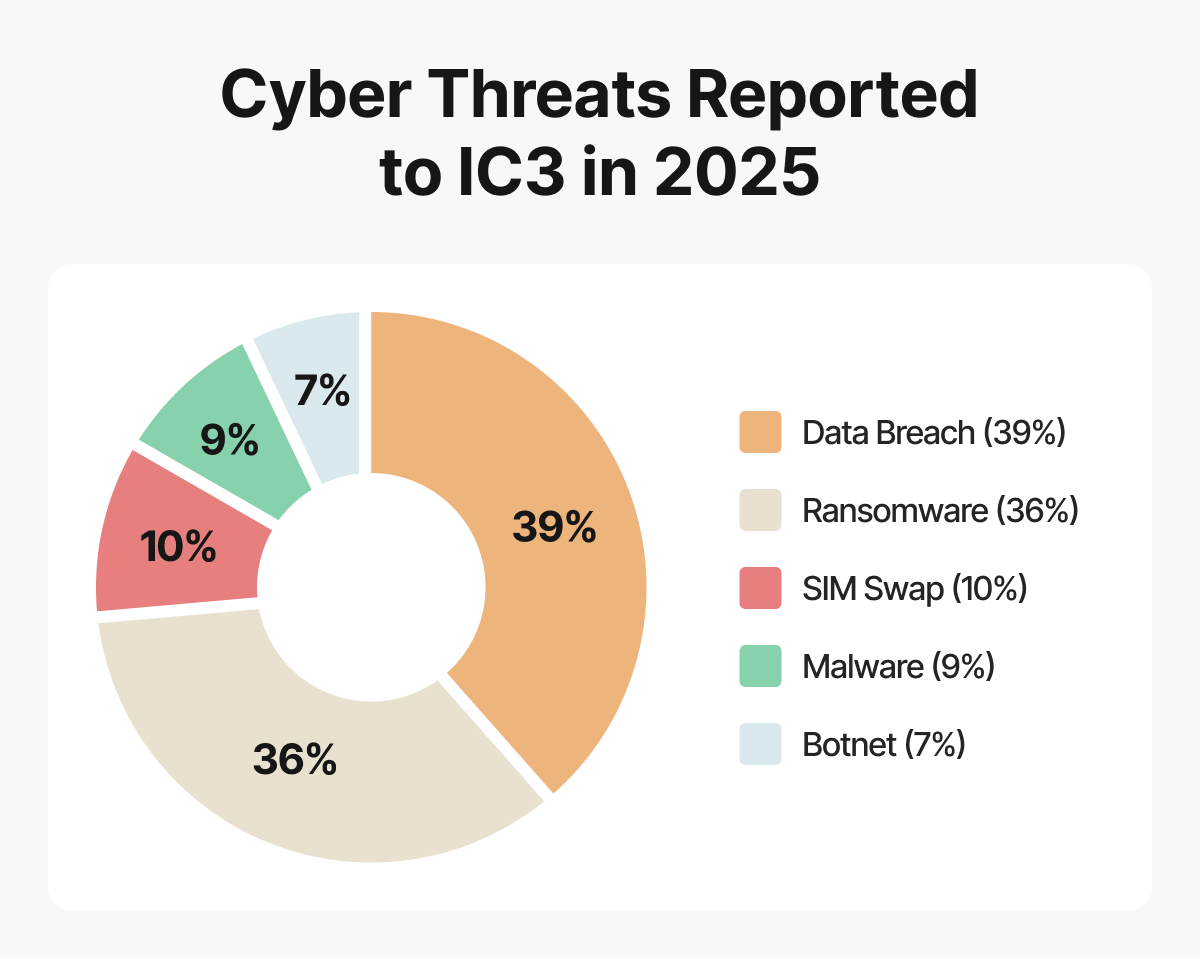
For example, this Bank of America customer lost $38,000 after a SIM-swapping attack. And in a recent Internet Crime Complaint Center (IC3) report, the FBI reported getting nearly 1000 reports of SIM-swapping fraud, with losses of over $17 million in 2025 alone. In fact, SIM swapping complaints made up 10% of all Cyber Threats reported to the IC3 in 2025.
The first clue that you’re a victim is often surprisingly mundane: A phone might suddenly display “No Service” or “SOS,” stop receiving calls and texts altogether, or show unexpected notifications about account or SIM changes.
This guide explains how SIM swapping works, the tactics scammers use, and the warning signs of an attack. Learn the steps and help prevent your phone number from becoming a gateway to more valuable personal information.
What does swapping SIM cards actually do?
Your SIM card is the reason your phone rings when someone dials your number. When an attacker remotely transfers your number to a different SIM card, they’ll get the call on their device instead.
And it’s not just a few “hi honey” texts from your mom or annoying spam calls that’ll go astray. After a successful swap, a hacker can receive all calls and texts intended for you, including one-time passwords and verification codes to your online accounts. These might be the missing pieces they need to reset your passwords, access email or financial accounts, hijack a social media account, and complete an account takeover attack.
How does SIM swapping work?
Here’s the unsettling part: A SIM card swap doesn’t require a scammer to steal or even touch your phone. All they have to do is impersonate you and convince your mobile carrier that “their” phone or SIM has been lost, stolen, or damaged. The carrier then “helps” by transferring your number to a SIM or eSIM controlled by the scammer — while your real phone remains in your hands and you’re none the wiser. Sometimes ignorance isn’t bliss.
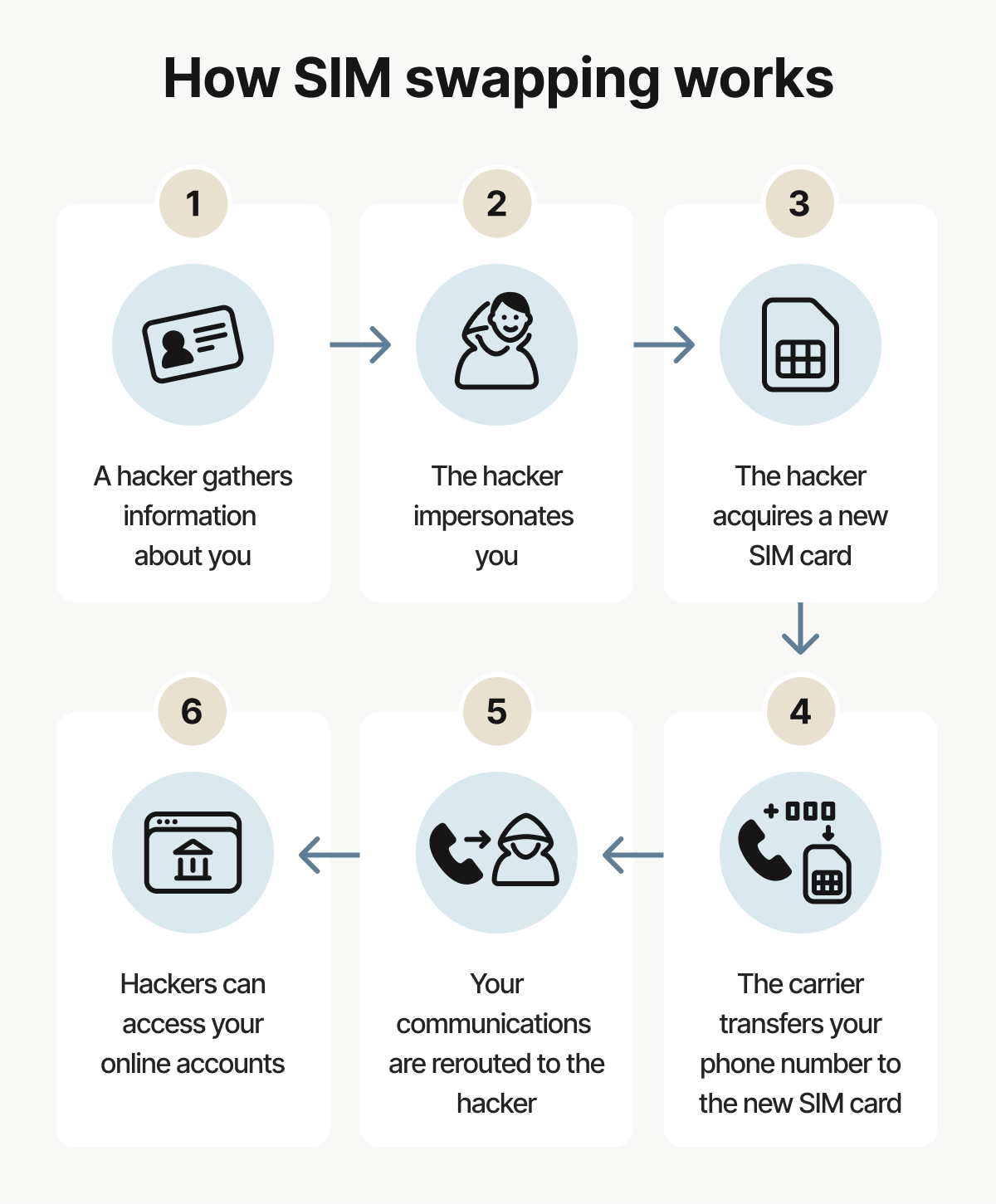
SIM swapping generally follows these steps:
1. A hacker gathers information about you: They collect personal details to build a file about you, such as your address, date of birth, and whatever else they can get their hands on about you. Every piece of information strengthens their chances of successfully impersonating you.
The Gen 2025 Threat Report describes that attackers can combine known phone numbers “with old breach data, open profile information and cheap lookup tools to reconstruct profiles of who you are, where you live, who you talk to and which services you most likely use”. All of this information is used in the impersonation stage of a SIM-swapping attempt.
2. The hacker impersonates you: Armed with your personal information, the hacker contacts your mobile carrier and tries to pose as you, usually claiming that your phone or SIM has been lost or damaged.
3. The hacker acquires a new SIM card: The hacker asks the carrier to activate a new SIM or eSIM, using convincing details and social engineering tactics to pass identity checks. A desperate-sounding fraudster might even persuade the representative to bypass identity checks altogether.
4. The carrier transfers your phone number to the new SIM card: The hackers read the new SIM card’s serial number to the operator, who assigns your phone number to that SIM. Your real phone loses cellular service and “No Service” appears on your screen.
5. Your communications are rerouted to the hacker: Now in control of your number, the calls and texts meant for you begin arriving on the attacker’s device instead, including verification codes to online accounts. The hacker might request a password reset for your bank account, for example, and then intercept the code needed to confirm it.
6. Hackers can access your online accounts: If successful, your phone number becomes a skeleton key, granting entry to your personal accounts. Combined with personal data meticulously collected over weeks or even years, the hacker can take action in your name, like changing passwords on your accounts and locking you out.
In the Gen Threat Report, Security evangelist Luis Corrons sums it up neatly: “...the most striking changes we see are no longer brand new types of malware; it is how tightly attacks are woven into every fiber of our everyday digital routines”.
Your phone number is a vital thread in that digital tapestry, making it all the more important to protect the personal information connected to it. And it doesn’t necessarily take a major data leak to give a SIM swapper what they need. Simply looking you up online may even reveal enough personal information for them to impersonate you and set the attack in motion.
Signs of a SIM swap
A SIM swap happens quietly, but it rarely stays hidden for long. Victims will likely notice a sudden loss of service and unexpected account alerts, or verification codes that never arrive. But if it’s a phone they don’t check regularly, it can take them some time to realize what’s happened.
Recognizing the early warning signs can help you regain control faster and mitigate damage that’s already begun to occur:
- Lost access: You won’t be able to make or receive calls or texts. iMessage and Wi-Fi will still work because they’re not tied to your SIM.
- Odd notifications: You could see login notifications at times when you didn’t try to log in, or notifications about a change of password or two-factor authentication (2FA) notifications.
- Unusual account activity: You may see unfamiliar actions on one of your accounts or suddenly be unable to log in.
- Carrier messages: If you never hear from Verizon but you’re getting emails from them now about confirming a new SIM card, it could be a sign.
- Missed calls: Your friends tell you they tried to call you, but you didn’t see any missed calls.
- No service messages: Your phone may suddenly display “No service,” “Emergency calls only,” or “SIM not provisioned.”
- Not receiving 2FA texts: They may now be arriving on someone else’s phone.
- Social media warnings: You could receive alerts about suspicious logins or see communication you know you didn’t send.
- Unexpected logouts: You might get logged out of email or app sessions without explanation.
What to do if you've been a victim of a SIM swap attack?
If you’re a victim of a SIM swapping attack, call your provider to get your number back and ask them to implement further security measures to help stop this from happening again. If your bank accounts were compromised, tell your bank, too. Then take steps to regain access to or secure your online accounts and social media. If available, the “log out everywhere” button is useful, and changing your passwords is essential.
SIM-swapping attacks need to be addressed immediately to mitigate the risks. Once your accounts start falling to a SIM swapper, it becomes harder to recover them.
Here’s what to do if you think you’ve been victimized by a SIM swapper:
- Call your cell phone carrier: Explain the situation. Get your phone number reassigned and ask them to place a SIM lock or port freeze on it. This prevents a SIM from being swapped without a special password.
- Report it to your bank: Call your financial institutions to explain that a scammer might’ve had access to your accounts. You can try to claim back any lost money and freeze your accounts to prevent further fraud.
- Report it to the authorities: Report the scam to the FTC, the Internet Crime Complaint Center (IC3), and the police (depending on the seriousness of your losses).
- Monitor your accounts: Monitor your financial accounts and credit report regularly for suspicious activity as a followup to ensuring any financial fraud is reported.
- Use the “log out everywhere” button: Some platforms, like Gmail, offer a link to automatically sign you out of all other web sessions on other devices.
- Regain access to online accounts you’ve been locked out of: Email accounts offer a variety of ways to prove your identity. The sooner you start doing this, the better, as once you lose access to critical accounts, verifying your identity for other accounts becomes much more difficult.
- Strengthen the security of your other online accounts: Update your passwords to new, stronger ones, set up a new email account for recovery purposes, and use 2FA that relies on an authentication app rather than a phone number.
How to help prevent SIM swapping fraud
SIM swapping relies on scammers getting enough information (plus the opportunity) to impersonate you. You’ll have to reduce both to make an attack harder to pull off. Tighten security with your mobile carrier and accounts, and be highly selective about the information you share online. Consider whether your social media followers really need to know the names of your siblings, pets, or street you live on.
Follow these tips to lessen the chances of being targeted by a SIM swapping attack:
- Use an account PIN with your mobile carrier: Call customer support to set up a PIN, which will be required whenever you make changes to your account.
- Set up account alerts with the carrier: Log in to your carrier’s website and turn on notifications for any account changes.
- Keep your phone number private: Treat your phone number with the same care and privacy that you would your password. Stop oversharing details about your life, too.
- Avoid SMS-based two-factor authentication: Use an app like Google Authenticator instead, or try biometrics.
- Don’t click suspicious links: One of the golden rules of the internet is never to click a link in an unexpected text or email. Learn how to spot scams in other situations too.
- Add account recovery options: Set up security questions or an alternate email account that you’ll only use to recover your primary account.
- Ensure you’re using strong passwords everywhere: Use a password manager for added convenience and security, and to help you create passwords that are 15+ characters long for the best chances of staying secure.
- Get identity theft protection: Use a service that alerts you when your risk of identity theft increases (e.g., due to a data breach on the dark web).
For an extra layer of identity theft protection (and more peace of mind), use LifeLock Total. It alerts you to potentially suspicious account changes and comes with 24/7 credit monitoring to help you stay a step ahead of scammers. And if you need it, there’s also guidance on freezing accounts.
How do cell providers protect users from SIM swapping attacks
Carriers offer security against SIM swapping by requiring a PIN or passcode. You may need to set this up manually, but we encourage you to do it as soon as possible. They’ll even block attempts to transfer your number to other carriers; just make sure that you use a unique passcode, store it securely, and don’t lose it.
Here are some security measures offered by specific carriers:
Verizon
Verizon’s SIM Protection blocks attempts to move your number to a new SIM without your authorization, and Number Lock prevents your number from being ported out to another carrier. You can enable these security settings by logging into your My Verizon account. From there, you can also find out how Verizon helps protect your account and how to report SIM swap scams should you be targeted.
AT&T
Use the Wireless Account Lock feature to disable account changes like transferring to a new SIM, transferring a phone number, adding a new line, and changing billing information.
If you’re the primary user, you can turn this feature on or off in your myAT&T app. Once enabled, AT&T will send a confirmation email if this feature is toggled on or off, plus a text to other devices on the same account.
T-Mobile
T-Mobile urges you to set up an account PIN, and it can only be changed by the primary account holder. You can also log in to T-Life or T-Mobile.com with your ID and add SIM Protection. Authorized users can add this feature, but only the primary account holder can remove it.
SIM swapping examples
Here are some real-life examples of SIM swap attacks to give you a sense of what they look like in real time. They usually involve the victim noticing something off in one of their email, social media, or bank accounts.
- Patricia Esciva from Florida: Her first clue was that everything went quiet, including all notifications and cell service. Once she connected to Wi-Fi, she realized she’d lost control of her phone number, and within mere minutes, scammers broke into her other online accounts and started spending her money.
- A UK businessman: He allegedly had £250,000 stolen from his accounts after his phone number was hijacked. He’s not alone. Cifas, the UK fraud prevention service, recorded a 1,055% rise in SIM swap fraud in 2024.
- Jack Dorsey’s Twitter account: His account started posting offensive tweets, which was totally out of character for the then-CEO of Twitter. The tweets were the doing of the Chuckling Squad, who had executed a SIM swap attack and used Dorsey’s number to tweet via SMS.
- U.S. Securities and Exchange Commission: A SIM swap allowed a bad actor to make an erroneous tweet from an official government account. The tweet claimed that national exchanges had approved listings of Bitcoin ETFs, and Bitcoin's price rose shortly thereafter.
- SIM-swapping involving O2: The UK Telecoms regulator Ofcom monitored O2 following complaints about its handling of SIM-swap fraud. In one instance, a case was closed and reimbursement denied because the victim had failed to answer the phone.
Get LifeLock to help protect against SIM swapping
A new kind of threat demands new tools. With LifeLock Total, you get proactive monitoring of the key data “building blocks” that make up your identity, from your credit report to your home title.
LifeLock can alert you if the SIM card associated with your phone number has been changed or if an attempt has been made to port your number to a new carrier, so you can act quickly to mitigate the damage from SIM swap fraud.
FAQs
Is SIM swapping illegal?
Yes, SIM swapping is illegal as it constitutes fraud and identity theft. It involves using another person’s identity without permission to steal personal data or commit financial fraud.
Does swapping SIM cards change your phone number?
No, it transfers your phone number to a new device, so your personal device is no longer tied to that phone number. All notifications tied to your phone number will be routed to the other device.
How long does a SIM swap take?
Collecting enough information to convince the carrier may take a long time, but the actual process of changing the number takes minutes or hours.
How do I know if I was SIM-swapped?
You’ll know if you see “No Service” or “Emergency Calls Only” on your phone screen, and you can’t send or receive calls/texts. Note that Wi-Fi and iMessage will still work. You may get sudden login notifications from various accounts. If you’re not locked out of any accounts yet, you can prevent damage by changing your password immediately.
Editors’ note: Our articles provide educational information about identity theft, scams, financial fraud, and other topics that can put your identity or personal accounts at risk. LifeLock offerings may not cover or protect against every type of crime, fraud, scam, or threat we write about. For more details about how we write, review, and update our articles, see our Editorial Policy.
This article contains
- What is SIM swapping?
- What does swapping SIM cards actually do?
- How does SIM swapping work?
- Signs of a SIM swap
- What to do if you've been a victim of a SIM swap attack?
- How to help prevent SIM swapping fraud
- How do cell providers protect users from SIM swapping attacks
- SIM swapping examples
- Get LifeLock to help protect against SIM swapping
- FAQs
Related articles