





 Why do we ask?


Note: If you’re ever unsure, skip the links completely and go straight to your device’s Settings app or log in directly at icloud.com to check your account status and notifications.
Has your personal data been recently exposed?
Check if information like your Social Security number, email, and passwords is exposed on the dark web.


You have reached the maximum number of scans allowed. Please come back after 24 hours.

Scanning the dark web...
Scanning public databases...
Scanning millions of records...
Narrowing down the search...
We need more information
Please enter a few more details to ensure we show you the right information.
Risk level:
High
You’re at high risk
We found your personal information on the dark web and on data broker sites.
Your personalized protection plan
Product Benefits:
 Up to $3M Reimbursement for identity theft, with up to $1M for Stolen Funds†††
$10K Scam Reimbursement7
Scam Support
Credit, Checking and Savings Activity Alerts: Unlimited Accounts
Credit & Payday Loan Lock2
Credit Monitoring:
3 Bureau1
Automatic Data Broker Removal8
Dark Web Monitoring
Priority 24/7 Customer Phone Support
Up to $3M Reimbursement for identity theft, with up to $1M for Stolen Funds†††
$10K Scam Reimbursement7
Scam Support
Credit, Checking and Savings Activity Alerts: Unlimited Accounts
Credit & Payday Loan Lock2
Credit Monitoring:
3 Bureau1
Automatic Data Broker Removal8
Dark Web Monitoring
Priority 24/7 Customer Phone Support
LifeLock Total
Your price:
$
349.99
Your price:
$
34.99
60-day money back guarantee with an annual plan
24/7 Live Member Support
No one can prevent all cybercrime or prevent all identity theft.
- Price valid for introductory term. After that, your price will renew at the standard price.
- Your subscription begins immediately after your transaction is complete. A payment method is required at sign-up for trials, and you will be charged at the end of your trial, unless canceled first.
- Prices are subject to change and may be charged up to 35 days prior to renewal. Cancel here or contact Member Services.
- Restrictions apply. Automatically renewing subscription required. If you're a victim of identity theft and not satisfied with our resolution, you may receive a refund for the current term of your subscription. See lifelock.norton.com/guarantee for complete details.
††† Up to $1 million coverage for Lawyers and Experts included with all plans. Reimbursement and expense compensation vary according to plan. Insurance benefits are issued by third parties. See lifelock.norton.com/legal for policy info.
1 Bureau Monitoring and Monthly Credit Report and Score / 3 Bureau Monitoring and Monthly Credit Report and Score.
2 Credit Lock cannot prevent all account takeovers, unauthorized account openings, or credit file inquiries. Deactivates if you downgrade or cancel your subscription.
7 Scam protection coverage as part of identity theft benefits is currently available to all customers residing in the United States, including U.S. territories and the District of Columbia, with the exception of residents of New York. Gen Digital is not a licensed insurance producer. Benefits under the Master Policy are issued and covered by HSB Specialty Insurance Company. You can find further details and exclusions in the summary of benefits.
8 After setup, automatic data broker removal service scans and requests removal every 90 days.
Risk level:
Medium
You’re at medium risk
We found your personal information on data broker sites.
Your personalized protection plan
Product Benefits:
Up to $1.2M Reimbursement for identity theft, with up to $100K for Stolen Funds†††
$5K Scam Reimbursement7
Scam Support
Credit, Checking and Savings Activity Alerts:
5 Accounts
Credit & Payday Loan Lock2
Credit Monitoring:
3 Bureau1
Automatic Data Broker Removal8
Dark Web Monitoring
Priority 24/7 Customer Phone Support
LifeLock Advanced
Your price:
$
199.99
Your price:
$
19.99
60-day money back guarantee with an annual plan
24/7 Live Member Support
No one can prevent all cybercrime or prevent all identity theft.
- Price valid for introductory term. After that, your price will renew at the standard price.
- Your subscription begins immediately after your transaction is complete. A payment method is required at sign-up for trials, and you will be charged at the end of your trial, unless canceled first.
- Prices are subject to change and may be charged up to 35 days prior to renewal. Cancel here or contact Member Services.
- Restrictions apply. Automatically renewing subscription required. If you're a victim of identity theft and not satisfied with our resolution, you may receive a refund for the current term of your subscription. See lifelock.norton.com/guarantee for complete details.
††† Up to $1 million coverage for Lawyers and Experts included with all plans. Reimbursement and expense compensation vary according to plan. Insurance benefits are issued by third parties. See lifelock.norton.com/legal for policy info.
1 Bureau Monitoring and Monthly Credit Report and Score / 3 Bureau Monitoring and Monthly Credit Report and Score.
2 Credit Lock cannot prevent all account takeovers, unauthorized account openings, or credit file inquiries. Deactivates if you downgrade or cancel your subscription.
7 Scam protection coverage as part of identity theft benefits is currently available to all customers residing in the United States, including U.S. territories and the District of Columbia, with the exception of residents of New York. Gen Digital is not a licensed insurance producer. Benefits under the Master Policy are issued and covered by HSB Specialty Insurance Company. You can find further details and exclusions in the summary of benefits.
8 After setup, automatic data broker removal service scans and requests removal every 90 days.
Risk level:
Low
Good news!
We didn’t find your personal information across millions of records or on public data sources.
Your personalized protection plan
Product Benefits:
Up to $1.05M Reimbursement for identity theft, with up to $25K for Stolen Funds†††
Identity Restoration Specialists
Credit, Checking and Savings Activity Alerts:
2 Accounts
Credit & Payday Loan Lock2
Credit Monitoring:
2 Bureau1
Automatic Data Broker Removal8
Dark Web Monitoring
Breach Alerts
24/7 Customer Phone Support
Lifelock Core
Your price:
$
124.99
Your price:
$
12.49
60-day money back guarantee with an annual plan
24/7 Live Member Support
No one can prevent all cybercrime or prevent all identity theft.
- Price valid for introductory term. After that, your price will renew at the standard price.
- Your subscription begins immediately after your transaction is complete. A payment method is required at sign-up for trials, and you will be charged at the end of your trial, unless canceled first.
- Prices are subject to change and may be charged up to 35 days prior to renewal. Cancel here or contact Member Services.
- Restrictions apply. Automatically renewing subscription required. If you're a victim of identity theft and not satisfied with our resolution, you may receive a refund for the current term of your subscription. See lifelock.norton.com/guarantee for complete details.
††† Up to $1 million coverage for Lawyers and Experts included with all plans. Reimbursement and expense compensation vary according to plan. Insurance benefits are issued by third parties. See lifelock.norton.com/legal for policy info.
1 Credit features require successful setup, identity verification, and sufficient credit history by the appropriate credit bureau. Credit monitoring features may take several days to activate after enrollment.
2 Identity Lock cannot prevent all account takeovers, unauthorized account openings, or credit file inquiries. Deactivates if you downgrade or cancel your subscription.
8 After setup, automatic data broker removal service scans and requests removal every 90 days.
1/2
Finding your match...

DID YOU KNOW?
10 cents
If your information is exposed or stolen in a data breach, it can end up on the dark web where it can be sold for as little as 10 cents.
100M+
LifeLock monitors hundreds of millions of data points a second.
Based on your concerns, the best plan for you is:
LifeLock Core
(Individual)
LifeLock Advanced
(Individual)
LifeLock Total
(Individual)
LifeLock Core
(2 adults)
LifeLock Advanced
(2 adults)
LifeLock Total
(2 adults)
LifeLock Core
(2 adults + up to 10 kids)
LifeLock Advanced
(2 adults + up to 10 kids)
LifeLock Total
(2 adults + up to 10 kids)
Pricing details below*
Pricing details below*
Pricing details below*
Pricing details below*
Pricing details below*
Pricing details below*
Pricing details below*
Pricing details below*
Pricing details below*
- Up to $1.05M Reimbursement for identity theft, with up to $25K for Stolen Funds†††
- Up to $1.2M Reimbursement for identity theft, with up to $100K for Stolen Funds†††
- Up to $3M Reimbursement for identity theft, with up to $1M for Stolen Funds†††
- Up to $1.05M Reimbursement for identity theft, with up to $25K for Stolen Funds††† for each adult
- Up to $1.2M Reimbursement for identity theft, with up to $100K for Stolen Funds††† for each adult
- Up to $3M Reimbursement for identity theft, with up to $1M for Stolen Funds††† for each adult
- Up to $1.05M Reimbursement for identity theft, with up to $25K for Stolen Funds††† for each adult
- Up to $1.2M Reimbursement for identity theft, with up to $100K for Stolen Funds††† for each adult
- Up to $3M Reimbursement for identity theft, with up to $1M for Stolen Funds††† for each adult
- Credit Monitoring Coverage1
- Credit Monitoring1 each adult
- Credit Monitoring1 for family
- Credit, Checking & Savings Account Activity Alerts
- Credit, Checking and Savings Activity Alerts for each adult
- Credit, Checking and Savings Activity Alerts for family
- 401K & Investment Account Activity Alerts
- 401K/Investment Account Alerts for each adult
- 401K/Investment Account Alerts for family
- Recurring and Unusual Charge Alerts
- Unexpected & Suspicious Charge Alerts for each adult
- Unexpected & Suspicious Charge Alerts for family
- Stolen Funds Reimbursement†††
- Stolen Funds Reimbursement††† for each adult
- Stolen Funds Reimbursement††† for family
- Lawyers and Experts†††
- Lawyers & Experts††† for each adult
- Lawyers & Experts††† for family
- Automatic Data Broker Removal8
- Automatic Data Broker Removal8 for each adult
- Automatic Data Broker Removal8 for family
- Scam Reimbursement7
- Scam Reimbursement7 for each adult
- Scam Reimbursement7 for family
- Credit Reports & Scores1
- Credit Report & Score for each adult
- Credit Report & Score for family
- Social Media Monitoring
- Social Media Monitoring for each adult
- Social Media Monitoring for family

We have more plans to choose from.
See all plans

Have questions?
Contact sales
*Your subscription begins immediately after payment and automatically renews unless cancelled. Discount for annual plans are compared to monthly billing. Prices subject to change and may be charged up to 35 days before current term ends. Cancel here or contact Member Services.
††† Up to $1 million coverage for Lawyers and Experts included with all plans. Reimbursement and expense compensation vary according to plan. Insurance benefits are issued by third parties. See LifeLock.Norton.com/legal for policy info.
1 Credit features require successful setup, identity verification and sufficient credit history by the appropriate credit bureau. Credit monitoring features may take several days to activate after enrollment.
7 Scam protection coverage as part of identity theft benefits is currently available to all customers residing in the United States, including U.S. territories and the District of Columbia, with the exception of residents of New York. Gen Digital is not a licensed insurance producer. Benefits under the Master Policy are issued and covered by HSB Specialty Insurance Company. You can find further details and exclusions in the Summary of Benefits.
8 After setup, automatic data broker removal service scans and requests removal every 90 days.
Why do we ask?
Identifying your concerns gives us the ability to recommend the right plan for your needs.
Return to quiz
Why do we ask?
Knowing this number helps us recommend coverage that fits your needs.
Return to quiz
Why do we ask?
Providing your email address makes you eligible for notifications of potential identity threats.
Return to quiz
5 latest iCloud email scams and how to outsmart them
Imposter scams are among the most common scams in the U.S., and Apple users are frequent targets. Scammers send bogus messages claiming there’s an issue with your Apple account in order to gain access to it. Learn how to spot iCloud email scams — and how LifeLock can help you safeguard your identity if your guard ever slips.


Fake iCloud emails are phishing attacks designed to trick you into clicking malicious links. Apple is one of the most targeted brands by email scammers, and iCloud in particular is a prime target.
These emails often include familiar branding and logos, and employ urgency tactics hoping you’ll hand over sensitive information without thinking. But falling for one of these scams could compromise your privacy, cause account issues, and even lead to identity theft.
Recently, for example, a woman in Charlotte lost thousands of cherished photos and videos and ended up having to deal with fraudulent charges for gaming apps after a scammer hacked her iCloud account.
If you’ve received an email about your iCloud account and you’re struggling to tell whether it’s a scam or a legitimate message from Apple, jump to the section on how to tell if an iCloud email is real or a scam. Or, if you’ve already clicked a potentially malicious link in a scam email, learn what to do to mitigate the damage. In this article, we’ll cover five of the most common iCloud email scams, how to spot them, and what you should do.
1. iCloud “storage full” email scam
This iCloud scam starts with an email claiming that your storage is almost full, and urges you to click a link to upgrade your account, often “for free.” To push you into acting fast, the message may say your photos and files won’t upload anymore, or that you won’t be able to send or receive emails.
If you click the link in an iCloud storage scam email, it might send you to a fake Apple login page designed to steal your iCloud username and password. Alternatively, you might be prompted to enter your payment details and access to much more than just your iCloud storage.
Outsmart the scam: Don’t pay attention to suspicious emails claiming your storage is low. Check the amount of iCloud storage you have left manually by visiting the iCloud website and navigating to Settings > your name > iCloud > Storage. From there, if you want to purchase more storage, tap Change Storage Plan.
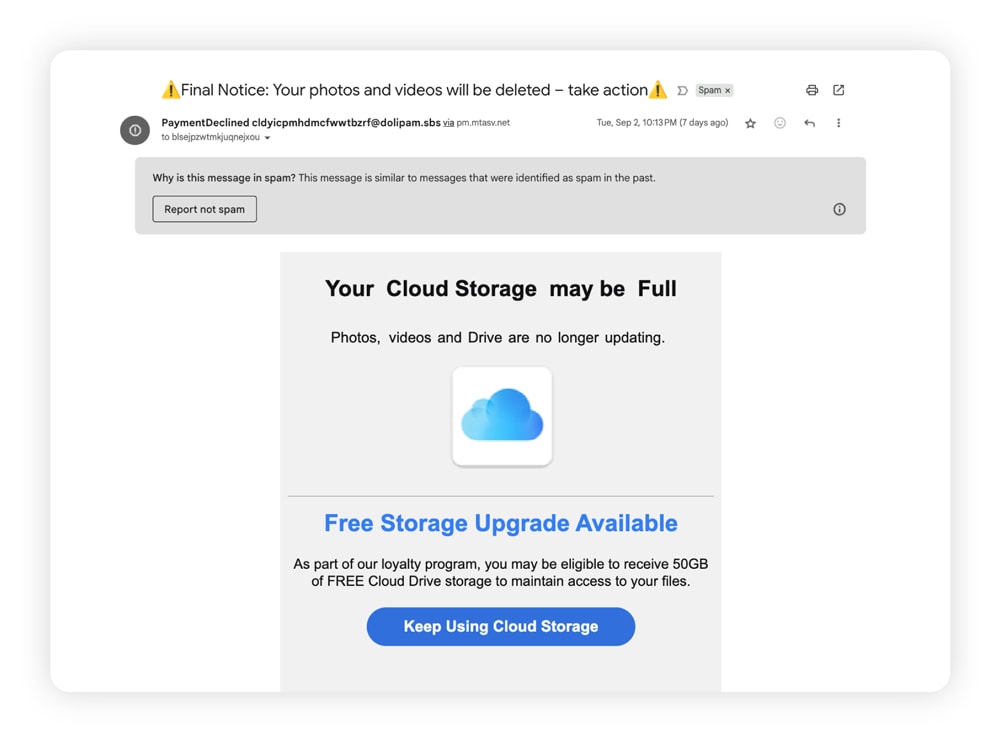
A screenshot of a “Storage full” iCloud email scam.
2. iCloud verification phishing emails
In this iCloud scam, you’ll receive a phishing email that claims your iCloud account has been temporarily disabled or suspended because certain information is missing, and that if you don’t update it, your saved device data will be lost. A link in the email will direct you to a fake site to verify your Apple ID.
While the email claims this is to prevent unauthorized access, the so-called missing information is really sensitive data that scammers can use to access your account and potentially steal your identity.
Outsmart the scam: Apple does not immediately disable Apple ID or iCloud accounts due to missing information. If your account is ever legitimately disabled, follow Apple’s official instructions to reactivate it.
3. iCloud payment confirmation scams
If you get a payment confirmation email for an iCloud purchase that you didn’t make, it could be a scam. These emails show fake charges for iCloud services you didn't purchase, hoping to incite enough panic to push you toward “Cancel Payment” or “Dispute Charge” buttons. But clicking one of those buttons will lead you to a fake Apple website that steals your login information when you try to "resolve" the fraudulent charge.
One Reddit user shared an example in which they were told they’d been charged $143.95, but the charge was “on hold” due to suspicious activity. The email even included a fake phone number and cancellation link to trick them into handing over their personal information.
Outsmart the scam: Legitimate iCloud purchase receipts include your current billing address, which scammers are unlikely to have access to. To verify the purchase, you can also view your Apple purchase history.
4. Fake Apple iCloud support emails
This form of phishing scam involves a fraudster posing as Apple Support in an unsolicited email. They might warn that your iCloud account is at risk or locked for security reasons, with links to “reset your password” and enter two-factor authentication (2FA) codes to unlock your account.
While the message may appear legitimate, including a fully branded email template and maybe even your name, clicking any links can give scammers direct access to your account and personal information.
Outsmart the scam: Apple will never ask for your password or verification codes in an unsolicited email. To access Apple Support, always go through verified official channels.
5. iCloud subscription renewal scams
In this iCloud scam, you receive an email claiming to be from Apple that warns you’ll lose access to your photos unless you renew your iCloud subscription. In other cases, the message says your subscription couldn’t be renewed because of a billing issue.
The email then provides instructions to “update” your payment details, along with a link to a fake website. If you enter your financial information or other personal data, scammers can use it for financial fraud or identity theft.
Although legitimate subscription issues do happen (especially after upgrading plans or switching to a Family or bundled subscription), if you’re unsure whether your account is active, don’t click links in an email. Instead, check your subscription status directly in your Apple ID settings or through Apple’s official website.
Outsmart the scam: Only renew or update your financial details through your device. Navigate to Settings > your name > Payment & Shipping.
How to tell if an iCloud email is real or a scam
It’s not always easy to tell if an iCloud email is trustworthy, but there are key red flags that can help you identify a scammer, as well as hallmarks that can help confirm that the message is legit.
Red flags of a scam email
When reviewing a suspicious email, watch out for these warning signs that it may not be legitimate:
- Suspicious sender address: Look for subtle misspellings or odd domains. A scammer’s email might come from “@apple.email.com” instead of the official “@apple.com” or “@icloud.com.” But, this is a nuanced red flag, as scammers may spoof legitimate senders to look more legitimate.
- Shady links: Hover over any link before clicking. If the full URL in the preview looks suspicious, steer well clear.
- Typos or sloppy formatting: Compare the message to other Apple emails you’ve received. Inconsistent logos, design issues, or spelling mistakes can help you spot a fake email. Just keep in mind that scammers can use AI tools just like everyone else, and in doing so, they can fix design and grammar inconsistencies that used to be a surefire way to spot a scam email.
- Requests for login details: Look for subtle misspellings or odd domains. A scammer’s email might come from “@apple.email.com” instead of the official “@apple.com” or “@icloud.com.”
Signs the email is legitimate
Here are the signs that indicate an iCloud email is actually from Apple:
- Official domains: Real emails typically come from addresses ending in @apple.com or @icloud.com. But, never take this positive sign of legitimacy in isolation, as scammers use spoofing all the time to impersonate known brands.
- Professional design: Apple’s emails are polished, consistent, and error-free.
- Personalization: You’re usually greeted by name, and purchase receipts often include your billing details.
- Relevant context: Apple will only contact you about services you actually use — not vague warnings about accounts you don’t recognize.
What to do if you already clicked an iCloud scam link
If you've already clicked a link and entered your information, your priority now is mitigating the damage. Work through these steps in order. Move quickly, but ensure you’re not skipping any of the steps:
Within the first hour:
1. Change your Apple ID password immediately by navigating directly to account.apple.com — do not change your Apple ID password through any link in the email.
2. If you reuse that password elsewhere, navigate to those accounts too and change it.
3. Check whether any trusted devices have been removed from your account or any unfamiliar devices added. Open Settings, tap your name, then scroll to the device list. Remove any device you don't recognize.
4. If you also entered payment details alongside your iCloud login credentials, call your bank or card issuer directly and report the potential fraud — do not use any phone number listed in the scam email; call your bank or payment institution directly by opening their website and checking the number.
5. Ask your bank whether a temporary freeze or card replacement is appropriate.
Within the first 24 hours:
6. Enable two-factor authentication in your iCloud account if it isn't already active.
7. Review your Apple ID recovery contacts and recovery key settings to make sure a scammer hasn't already changed them.
8. Check your iCloud Mail, Contacts, and Notes for any forwarding rules or saved data that could have been exported to a scammer.
9. If you use the same Apple ID email address as a login on other services, like banking and social media accounts, or healthcare portals, check those accounts for any login activity you don't recognize.
In the following weeks:
10. Monitor your credit reports and financial statements for unfamiliar activity.
11. If you provided a Social Security number, consider placing an initial fraud alert or credit freeze with credit bureaus, because identity misuse can surface weeks after the initial data compromise — don't assume you're clear just because no signs of personal data misuse appear immediately.
12. Report the incident to the FTC at reportfraud.ftc.gov so it can be investigated and used to warn others.
How to report an iCloud email scam
If you’ve received a message you suspect is an iCloud email scam, reporting it to Apple and the FTC can help aid in investigations and protect other users from these schemes.
Follow these steps to report an iCloud email scam:
- Forward suspicious emails to reportphishing@apple.com to alert their security team.
- Mark spam emails as Junk to help improve iCloud Mail filtering and reduce future spam if you have an @icloud.com, @me.com, or @mac.com email address.
- Report scam emails to the Federal Trade Commission at reportfraud.ftc.gov. If you’re based in the UK, forward the email to report@phishing.gov.uk and, if you received a scam text, forward it to 7726 (free from most networks).
- If you provided financial information, report it to your bank directly using the number on the back of your card.
Keep your data floating out of scammers’ reach
iCloud email scams are just one example of how phishing attacks continue to evolve and flood inboxes. Cybercriminals are always refining their tactics to steal sensitive information — but you don’t have to face those risks alone.
As a LifeLock member, you’ll benefit from stronger protection against misuse of your identity if it's compromised — with ongoing credit monitoring, identity alerts, and tools designed to help detect when your identifying data is being used fraudulently. And if a scammer does catch you off guard and manages to steal your identity, you’ll get restoration support from one of our experts. Protect your identity and your financial future with LifeLock today.
FAQs
Does iCloud send emails about storage?
Apple may contact you about your account, but it generally doesn’t send emails warning that you’re running out of iCloud storage. Messages claiming urgent storage issues are a common tactic used in scams.
What can someone do with your iCloud email address?
If someone has access to your iCloud email address, they can potentially use it for malicious purposes. For example, a scammer with your email address could send you phishing emails or attempt to guess the passwords of your linked accounts through credential stuffing attacks.
Can someone access my iCloud without me knowing?
Yes, if someone has gotten hold of your Apple ID and password, they could access your iCloud account without triggering an obvious alert, especially if they were able to change your recovery information and passwords before you’re aware of the intrusion.
That said, Apple sends alerts for suspicious activity on unrecognized devices, but that requires you to have access to your trusted device(s), with notifications enabled. Enabling multi-factor authentication makes unauthorized access far more difficult, especially if you regularly check that your trusted devices and recovery accounts haven’t changed and you keep notifications enabled.
Can iCloud email scams affect my other Apple devices?
Yes, an iCloud email scam can affect your other Apple devices if your Apple ID is compromised. Since your Apple ID links your devices and services, account access could expose data across iCloud, iMessage, photos, and other Apple-connected devices.
Editors’ note: Our articles provide educational information about identity theft, scams, financial fraud, and other topics that can put your identity or personal accounts at risk. LifeLock offerings may not cover or protect against every type of crime, fraud, scam, or threat we write about. For more details about how we write, review, and update our articles, see our Editorial Policy.
This article contains
- 1. iCloud “storage full” email scam
- 2. iCloud verification phishing emails
- 3. iCloud payment confirmation scams
- 4. Fake Apple iCloud support emails
- 5. iCloud subscription renewal scams
- How to tell if an iCloud email is real or a scam
- What to do if you already clicked an iCloud scam link
- How to report an iCloud email scam
- Keep your data floating out of scammers’ reach
- FAQs
Related articles

Internet Security
Accidentally opened a spam email? Here's what to do next
July 07, 2025
·
7 min read
Internet Security
What to do if a scammer has your email address: 9 smart moves
March 06, 2025
·
8 min read


Internet Security
Email found on the dark web? Here's what you should do
December 17, 2024
·
6 min read
Scams & Fraud
How to spot scam, fake, and phishing emails in 30 seconds
October 10, 2025
·
11 min read
Internet Security
Accidentally opened a spam email? Here's what to do next
July 07, 2025
·
7 min read
Internet Security
What to do if a scammer has your email address: 9 smart moves
March 06, 2025
·
8 min read
Internet Security
Email found on the dark web? Here's what you should do
December 17, 2024
·
6 min read
Scams & Fraud
How to spot scam, fake, and phishing emails in 30 seconds
October 10, 2025
·
11 min read
Internet Security
Accidentally opened a spam email? Here's what to do next
July 07, 2025
·
7 min read
Internet Security
What to do if a scammer has your email address: 9 smart moves
March 06, 2025
·
8 min read
Internet Security
Email found on the dark web? Here's what you should do
December 17, 2024
·
6 min read