

 Why do we ask?


†LifeLock does not monitor all transactions at all businesses.
Apple Pay is a trademark of Apple, Inc.
Has your personal data been recently exposed?
Check if information like your Social Security number, email, and passwords is exposed on the dark web.


You have reached the maximum number of scans allowed. Please come back after 24 hours.

Scanning the dark web...
Scanning public databases...
Scanning millions of records...
Narrowing down the search...
We need more information
Please enter a few more details to ensure we show you the right information.
Risk level:
High
You’re at high risk
We found your personal information on the dark web and on data broker sites.
Your personalized protection plan
Product Benefits:
 Up to $3M Reimbursement for identity theft, with up to $1M for Stolen Funds†††
$10K Scam Reimbursement7
Scam Support
Credit, Checking and Savings Activity Alerts: Unlimited Accounts
Credit & Payday Loan Lock2
Credit Monitoring:
3 Bureau1
Automatic Data Broker Removal8
Dark Web Monitoring
Priority 24/7 Customer Phone Support
Up to $3M Reimbursement for identity theft, with up to $1M for Stolen Funds†††
$10K Scam Reimbursement7
Scam Support
Credit, Checking and Savings Activity Alerts: Unlimited Accounts
Credit & Payday Loan Lock2
Credit Monitoring:
3 Bureau1
Automatic Data Broker Removal8
Dark Web Monitoring
Priority 24/7 Customer Phone Support
LifeLock Total
Your price:
$
349.99
Your price:
$
34.99
60-day money back guarantee with an annual plan
24/7 Live Member Support
No one can prevent all cybercrime or prevent all identity theft.
- Price valid for introductory term. After that, your price will renew at the standard price.
- Your subscription begins immediately after your transaction is complete. A payment method is required at sign-up for trials, and you will be charged at the end of your trial, unless canceled first.
- Prices are subject to change and may be charged up to 35 days prior to renewal. Cancel here or contact Member Services.
- Restrictions apply. Automatically renewing subscription required. If you're a victim of identity theft and not satisfied with our resolution, you may receive a refund for the current term of your subscription. See lifelock.norton.com/guarantee for complete details.
††† Up to $1 million coverage for Lawyers and Experts included with all plans. Reimbursement and expense compensation vary according to plan. Insurance benefits are issued by third parties. See lifelock.norton.com/legal for policy info.
1 Bureau Monitoring and Monthly Credit Report and Score / 3 Bureau Monitoring and Monthly Credit Report and Score.
2 Credit Lock cannot prevent all account takeovers, unauthorized account openings, or credit file inquiries. Deactivates if you downgrade or cancel your subscription.
7 Scam protection coverage as part of identity theft benefits is currently available to all customers residing in the United States, including U.S. territories and the District of Columbia, with the exception of residents of New York. Gen Digital is not a licensed insurance producer. Benefits under the Master Policy are issued and covered by HSB Specialty Insurance Company. You can find further details and exclusions in the summary of benefits.
8 After setup, automatic data broker removal service scans and requests removal every 90 days.
Risk level:
Medium
You’re at medium risk
We found your personal information on data broker sites.
Your personalized protection plan
Product Benefits:
Up to $1.2M Reimbursement for identity theft, with up to $100K for Stolen Funds†††
$5K Scam Reimbursement7
Scam Support
Credit, Checking and Savings Activity Alerts:
5 Accounts
Credit & Payday Loan Lock2
Credit Monitoring:
3 Bureau1
Automatic Data Broker Removal8
Dark Web Monitoring
Priority 24/7 Customer Phone Support
LifeLock Advanced
Your price:
$
199.99
Your price:
$
19.99
60-day money back guarantee with an annual plan
24/7 Live Member Support
No one can prevent all cybercrime or prevent all identity theft.
- Price valid for introductory term. After that, your price will renew at the standard price.
- Your subscription begins immediately after your transaction is complete. A payment method is required at sign-up for trials, and you will be charged at the end of your trial, unless canceled first.
- Prices are subject to change and may be charged up to 35 days prior to renewal. Cancel here or contact Member Services.
- Restrictions apply. Automatically renewing subscription required. If you're a victim of identity theft and not satisfied with our resolution, you may receive a refund for the current term of your subscription. See lifelock.norton.com/guarantee for complete details.
††† Up to $1 million coverage for Lawyers and Experts included with all plans. Reimbursement and expense compensation vary according to plan. Insurance benefits are issued by third parties. See lifelock.norton.com/legal for policy info.
1 Bureau Monitoring and Monthly Credit Report and Score / 3 Bureau Monitoring and Monthly Credit Report and Score.
2 Credit Lock cannot prevent all account takeovers, unauthorized account openings, or credit file inquiries. Deactivates if you downgrade or cancel your subscription.
7 Scam protection coverage as part of identity theft benefits is currently available to all customers residing in the United States, including U.S. territories and the District of Columbia, with the exception of residents of New York. Gen Digital is not a licensed insurance producer. Benefits under the Master Policy are issued and covered by HSB Specialty Insurance Company. You can find further details and exclusions in the summary of benefits.
8 After setup, automatic data broker removal service scans and requests removal every 90 days.
Risk level:
Low
Good news!
We didn’t find your personal information across millions of records or on public data sources.
Your personalized protection plan
Product Benefits:
Up to $1.05M Reimbursement for identity theft, with up to $25K for Stolen Funds†††
Identity Restoration Specialists
Credit, Checking and Savings Activity Alerts:
2 Accounts
Credit & Payday Loan Lock2
Credit Monitoring:
2 Bureau1
Automatic Data Broker Removal8
Dark Web Monitoring
Breach Alerts
24/7 Customer Phone Support
Lifelock Core
Your price:
$
124.99
Your price:
$
12.49
60-day money back guarantee with an annual plan
24/7 Live Member Support
No one can prevent all cybercrime or prevent all identity theft.
- Price valid for introductory term. After that, your price will renew at the standard price.
- Your subscription begins immediately after your transaction is complete. A payment method is required at sign-up for trials, and you will be charged at the end of your trial, unless canceled first.
- Prices are subject to change and may be charged up to 35 days prior to renewal. Cancel here or contact Member Services.
- Restrictions apply. Automatically renewing subscription required. If you're a victim of identity theft and not satisfied with our resolution, you may receive a refund for the current term of your subscription. See lifelock.norton.com/guarantee for complete details.
††† Up to $1 million coverage for Lawyers and Experts included with all plans. Reimbursement and expense compensation vary according to plan. Insurance benefits are issued by third parties. See lifelock.norton.com/legal for policy info.
1 Credit features require successful setup, identity verification, and sufficient credit history by the appropriate credit bureau. Credit monitoring features may take several days to activate after enrollment.
2 Identity Lock cannot prevent all account takeovers, unauthorized account openings, or credit file inquiries. Deactivates if you downgrade or cancel your subscription.
8 After setup, automatic data broker removal service scans and requests removal every 90 days.
1/2
Finding your match...

DID YOU KNOW?
10 cents
If your information is exposed or stolen in a data breach, it can end up on the dark web where it can be sold for as little as 10 cents.
100M+
LifeLock monitors hundreds of millions of data points a second.
Based on your concerns, the best plan for you is:
LifeLock Core
(Individual)
LifeLock Advanced
(Individual)
LifeLock Total
(Individual)
LifeLock Core
(2 adults)
LifeLock Advanced
(2 adults)
LifeLock Total
(2 adults)
LifeLock Core
(2 adults + up to 10 kids)
LifeLock Advanced
(2 adults + up to 10 kids)
LifeLock Total
(2 adults + up to 10 kids)
Pricing details below*
Pricing details below*
Pricing details below*
Pricing details below*
Pricing details below*
Pricing details below*
Pricing details below*
Pricing details below*
Pricing details below*
- Up to $1.05M Reimbursement for identity theft, with up to $25K for Stolen Funds†††
- Up to $1.2M Reimbursement for identity theft, with up to $100K for Stolen Funds†††
- Up to $3M Reimbursement for identity theft, with up to $1M for Stolen Funds†††
- Up to $1.05M Reimbursement for identity theft, with up to $25K for Stolen Funds††† for each adult
- Up to $1.2M Reimbursement for identity theft, with up to $100K for Stolen Funds††† for each adult
- Up to $3M Reimbursement for identity theft, with up to $1M for Stolen Funds††† for each adult
- Up to $1.05M Reimbursement for identity theft, with up to $25K for Stolen Funds††† for each adult
- Up to $1.2M Reimbursement for identity theft, with up to $100K for Stolen Funds††† for each adult
- Up to $3M Reimbursement for identity theft, with up to $1M for Stolen Funds††† for each adult
- Credit Monitoring Coverage1
- Credit Monitoring1 each adult
- Credit Monitoring1 for family
- Credit, Checking & Savings Account Activity Alerts
- Credit, Checking and Savings Activity Alerts for each adult
- Credit, Checking and Savings Activity Alerts for family
- 401K & Investment Account Activity Alerts
- 401K/Investment Account Alerts for each adult
- 401K/Investment Account Alerts for family
- Recurring and Unusual Charge Alerts
- Unexpected & Suspicious Charge Alerts for each adult
- Unexpected & Suspicious Charge Alerts for family
- Stolen Funds Reimbursement†††
- Stolen Funds Reimbursement††† for each adult
- Stolen Funds Reimbursement††† for family
- Lawyers and Experts†††
- Lawyers & Experts††† for each adult
- Lawyers & Experts††† for family
- Automatic Data Broker Removal8
- Automatic Data Broker Removal8 for each adult
- Automatic Data Broker Removal8 for family
- Scam Reimbursement7
- Scam Reimbursement7 for each adult
- Scam Reimbursement7 for family
- Credit Reports & Scores1
- Credit Report & Score for each adult
- Credit Report & Score for family
- Social Media Monitoring
- Social Media Monitoring for each adult
- Social Media Monitoring for family

We have more plans to choose from.
See all plans

Have questions?
Contact sales
*Your subscription begins immediately after payment and automatically renews unless cancelled. Discount for annual plans are compared to monthly billing. Prices subject to change and may be charged up to 35 days before current term ends. Cancel here or contact Member Services.
††† Up to $1 million coverage for Lawyers and Experts included with all plans. Reimbursement and expense compensation vary according to plan. Insurance benefits are issued by third parties. See LifeLock.Norton.com/legal for policy info.
1 Credit features require successful setup, identity verification and sufficient credit history by the appropriate credit bureau. Credit monitoring features may take several days to activate after enrollment.
7 Scam protection coverage as part of identity theft benefits is currently available to all customers residing in the United States, including U.S. territories and the District of Columbia, with the exception of residents of New York. Gen Digital is not a licensed insurance producer. Benefits under the Master Policy are issued and covered by HSB Specialty Insurance Company. You can find further details and exclusions in the Summary of Benefits.
8 After setup, automatic data broker removal service scans and requests removal every 90 days.
Why do we ask?
Identifying your concerns gives us the ability to recommend the right plan for your needs.
Return to quiz
Why do we ask?
Knowing this number helps us recommend coverage that fits your needs.
Return to quiz
Why do we ask?
Providing your email address makes you eligible for notifications of potential identity threats.
Return to quiz
9 common Apple Pay scams and how to protect yourself
Apple Pay scams are ploys fraudsters use to steal your money or Apple Pay login credentials. Learn about some of the most common scams involving Apple Pay and steps you can take to safeguard against them. Then, join LifeLock for financial alerts and scam protection that can help you defend your finances.


If you’ve ever fallen for a scam involving Apple Pay, you aren’t alone. According to the Federal Trade Commission (FTC), there were about 5,000 reports of scammers impersonating Apple in 2023 alone, which led to total losses of around $17 million.
Keep in mind these numbers only represent a fraction of Apple Pay scams — many other ruses exist, including fake verification or security code messages, bogus refund offers, and attacks carried out over unsecured public Wi-Fi.
Read on to learn more about common Apple Pay scams, including how to identify and avoid them.
1. Customer support
Customer support and tech support scams occur when a criminal impersonates a member of Apple’s support staff. These scams often start with a claim that your device is compromised or your Apple Pay account has been "locked."
Next, cybercriminals may ask you to send payment for urgent repair services, transaction reversals, security upgrades, or regulatory fees. While there’s no single script, these requests are usually framed to sound plausible and tied to account recovery. They may also try to extract sensitive information that could give them access to your Apple account.
Apple Pay customer support scammers commonly request:
- Payments via Apple Cash to “test” your device.
- Your Apple ID email address and password.
- That you disable security features like two-factor authentication (2FA) or Find My.
- Permission to remotely access your device (often via screen sharing).
- That you click a link to help “fix” an issue with your account.
Apple has strict policies against asking for personal information like user passwords and account information. Instead, Apple’s customer service team will send a notification to your device. Apple representatives also won’t ask you to share your screen or tell you to click unusual links, so ignore these requests and report them to Apple’s actual customer support staff.
How to avoid a customer support scam: If you get an unexpected message from Apple customer support, don’t click on any links sent through unofficial channels, download apps, share personal information, or transfer money to the “agent.” If you’re ever unsure, contact Apple customer support directly.
2. Fraud alert texts
Fraud alert text scams involve criminals sending "urgent" SMS or smishing messages that mimic official bank or Apple notifications. In these scam text messages, attackers may claim to have detected a suspicious Apple Pay transaction and urge you to take immediate action. In reality, they want to collect payment to "cancel" the charge or sensitive information to "verify" your identity.
Fraud alert scammers often use these tactics to steal:
- Your Apple ID and password via a fake login page.
- Full credit or debit card numbers.
- Social Security numbers.
- One-time passcodes sent to your device.
They often include a link to a spoofed website that looks like the official Apple website or a legitimate banking portal. Once you enter your credentials, the scammer captures them in real-time. Then, they’re free to hijack your account or make unauthorized purchases.
How to avoid a fraud alert scam: If you get a text about a suspicious Apple Pay transaction, don’t click links or call the number. Check your Wallet or bank app directly instead. Legitimate institutions won’t ask for passwords or Social Security numbers through unsecured messages.
3. 2FA requests
Two-factor authentication (2FA) request scams happen when a scammer tries to steal authentication codes to access your account. These codes are usually sent to your email, phone, or authentication app (such as Google Authenticator). If you’re targeted in a 2FA scam, it often means criminals already have your password and only need the one-time verification code to complete the login and take over your account.
Scammers tend to rely on bots, such as automatic dialers and texting systems, to make fake authentication requests in bulk. In other cases, these authentication requests can be made through a fake website.
In extreme cases, scammers may attempt to hijack your number with a SIM swap attack, where they convince your phone provider to switch your number to a SIM card they control. If they’re successful, they can get direct access to text-based 2FA codes, compromising your account.
How to avoid a 2FA scam: Use trusted authentication apps like Google Authenticator or Apple’s built-in 2FA feature to receive your codes. Never share your code with anyone — a legitimate support agent won’t ever ask for it.
4. Security breaches
Apple Pay has strong security in place to protect your card numbers. However, you may still be at a higher risk of Apple Pay-related scams if the stores or online services you visit are hit by a data breach. When businesses are breached, information like your name, email, and partial transaction data can become exposed.
Scammers often use this stolen data in Apple Pay phishing and customer support scams, where criminals reference real purchases and account details to pressure targets into sending money or sharing verification codes.
To reduce the risk of having your personal information used against you following a data breach, limit the websites and businesses you share your personal data with. Subscribing to an identity theft protection service like LifeLock Advanced also monitors for fraudulent use of your personal information and provides robust restoration services if your money is ever stolen as a result of identity theft.
5. Gift cards
Gift card scams are when a fraudster tries to get you to pay them with gift cards, which are difficult to trace. They may suggest you use Apple Pay as a convenient way to purchase and send them an Apple Gift Card or other digital gift card.
Scammers often reuse the same stories to trick you into sending a gift card. Here are a few to look out for:
- Impersonating the IRS or another government agency and saying you owe them money and need to make an immediate payment.
- Pretending to be a company and claiming you need to pay them to fix a tech support issue.
- Impersonating a friend or family member who’s in trouble and needs money fast.
- Pretending to be your utility company and threatening to shut off your services unless you pay them immediately.
- Telling you that you’ve won a prize, but you need to pay fees through a gift card to claim it.
How to avoid a gift card scam: Don’t provide gift card numbers to anyone you don’t know. Never use gift cards as a form of payment.
6. Stolen credit cards or fake check scams
Fake check and stolen credit card scams are both forms of overpayment scams — attacks where scammers “accidentally” send too much money and request an Apple Cash refund for the excess.
Here’s an example of this scam from a Reddit user:
“...I was sent $287 on Apple Cash by a random number… and… my settings automatically accept Apple Cash sent to me… They asked me to send it back, saying they were recording me and calling the cops…”
Source: Reddit
Scammers may use stolen credit cards or counterfeit checks — not their own money — to send funds initially. They then pressure you to issue a refund before the payment fails to clear or the charge is reversed, ensuring they get your money before you realize the original payment was fraudulent.
These scams are commonly found on online marketplaces, such as Craigslist and Facebook Marketplace.
How to avoid a stolen credit card scam: Never refund payments to people you don’t know via Apple Pay or Apple Cash. Contact your bank or card issuer for guidance and only ever refund the original transaction once it clears.
7. Unsecured Wi-Fi
Using Apple Pay or any digital wallet on unsecured public Wi-Fi networks increases the risk of unauthorized access to your personal information. Without security measures like VPN encryption, attackers on the same network can intercept data or monitor traffic, potentially exposing login credentials or information linked to your Apple ID.
Once compromised, attackers can exploit this access to initiate fraudulent transactions, launch phishing scams, or commit identity theft.
How to avoid scams over unsecured Wi-Fi: Don’t use Apple Pay or initiate other sensitive transactions over public Wi-Fi. If you have to, connect to a VPN first to help secure your connection.
8. Fraudulent businesses
Fraudulent businesses may claim to be Apple-affiliated and offer large Apple Cash rewards to trick customers into entering their Apple Pay details. In these scams, fraudsters may request personal information like your Social Security number, address, full name, and Apple ID credentials.
While some banks and other companies do promote Apple Cash rewards, legitimate offers will never require you to provide your full Apple ID password, verification codes, or send money to claim the reward. If you do provide this information, it can lead to unauthorized access to your Apple Pay account, potentially resulting in financial loss.
How to avoid fraudulent business scams: Double-check the legitimacy of offers by visiting official websites and avoiding suspicious links. Don’t respond to unsolicited communications.
Apple Pay scam warning signs
Apple Pay scams usually begin as suspicious texts or emails, and often:
- Come unexpectedly and unsolicited.
- Include an unexpected payment via Apple Pay.
- Request sensitive information like your Apple ID, password, or bank card.
- Create a sense of urgency by threatening legal action, financial penalties, or account suspension.
- Contain a link or attachment.
- Originate from an email address or phone number doesn’t match what’s listed on Apple’s official website.
If you suspect you’re being targeted by an Apple Pay scam, don’t respond. Clicking links can result in a malware infection and potentially compromise your personal information.
Instead, confirm any unusual requests by contacting Apple’s official customer support at (800) 275-2273.
Steps to take if you fall victim to an Apple Pay scam
If you fall victim to Apple Pay fraud, it’s important to take quick action to help limit the damage and re-secure your Apple Pay account. Here are the steps you should follow:
- Contact Apple support to notify them of your account issue so they can temporarily lock your account.
- Change your Apple ID password to something unique and strong.
- Add 2FA to your Apple account if you haven’t already.
- Freeze or replace bank cards linked to your Apple Pay account to prevent fraudulent transactions.
- File a police report with local law enforcement through their non-emergency line if you’ve lost a significant amount of money.
- File a complaint with the FTC by clicking the “report now” button on their ReportFraud page.
- Monitor your accounts for any suspicious activity, including fraudulent payments, login attempts, and suspicious notifications.
- Subscribe to a dark web monitoring tool to find out if any of your information has leaked onto the dark web.
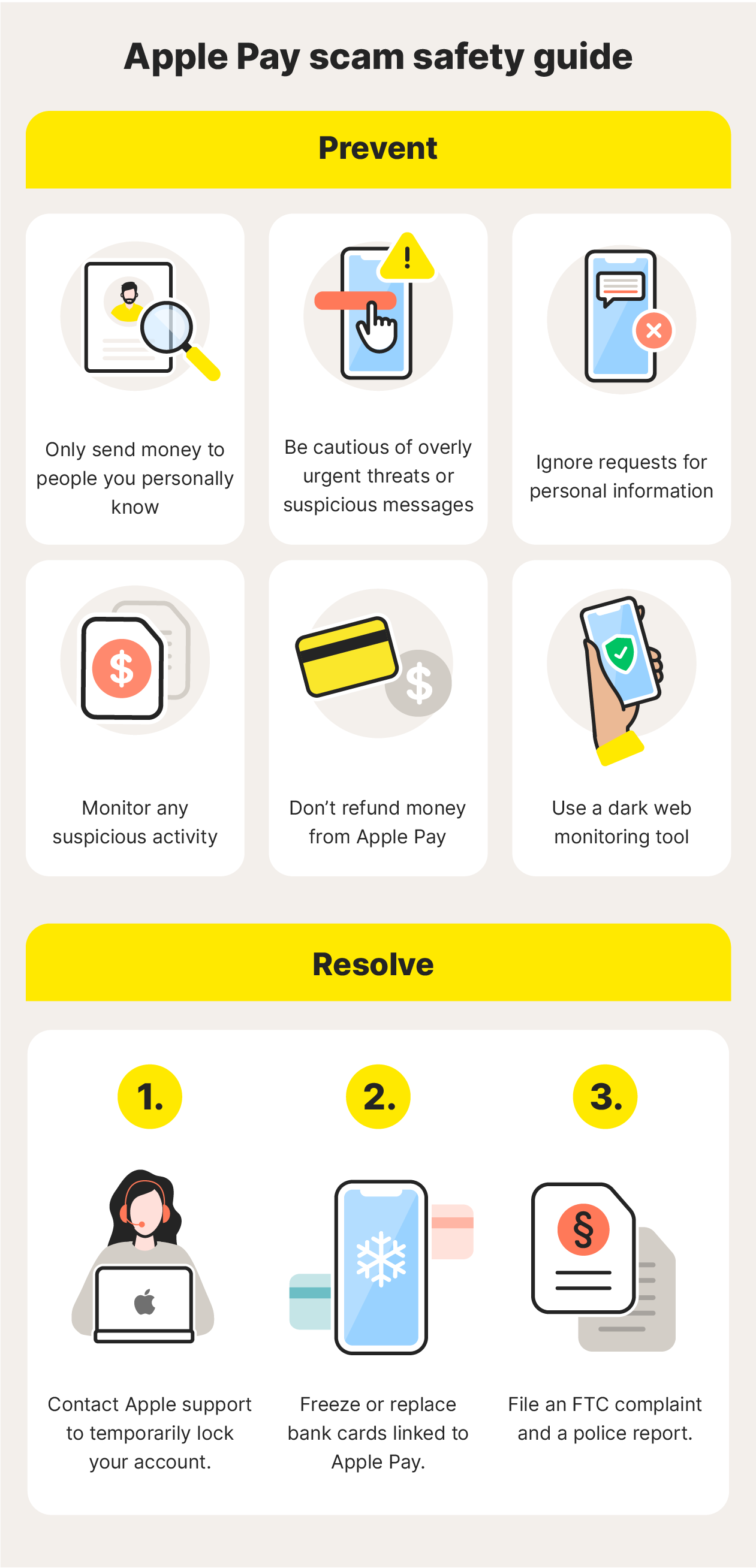
An infographic showing how to help prevent and resolve issues relating to Apple Pay scams.
Tips to help prevent Apple Pay scams
Here are tips to follow to implement proactive measures to help prevent Apple Pay scams before they happen:
- Don’t respond to unsolicited messages even if they appear to be from Apple.
- Only send money to individuals you know personally via Apple Cash.
- Verify the email and phone number of any communication claiming to be from Apple.
- Never share personal information unless you can verify the recipient's identity.
- Be cautious of threats involving legal action or account suspension.
- Ignore requests for personal information as they are likely phishing attempts.
- Use strong, unique passwords on all your accounts.
- Enable 2FA on your banking and Apple accounts for added security.
- Regularly monitor your linked Apple Pay cards for any unauthorized transactions.
- Don’t refund money from Apple Pay; the requester is most likely a scammer who’s used a fake or hacked account.
Protect yourself from mobile payment scams
You can do a lot to help protect yourself against Apple Pay scams, but it’s difficult to monitor for fraud all by yourself. That’s where a strong identity theft protection service like LifeLock comes in.
LifeLock keeps track of your personal information and financial accounts, monitoring† for potentially fraudulent activity. And, if you suffer identity theft, you’ll get live, U.S.-based assistance from dedicated restoration specialists. Help defend against Apple Pay fraud and strengthen your financial security today.
FAQs
Can someone steal your card info from Apple Pay?
Generally, no. Apple Pay protects your card number by displaying only the last four digits, keeping the rest hidden. That way, even if someone gains access to your account, they can’t see your full card number, adding an extra layer of security.
While it’s theoretically possible that a more sophisticated hacking attack could lead to complete card information being exposed, it’s unlikely due to Apple’s robust security measures.
Can I dispute an Apple Pay transaction?
Apple Pay functions as a digital wallet that securely stores your payment information, and like a physical wallet, it doesn't handle transaction disputes. You’ll need to contact your bank for refunds, chargebacks, and disputes.
Can my Apple Pay be hacked?
Yes, your Apple Pay account can potentially be hacked like any other online account. Apple devices and accounts are not immune to hacking attempts or stolen credentials.
Does Apple Pay have buyer protection?
No, Apple Pay doesn’t offer buyer protection. It’s a digital wallet, which means it’s a place to store and send payment information rather than process payments. However, some banks and card companies refund unauthorized transactions made through Apple Pay.
Editors’ note: Our articles provide educational information about identity theft, scams, financial fraud, and other topics that can put your identity or personal accounts at risk. LifeLock offerings may not cover or protect against every type of crime, fraud, scam, or threat we write about. For more details about how we write, review, and update our articles, see our Editorial Policy.
This article contains
- 1. Customer support
- 2. Fraud alert texts
- 3. 2FA requests
- 4. Security breaches
- 5. Gift cards
- 6. Stolen credit cards or fake check scams
- 7. Unsecured Wi-Fi
- 8. Fraudulent businesses
- Apple Pay scam warning signs
- Steps to take if you fall victim to an Apple Pay scam
- Tips to help prevent Apple Pay scams
- Protect yourself from mobile payment scams
- FAQs
Related articles