





 Why do we ask?
* Scam protection coverage as part of identity theft benefits is currently available to all customers residing in the United States, including U.S. territories and the District of Columbia, with the exception of residents of New York. Gen Digital is not a licensed insurance producer. Benefits under the Master Policy are issued and covered by HSB Specialty Insurance Company. You can find further details and exclusions in the Summary of Benefits.
Has your personal data been recently exposed?
Check if information like your Social Security number, email, and passwords is exposed on the dark web.


You have reached the maximum number of scans allowed. Please come back after 24 hours.

Scanning the dark web...
Scanning public databases...
Scanning millions of records...
Narrowing down the search...
We need more information
Please enter a few more details to ensure we show you the right information.
Risk level:
High
You’re at high risk
We found your personal information on the dark web and on data broker sites.
Your personalized protection plan
Product Benefits:
 Up to $3M Reimbursement for identity theft, with up to $1M for Stolen Funds†††
$10K Scam Reimbursement7
Scam Support
Credit, Checking and Savings Activity Alerts: Unlimited Accounts
Credit & Payday Loan Lock2
Credit Monitoring:
3 Bureau1
Automatic Data Broker Removal8
Dark Web Monitoring
Priority 24/7 Customer Phone Support
Up to $3M Reimbursement for identity theft, with up to $1M for Stolen Funds†††
$10K Scam Reimbursement7
Scam Support
Credit, Checking and Savings Activity Alerts: Unlimited Accounts
Credit & Payday Loan Lock2
Credit Monitoring:
3 Bureau1
Automatic Data Broker Removal8
Dark Web Monitoring
Priority 24/7 Customer Phone Support
LifeLock Total
Your price:
$
349.99
Your price:
$
34.99
60-day money back guarantee with an annual plan
24/7 Live Member Support
No one can prevent all cybercrime or prevent all identity theft.
- Price valid for introductory term. After that, your price will renew at the standard price.
- Your subscription begins immediately after your transaction is complete. A payment method is required at sign-up for trials, and you will be charged at the end of your trial, unless canceled first.
- Prices are subject to change and may be charged up to 35 days prior to renewal. Cancel here or contact Member Services.
- Restrictions apply. Automatically renewing subscription required. If you're a victim of identity theft and not satisfied with our resolution, you may receive a refund for the current term of your subscription. See lifelock.norton.com/guarantee for complete details.
††† Up to $1 million coverage for Lawyers and Experts included with all plans. Reimbursement and expense compensation vary according to plan. Insurance benefits are issued by third parties. See lifelock.norton.com/legal for policy info.
1 Bureau Monitoring and Monthly Credit Report and Score / 3 Bureau Monitoring and Monthly Credit Report and Score.
2 Credit Lock cannot prevent all account takeovers, unauthorized account openings, or credit file inquiries. Deactivates if you downgrade or cancel your subscription.
7 Scam protection coverage as part of identity theft benefits is currently available to all customers residing in the United States, including U.S. territories and the District of Columbia, with the exception of residents of New York. Gen Digital is not a licensed insurance producer. Benefits under the Master Policy are issued and covered by HSB Specialty Insurance Company. You can find further details and exclusions in the summary of benefits.
8 After setup, automatic data broker removal service scans and requests removal every 90 days.
Risk level:
Medium
You’re at medium risk
We found your personal information on data broker sites.
Your personalized protection plan
Product Benefits:
Up to $1.2M Reimbursement for identity theft, with up to $100K for Stolen Funds†††
$5K Scam Reimbursement7
Scam Support
Credit, Checking and Savings Activity Alerts:
5 Accounts
Credit & Payday Loan Lock2
Credit Monitoring:
3 Bureau1
Automatic Data Broker Removal8
Dark Web Monitoring
Priority 24/7 Customer Phone Support
LifeLock Advanced
Your price:
$
199.99
Your price:
$
19.99
60-day money back guarantee with an annual plan
24/7 Live Member Support
No one can prevent all cybercrime or prevent all identity theft.
- Price valid for introductory term. After that, your price will renew at the standard price.
- Your subscription begins immediately after your transaction is complete. A payment method is required at sign-up for trials, and you will be charged at the end of your trial, unless canceled first.
- Prices are subject to change and may be charged up to 35 days prior to renewal. Cancel here or contact Member Services.
- Restrictions apply. Automatically renewing subscription required. If you're a victim of identity theft and not satisfied with our resolution, you may receive a refund for the current term of your subscription. See lifelock.norton.com/guarantee for complete details.
††† Up to $1 million coverage for Lawyers and Experts included with all plans. Reimbursement and expense compensation vary according to plan. Insurance benefits are issued by third parties. See lifelock.norton.com/legal for policy info.
1 Bureau Monitoring and Monthly Credit Report and Score / 3 Bureau Monitoring and Monthly Credit Report and Score.
2 Credit Lock cannot prevent all account takeovers, unauthorized account openings, or credit file inquiries. Deactivates if you downgrade or cancel your subscription.
7 Scam protection coverage as part of identity theft benefits is currently available to all customers residing in the United States, including U.S. territories and the District of Columbia, with the exception of residents of New York. Gen Digital is not a licensed insurance producer. Benefits under the Master Policy are issued and covered by HSB Specialty Insurance Company. You can find further details and exclusions in the summary of benefits.
8 After setup, automatic data broker removal service scans and requests removal every 90 days.
Risk level:
Low
Good news!
We didn’t find your personal information across millions of records or on public data sources.
Your personalized protection plan
Product Benefits:
Up to $1.05M Reimbursement for identity theft, with up to $25K for Stolen Funds†††
Identity Restoration Specialists
Credit, Checking and Savings Activity Alerts:
2 Accounts
Credit & Payday Loan Lock2
Credit Monitoring:
2 Bureau1
Automatic Data Broker Removal8
Dark Web Monitoring
Breach Alerts
24/7 Customer Phone Support
Lifelock Core
Your price:
$
124.99
Your price:
$
12.49
60-day money back guarantee with an annual plan
24/7 Live Member Support
No one can prevent all cybercrime or prevent all identity theft.
- Price valid for introductory term. After that, your price will renew at the standard price.
- Your subscription begins immediately after your transaction is complete. A payment method is required at sign-up for trials, and you will be charged at the end of your trial, unless canceled first.
- Prices are subject to change and may be charged up to 35 days prior to renewal. Cancel here or contact Member Services.
- Restrictions apply. Automatically renewing subscription required. If you're a victim of identity theft and not satisfied with our resolution, you may receive a refund for the current term of your subscription. See lifelock.norton.com/guarantee for complete details.
††† Up to $1 million coverage for Lawyers and Experts included with all plans. Reimbursement and expense compensation vary according to plan. Insurance benefits are issued by third parties. See lifelock.norton.com/legal for policy info.
1 Credit features require successful setup, identity verification, and sufficient credit history by the appropriate credit bureau. Credit monitoring features may take several days to activate after enrollment.
2 Identity Lock cannot prevent all account takeovers, unauthorized account openings, or credit file inquiries. Deactivates if you downgrade or cancel your subscription.
8 After setup, automatic data broker removal service scans and requests removal every 90 days.
1/2
Finding your match...

DID YOU KNOW?
10 cents
If your information is exposed or stolen in a data breach, it can end up on the dark web where it can be sold for as little as 10 cents.
100M+
LifeLock monitors hundreds of millions of data points a second.
Based on your concerns, the best plan for you is:
LifeLock Core
(Individual)
LifeLock Advanced
(Individual)
LifeLock Total
(Individual)
LifeLock Core
(2 adults)
LifeLock Advanced
(2 adults)
LifeLock Total
(2 adults)
LifeLock Core
(2 adults + up to 10 kids)
LifeLock Advanced
(2 adults + up to 10 kids)
LifeLock Total
(2 adults + up to 10 kids)
Pricing details below*
Pricing details below*
Pricing details below*
Pricing details below*
Pricing details below*
Pricing details below*
Pricing details below*
Pricing details below*
Pricing details below*
- Up to $1.05M Reimbursement for identity theft, with up to $25K for Stolen Funds†††
- Up to $1.2M Reimbursement for identity theft, with up to $100K for Stolen Funds†††
- Up to $3M Reimbursement for identity theft, with up to $1M for Stolen Funds†††
- Up to $1.05M Reimbursement for identity theft, with up to $25K for Stolen Funds††† for each adult
- Up to $1.2M Reimbursement for identity theft, with up to $100K for Stolen Funds††† for each adult
- Up to $3M Reimbursement for identity theft, with up to $1M for Stolen Funds††† for each adult
- Up to $1.05M Reimbursement for identity theft, with up to $25K for Stolen Funds††† for each adult
- Up to $1.2M Reimbursement for identity theft, with up to $100K for Stolen Funds††† for each adult
- Up to $3M Reimbursement for identity theft, with up to $1M for Stolen Funds††† for each adult
- Credit Monitoring Coverage1
- Credit Monitoring1 each adult
- Credit Monitoring1 for family
- Credit, Checking & Savings Account Activity Alerts
- Credit, Checking and Savings Activity Alerts for each adult
- Credit, Checking and Savings Activity Alerts for family
- 401K & Investment Account Activity Alerts
- 401K/Investment Account Alerts for each adult
- 401K/Investment Account Alerts for family
- Recurring and Unusual Charge Alerts
- Unexpected & Suspicious Charge Alerts for each adult
- Unexpected & Suspicious Charge Alerts for family
- Stolen Funds Reimbursement†††
- Stolen Funds Reimbursement††† for each adult
- Stolen Funds Reimbursement††† for family
- Lawyers and Experts†††
- Lawyers & Experts††† for each adult
- Lawyers & Experts††† for family
- Automatic Data Broker Removal8
- Automatic Data Broker Removal8 for each adult
- Automatic Data Broker Removal8 for family
- Scam Reimbursement7
- Scam Reimbursement7 for each adult
- Scam Reimbursement7 for family
- Credit Reports & Scores1
- Credit Report & Score for each adult
- Credit Report & Score for family
- Social Media Monitoring
- Social Media Monitoring for each adult
- Social Media Monitoring for family

We have more plans to choose from.
See all plans

Have questions?
Contact sales
*Your subscription begins immediately after payment and automatically renews unless cancelled. Discount for annual plans are compared to monthly billing. Prices subject to change and may be charged up to 35 days before current term ends. Cancel here or contact Member Services.
††† Up to $1 million coverage for Lawyers and Experts included with all plans. Reimbursement and expense compensation vary according to plan. Insurance benefits are issued by third parties. See LifeLock.Norton.com/legal for policy info.
1 Credit features require successful setup, identity verification and sufficient credit history by the appropriate credit bureau. Credit monitoring features may take several days to activate after enrollment.
7 Scam protection coverage as part of identity theft benefits is currently available to all customers residing in the United States, including U.S. territories and the District of Columbia, with the exception of residents of New York. Gen Digital is not a licensed insurance producer. Benefits under the Master Policy are issued and covered by HSB Specialty Insurance Company. You can find further details and exclusions in the Summary of Benefits.
8 After setup, automatic data broker removal service scans and requests removal every 90 days.
Why do we ask?
Identifying your concerns gives us the ability to recommend the right plan for your needs.
Return to quiz
Why do we ask?
Knowing this number helps us recommend coverage that fits your needs.
Return to quiz
Why do we ask?
Providing your email address makes you eligible for notifications of potential identity threats.
Return to quiz
Is LinkedIn safe?
LinkedIn is a popular online platform with strong security measures. But it’s not immune to threats, including scammers who take advantage of its huge user base. Cybercriminals targeting job seekers or professionals can trick LinkedIn users into revealing sensitive information that can be used to commit fraud. To keep your data, finances, and identity safer, you need to understand what risks LinkedIn poses and how to spot a threat when you encounter one.


LinkedIn has long been regarded as the social network for professional relationship building, and it has developed a reputation as a leading hub for job seekers. Over 1.3 billion members benefit from LinkedIn’s features but, like any other social media platform, it also plays host to scammers.
In the first half of 2025 alone, LinkedIn detected over 83 million fake profiles and more than 117 million spam or scam incidents according to its own Community Report.
How safe is LinkedIn?
LinkedIn is widely considered safe to use. The platform has robust security measures including data encryption, active breach monitoring, and third-party security testing procedures in place — as you’d expect from a major social network. And LinkedIn proactively advises users on account security best practices, like enabling two-factor authentication.
Here’s some more detail about the key measures LinkedIn has in place to protect information:
- Data encryption: LinkedIn encrypts data in transit via HTTPS, helping prevent interception. Some sensitive data, like credit card information and passwords, is also encrypted in storage, reducing the risk that it’s exposed in a data breach.
- Network protection: LinkedIn uses industry-standard network protection measures like firewalls and intrusion detection systems to help guard against attacks.
- Internal and third-party testing: LinkedIn’s security teams conduct internal assessments to ensure that security and user safety is prioritized across all its products and services. It also conducts regular penetration tests and threat modeling to analyze external risks.
- Security monitoring: LinkedIn actively monitors for threats across the site, looking out for both account- and platform-level risks. Dedicated security teams respond to issues as they arise.
The company is transparent about its efforts to fight spam, scams, and other cybercrime, releasing a Community Report every six months that provides detail on the total number of threats detected and how they were stopped. The latest report explains how LinkedIn’s automated defenses caught over 98% of the spam and scam content removed from the platform in the first half of 2025, for example.
However, no platform is completely safe and LinkedIn, like any other social media network, has some risks that users need to be aware of.
LinkedIn security risks
The main risks on LinkedIn include scams, public data exposure, and large-scale data leaks. Each of these threats can lead to your information falling into the hands of cybercriminals, who could use it to access other accounts, steal your money, or commit identity theft.
Scams
Social media platforms are an ideal environment for scammers to find new victims and make initial contact, often offering search functionality, open communication channels, and the option for anonymity. LinkedIn is no exception. In fact, it could even be particularly appealing to some scammers, since features like the job board make effective scam types like fake job postings possible.
These are some of the most common scams you might encounter on LinkedIn:
- Fake job postings: Fake job listings can be posted on LinkedIn as part of job application scams. These scams often mimic legitimate companies and hope to trick you into revealing sensitive information or visiting a dangerous website as part of the “application” process.
- False job offers: Some scammers pose as recruiters and reach out to victims directly, offering a high-paying job that requires minimal effort (like a remote personal assistant. This is an attempt to lure you into giving up sensitive information or sending money for “set-up costs.”
- Romance scams: Just because LinkedIn is a professional site doesn’t mean it’s exempt from online dating scams. Fraudsters might contact you from fake accounts, expressing romantic interest and hoping to gain your trust so they can ask for money.
- Tech support scams: Scammers may contact you pretending to be LinkedIn tech support, claiming there’s an issue with your account that urgently needs to be resolved. The goal is to get you to share sensitive information or click malicious links.
One Reddit user shared a story that showcases a typical LinkedIn scam. It started when they received a message about a “dream job,” which included a link to a PDF job description. But, upon opening the PDF, they were prompted to enter login credentials. Luckily their security software flagged the cybersecurity risk, but a less prepared victim might have accidentally given a scammer access to their account.
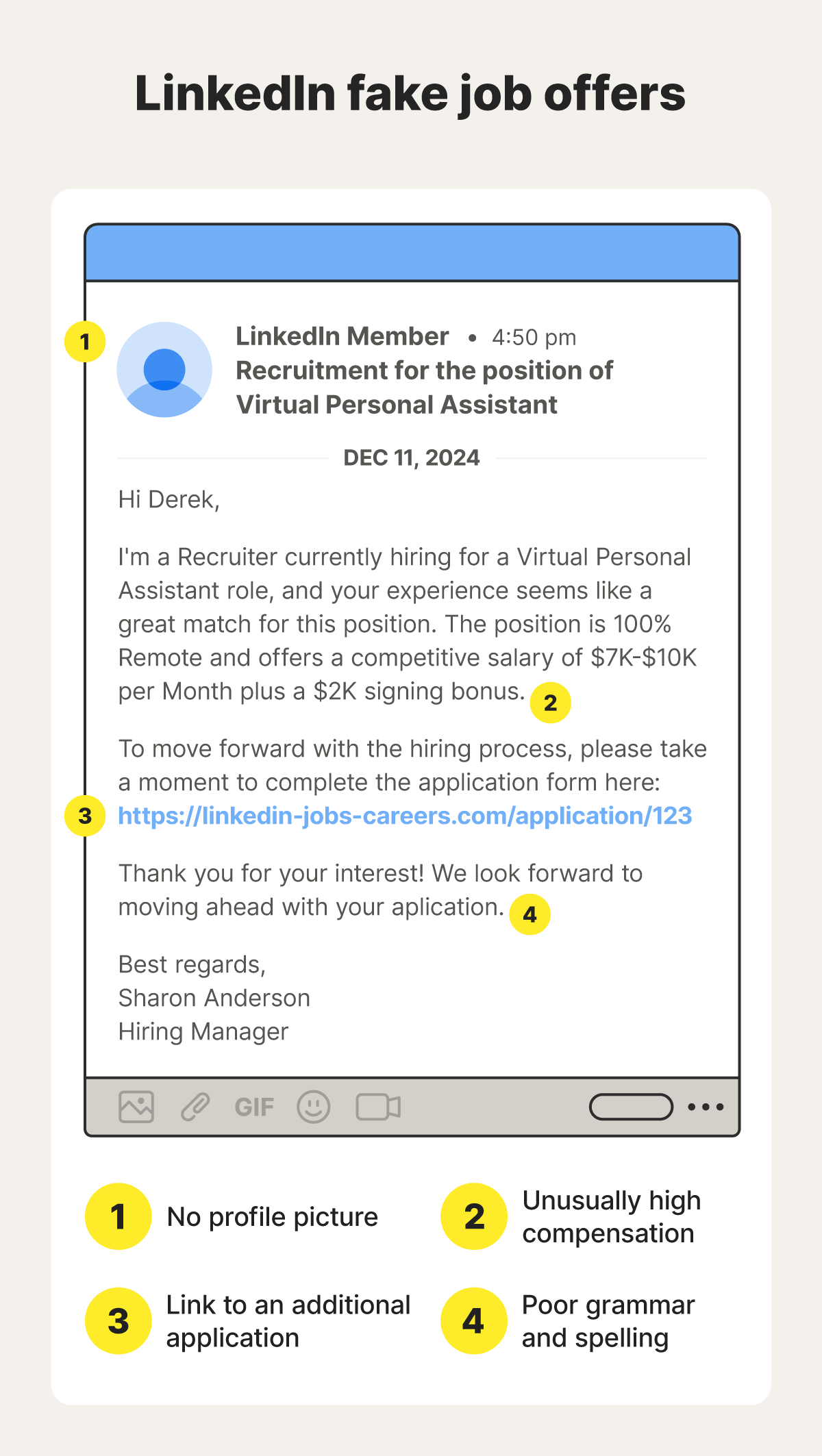
An image with an example of a fake job LinkedIn scam message.
Oversharing
Oversharing is a risk on any social media network, but it’s of particular concern on LinkedIn. This is partly because LinkedIn pages are public and searchable by default. But it’s also due to the fact that building a “good” LinkedIn profile requires giving away some information that could be of value to scammers, like what city you live in and your employer.
Cybercriminals can use the information they find on your LinkedIn profile in a variety of ways, from trying to crack your password using credential stuffing techniques to launching social engineering attacks that trick you into thinking they’re trustworthy.
While it goes against the purpose of the platform to avoid sharing basic details like the company you work for, your job title, and your name, be mindful of how much personally identifiable information (PII) you share beyond that. You should be especially careful about sharing contact information, including your email addresses, phone number, and home address.
Data scraping and breaches
Despite the strong security measures LinkedIn has to defend against external attacks, it’s not immune to the risk of data breaches. Whether it’s a sophisticated social engineering attack or an insider threat, there is always the possibility, no matter how remote, that internal systems are breached and user data exposed.
And, even if LinkedIn never suffers a data breach, your information can still be subject to mass scraping. This involves cybercriminals using web crawling tools to collect information from public profile URLs en masse, creating datasets that may be sold to scammers on underground markets.
For example, Cybernews recently discovered a database of nearly 4.3 billion documents, including LinkedIn profile data. While a data leak like this doesn’t necessarily indicate that LinkedIn suffered a security breach, it does mean users’ information ended up in the spotlight, perhaps without their knowledge.
How to use LinkedIn safely
There’s no guarantee you’ll be able to identify a LinkedIn scam if you’re targeted, and no perfect defense against data breaches exists either. But following general best practices — like practicing strong password hygiene and setting up your profile to match your privacy preferences — can help you mitigate risk, keep your personal information more private, and avoid financial scams:
- Use a strong password and enable 2FA: Create a strong and unique password, ideally containing 15+ characters, for your LinkedIn account. Then, enable two-factor authentication for an extra layer of protection against account takeover attacks.
- Tweak your profile privacy settings: If you’re concerned about your profile being public, and therefore viewable by anyone, you can adjust your profile settings to suit your needs. For example, you might want to make it so only first- or second-degree connections can view your full profile details.
- Don’t accept all connection requests: Be discerning about who you connect with. Vet connection requests carefully, paying attention to potential giveaways of fakes, like limited connection numbers, generic profile information, or suspicious work history.
- Confirm companies and recruiters through verified channels: If somebody contacts you on LinkedIn claiming to be from a specific company, take the time to verify if they’re telling the truth. Check if they’re connected with other employees, ensure their job history aligns with their claims, and contact the company they claim to represent if necessary.
- Don’t click suspicious links in messages: Treat links sent by strangers on LinkedIn the same as you would links in unsolicited emails or texts. Don’t click to open them unless you can verify they lead to a safe, legitimate website, as opposed to a fake website designed to steal your login credentials or install malware on your device.
- Use identity theft protection: An identity theft protection service monitors for your information on the dark web and alerts you to new data breaches as they happen, helping you stay informed about potential exposure risks that might leave you vulnerable to fraud or identity theft.
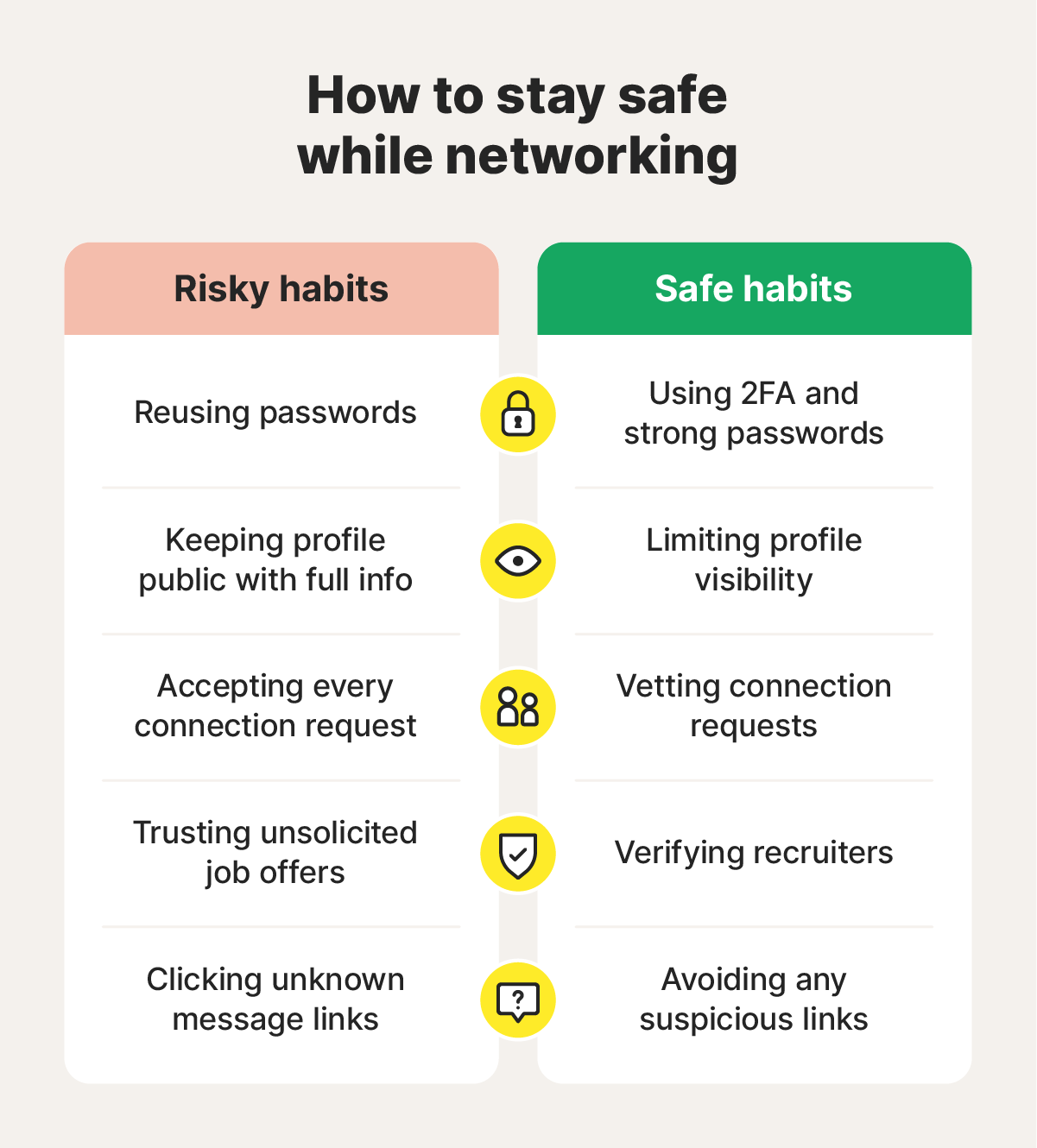
Graphic showing how to stay safe while networking on LinkedIn.
Stay safe as you network on LinkedIn
The risk of data breaches can never be fully ignored, and scammers are constantly developing new tactics to target individual victims on social media platforms like LinkedIn. Building an understanding of the threats and improving your cybersecurity practices is a great first step, but investing in identity theft protection adds an extra layer of defense.
LifeLock offers an automatic data broker removal feature you can use to minimize your online exposure, dark web monitoring, data breach alerts, expert scam support, and reimbursement coverage for qualifying losses following a scam or identity theft. It can help you keep your sensitive information and your finances protected, whether you’re posting professional updates or applying for a new job.
FAQs
Is LinkedIn verification safe?
LinkedIn’s identity verification feature allows you to get a checkmark on your profile, meant to help signal authenticity. The process of verifying your profile information involves sharing sensitive details with a third-party identity verification service (CLEAR in the U.S., Canada, and Mexico). It’s generally safe, but make sure you’re on the official LinkedIn website before entering any details and never share sensitive information on third-party URLs.
Can you get scammed on LinkedIn?
Yes, it’s possible to get scammed on LinkedIn despite the platform’s security measures. Any social media platform presents some risk of being targeted by scammers. On LinkedIn, that might involve you being contacted by fake recruiters, encountering fake job listings, or having support offered to you by fake tech support agents.
How can I tell if a LinkedIn recruiter is legit?
A legitimate recruiter on LinkedIn will typically have an established, detailed profile, recent post activity, a consistent and believable work history, and plenty of connections. If a recruiter reaches out about a job and you can’t tell if they’re a scammer, verify if the opening is real by checking the company’s website. And, if you’re ever in doubt, err on the side of caution and avoid sharing sensitive information with people you don’t trust entirely.
Editors’ note: Our articles provide educational information about identity theft, scams, financial fraud, and other topics that can put your identity or personal accounts at risk. LifeLock offerings may not cover or protect against every type of crime, fraud, scam, or threat we write about. For more details about how we write, review, and update our articles, see our Editorial Policy.
Related articles

Credit & Finance
Credit check for employment: What do employers look for?
July 10, 2025
·
10 min read



Internet Security
What is a data leak? Risks of data exposure and how to prevent it
November 05, 2024
·
7 min read

Credit & Finance
Credit check for employment: What do employers look for?
July 10, 2025
·
10 min read
Internet Security
What is a data leak? Risks of data exposure and how to prevent it
November 05, 2024
·
7 min read
Credit & Finance
Credit check for employment: What do employers look for?
July 10, 2025
·
10 min read