





 Why do we ask?


Good to know: 1-888 numbers aren’t the only ones linked to scams. Other common scam call numbers include (214) or (469) for Dallas, (216) for Cleveland, and (347) for New York City. Remember, seeing a familiar area code doesn’t mean the call is safe.
Has your personal data been recently exposed?
Check if information like your Social Security number, email, and passwords is exposed on the dark web.


You have reached the maximum number of scans allowed. Please come back after 24 hours.

Scanning the dark web...
Scanning public databases...
Scanning millions of records...
Narrowing down the search...
We need more information
Please enter a few more details to ensure we show you the right information.
Risk level:
High
You’re at high risk
We found your personal information on the dark web and on data broker sites.
Your personalized protection plan
Product Benefits:
 Up to $3M Reimbursement for identity theft, with up to $1M for Stolen Funds†††
$10K Scam Reimbursement7
Scam Support
Credit, Checking and Savings Activity Alerts: Unlimited Accounts
Credit & Payday Loan Lock2
Credit Monitoring:
3 Bureau1
Automatic Data Broker Removal8
Dark Web Monitoring
Priority 24/7 Customer Phone Support
Up to $3M Reimbursement for identity theft, with up to $1M for Stolen Funds†††
$10K Scam Reimbursement7
Scam Support
Credit, Checking and Savings Activity Alerts: Unlimited Accounts
Credit & Payday Loan Lock2
Credit Monitoring:
3 Bureau1
Automatic Data Broker Removal8
Dark Web Monitoring
Priority 24/7 Customer Phone Support
LifeLock Total
Your price:
$
349.99
Your price:
$
34.99
60-day money back guarantee with an annual plan
24/7 Live Member Support
No one can prevent all cybercrime or prevent all identity theft.
- Price valid for introductory term. After that, your price will renew at the standard price.
- Your subscription begins immediately after your transaction is complete. A payment method is required at sign-up for trials, and you will be charged at the end of your trial, unless canceled first.
- Prices are subject to change and may be charged up to 35 days prior to renewal. Cancel here or contact Member Services.
- Restrictions apply. Automatically renewing subscription required. If you're a victim of identity theft and not satisfied with our resolution, you may receive a refund for the current term of your subscription. See lifelock.norton.com/guarantee for complete details.
††† Up to $1 million coverage for Lawyers and Experts included with all plans. Reimbursement and expense compensation vary according to plan. Insurance benefits are issued by third parties. See lifelock.norton.com/legal for policy info.
1 Bureau Monitoring and Monthly Credit Report and Score / 3 Bureau Monitoring and Monthly Credit Report and Score.
2 Credit Lock cannot prevent all account takeovers, unauthorized account openings, or credit file inquiries. Deactivates if you downgrade or cancel your subscription.
7 Scam protection coverage as part of identity theft benefits is currently available to all customers residing in the United States, including U.S. territories and the District of Columbia, with the exception of residents of New York. Gen Digital is not a licensed insurance producer. Benefits under the Master Policy are issued and covered by HSB Specialty Insurance Company. You can find further details and exclusions in the summary of benefits.
8 After setup, automatic data broker removal service scans and requests removal every 90 days.
Risk level:
Medium
You’re at medium risk
We found your personal information on data broker sites.
Your personalized protection plan
Product Benefits:
Up to $1.2M Reimbursement for identity theft, with up to $100K for Stolen Funds†††
$5K Scam Reimbursement7
Scam Support
Credit, Checking and Savings Activity Alerts:
5 Accounts
Credit & Payday Loan Lock2
Credit Monitoring:
3 Bureau1
Automatic Data Broker Removal8
Dark Web Monitoring
Priority 24/7 Customer Phone Support
LifeLock Advanced
Your price:
$
199.99
Your price:
$
19.99
60-day money back guarantee with an annual plan
24/7 Live Member Support
No one can prevent all cybercrime or prevent all identity theft.
- Price valid for introductory term. After that, your price will renew at the standard price.
- Your subscription begins immediately after your transaction is complete. A payment method is required at sign-up for trials, and you will be charged at the end of your trial, unless canceled first.
- Prices are subject to change and may be charged up to 35 days prior to renewal. Cancel here or contact Member Services.
- Restrictions apply. Automatically renewing subscription required. If you're a victim of identity theft and not satisfied with our resolution, you may receive a refund for the current term of your subscription. See lifelock.norton.com/guarantee for complete details.
††† Up to $1 million coverage for Lawyers and Experts included with all plans. Reimbursement and expense compensation vary according to plan. Insurance benefits are issued by third parties. See lifelock.norton.com/legal for policy info.
1 Bureau Monitoring and Monthly Credit Report and Score / 3 Bureau Monitoring and Monthly Credit Report and Score.
2 Credit Lock cannot prevent all account takeovers, unauthorized account openings, or credit file inquiries. Deactivates if you downgrade or cancel your subscription.
7 Scam protection coverage as part of identity theft benefits is currently available to all customers residing in the United States, including U.S. territories and the District of Columbia, with the exception of residents of New York. Gen Digital is not a licensed insurance producer. Benefits under the Master Policy are issued and covered by HSB Specialty Insurance Company. You can find further details and exclusions in the summary of benefits.
8 After setup, automatic data broker removal service scans and requests removal every 90 days.
Risk level:
Low
Good news!
We didn’t find your personal information across millions of records or on public data sources.
Your personalized protection plan
Product Benefits:
Up to $1.05M Reimbursement for identity theft, with up to $25K for Stolen Funds†††
Identity Restoration Specialists
Credit, Checking and Savings Activity Alerts:
2 Accounts
Credit & Payday Loan Lock2
Credit Monitoring:
2 Bureau1
Automatic Data Broker Removal8
Dark Web Monitoring
Breach Alerts
24/7 Customer Phone Support
Lifelock Core
Your price:
$
124.99
Your price:
$
12.49
60-day money back guarantee with an annual plan
24/7 Live Member Support
No one can prevent all cybercrime or prevent all identity theft.
- Price valid for introductory term. After that, your price will renew at the standard price.
- Your subscription begins immediately after your transaction is complete. A payment method is required at sign-up for trials, and you will be charged at the end of your trial, unless canceled first.
- Prices are subject to change and may be charged up to 35 days prior to renewal. Cancel here or contact Member Services.
- Restrictions apply. Automatically renewing subscription required. If you're a victim of identity theft and not satisfied with our resolution, you may receive a refund for the current term of your subscription. See lifelock.norton.com/guarantee for complete details.
††† Up to $1 million coverage for Lawyers and Experts included with all plans. Reimbursement and expense compensation vary according to plan. Insurance benefits are issued by third parties. See lifelock.norton.com/legal for policy info.
1 Credit features require successful setup, identity verification, and sufficient credit history by the appropriate credit bureau. Credit monitoring features may take several days to activate after enrollment.
2 Identity Lock cannot prevent all account takeovers, unauthorized account openings, or credit file inquiries. Deactivates if you downgrade or cancel your subscription.
8 After setup, automatic data broker removal service scans and requests removal every 90 days.
1/2
Finding your match...

DID YOU KNOW?
10 cents
If your information is exposed or stolen in a data breach, it can end up on the dark web where it can be sold for as little as 10 cents.
100M+
LifeLock monitors hundreds of millions of data points a second.
Based on your concerns, the best plan for you is:
LifeLock Core
(Individual)
LifeLock Advanced
(Individual)
LifeLock Total
(Individual)
LifeLock Core
(2 adults)
LifeLock Advanced
(2 adults)
LifeLock Total
(2 adults)
LifeLock Core
(2 adults + up to 10 kids)
LifeLock Advanced
(2 adults + up to 10 kids)
LifeLock Total
(2 adults + up to 10 kids)
Pricing details below*
Pricing details below*
Pricing details below*
Pricing details below*
Pricing details below*
Pricing details below*
Pricing details below*
Pricing details below*
Pricing details below*
- Up to $1.05M Reimbursement for identity theft, with up to $25K for Stolen Funds†††
- Up to $1.2M Reimbursement for identity theft, with up to $100K for Stolen Funds†††
- Up to $3M Reimbursement for identity theft, with up to $1M for Stolen Funds†††
- Up to $1.05M Reimbursement for identity theft, with up to $25K for Stolen Funds††† for each adult
- Up to $1.2M Reimbursement for identity theft, with up to $100K for Stolen Funds††† for each adult
- Up to $3M Reimbursement for identity theft, with up to $1M for Stolen Funds††† for each adult
- Up to $1.05M Reimbursement for identity theft, with up to $25K for Stolen Funds††† for each adult
- Up to $1.2M Reimbursement for identity theft, with up to $100K for Stolen Funds††† for each adult
- Up to $3M Reimbursement for identity theft, with up to $1M for Stolen Funds††† for each adult
- Credit Monitoring Coverage1
- Credit Monitoring1 each adult
- Credit Monitoring1 for family
- Credit, Checking & Savings Account Activity Alerts
- Credit, Checking and Savings Activity Alerts for each adult
- Credit, Checking and Savings Activity Alerts for family
- 401K & Investment Account Activity Alerts
- 401K/Investment Account Alerts for each adult
- 401K/Investment Account Alerts for family
- Recurring and Unusual Charge Alerts
- Unexpected & Suspicious Charge Alerts for each adult
- Unexpected & Suspicious Charge Alerts for family
- Stolen Funds Reimbursement†††
- Stolen Funds Reimbursement††† for each adult
- Stolen Funds Reimbursement††† for family
- Lawyers and Experts†††
- Lawyers & Experts††† for each adult
- Lawyers & Experts††† for family
- Automatic Data Broker Removal8
- Automatic Data Broker Removal8 for each adult
- Automatic Data Broker Removal8 for family
- Scam Reimbursement7
- Scam Reimbursement7 for each adult
- Scam Reimbursement7 for family
- Credit Reports & Scores1
- Credit Report & Score for each adult
- Credit Report & Score for family
- Social Media Monitoring
- Social Media Monitoring for each adult
- Social Media Monitoring for family

We have more plans to choose from.
See all plans

Have questions?
Contact sales
*Your subscription begins immediately after payment and automatically renews unless cancelled. Discount for annual plans are compared to monthly billing. Prices subject to change and may be charged up to 35 days before current term ends. Cancel here or contact Member Services.
††† Up to $1 million coverage for Lawyers and Experts included with all plans. Reimbursement and expense compensation vary according to plan. Insurance benefits are issued by third parties. See LifeLock.Norton.com/legal for policy info.
1 Credit features require successful setup, identity verification and sufficient credit history by the appropriate credit bureau. Credit monitoring features may take several days to activate after enrollment.
7 Scam protection coverage as part of identity theft benefits is currently available to all customers residing in the United States, including U.S. territories and the District of Columbia, with the exception of residents of New York. Gen Digital is not a licensed insurance producer. Benefits under the Master Policy are issued and covered by HSB Specialty Insurance Company. You can find further details and exclusions in the Summary of Benefits.
8 After setup, automatic data broker removal service scans and requests removal every 90 days.
Why do we ask?
Identifying your concerns gives us the ability to recommend the right plan for your needs.
Return to quiz
Why do we ask?
Knowing this number helps us recommend coverage that fits your needs.
Return to quiz
Why do we ask?
Providing your email address makes you eligible for notifications of potential identity threats.
Return to quiz
1-888 scammer numbers: How to spot and block fake calls
Scammers often spoof 1-888 numbers to look more legitimate, hoping to trick people into sharing sensitive information that can lead to fraud or identity theft. Learn more about how 1-888 numbers are used in scams and what you can do to protect yourself. Then, get LifeLock for support if you’re scammed, including up to $5,000 in reimbursement.


What are 1-888 numbers?
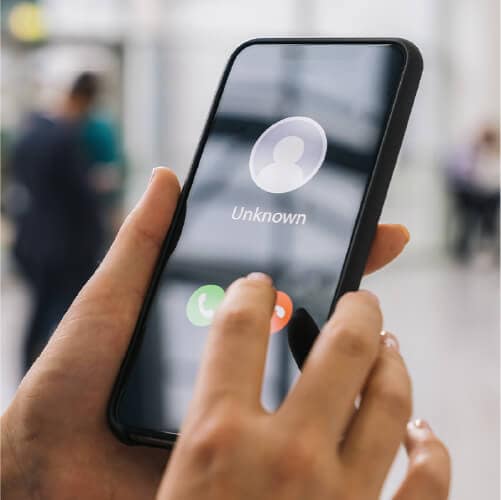
1-888 numbers are toll-free phone numbers commonly used by legitimate businesses to provide customer service. Unfortunately, scammers also exploit these numbers to make their calls appear trustworthy, when they’re anything but. 1-888 scam calls make up a portion of the approximately 2.7 billion spam or unwanted calls Americans receive each month.
Why scammers use 1-888 numbers
Scammers use 1-888 numbers because toll-free lines might seem more official and trustworthy than regular mobile numbers, making it more likely that call recipients will answer.
These numbers are just as easy to spoof using VoIP technology as any other number, so scammers can freely leverage them to pose as official organizations like banks, the IRS, tech support, or account services.
How to recognize a scam 1-888 call
Whatever number they’re calling on, scammers often use social engineering tactics to make their calls seem urgent or official. Watch out for the following signs that you’re talking to a scammer on the phone:
- Demands for immediate payment or sensitive information.
- Use of threatening or urgent language.
- Poor audio quality or strange background noise.
- Caller ID appears official, but doesn’t match a real company.
- Use of an untraceable number.
In some cases, your phone might automatically detect an incoming call as coming from a suspicious number and flag it as “potential spam.” But, if it doesn’t, that’s not a guarantee that the incoming call is legitimate. You should still exercise caution on the call, refuse to give away personal information, and verify the caller is who they say they are by confirming their contact details online.
For example, one Reddit user shared that they received a voicemail from someone claiming to be with a government agency, referencing a case number, and warning of legal consequences if they didn’t call back. They looked up the 1-888 number, but it didn’t appear online, indicating that it was a fresh number generated for a scam.
What can happen if you answer a 1-888 scammer call
The most serious consequence of answering a scam call is that you put yourself at risk of being scammed. Most phone scams aim to trick you into making a payment while on the call or sharing sensitive information that can be used to steal money, commit fraud, or access your accounts later.
But, even if you don’t get scammed, answering a spam call can mark your number as active, meaning you get more calls in the future.
Here’s a closer look at the risks associated with answering a 1-888 call:
- Phishing attempts for personal information: Many scam calls start with convincing stories or urgent warnings designed to make you panic. The goal is to get you to reveal private details, such as your Social Security number, online passwords, or banking information. Once they have these details, scammers can access your accounts or sell the data to other criminals.
- Identity theft: If scammers collect enough personal data, they can use it to impersonate you. This can lead to new credit cards, loans, or utility accounts being opened in your name, which can damage your credit and take months to resolve.
- Financial loss: Some scammers will push you into making immediate payments via gift cards, wire transfers, or cryptocurrency. Others might pretend to be from your bank or a government agency, convincing you to “verify” or “refund” money. Any payment you send will be nearly impossible to recover.
- Added to “active target” lists: Answering a scam call confirms to fraudsters that your phone number is active. Once that happens, your number may be added to lists that are shared or sold, resulting in a higher volume of scam calls and texts over time.
How to protect against scam 1-888 calls
You can reduce your risk of falling for a scam call by limiting exposure of your contact info online, not answering suspicious incoming calls, blocking suspicious numbers, and using call filtering apps. Here’s a closer look at how some of these tactics can help you avoid 1-888 scam calls.
Reduce online exposure of your phone number
Limiting where your phone number appears online makes it harder for scammers to find and target you. Avoid oversharing online by posting your number on public profiles, forums, or websites, only ever sharing it with trusted contacts.
You can also use a data broker removal tool like the one included in LifeLock to identify where your personal information, including your phone number, appears online and send automatic opt-out requests, reducing your exposure to opportunistic scammers.
Add your number to the Do Not Call Registry
The Do Not Call Registry is a free service that lets you opt out of most telemarketing calls. Adding your number helps reduce unwanted calls from legitimate businesses and makes it easier to spot scam calls when they occur. While it won’t stop scammers, it adds a layer of protection and may reduce the overall volume of unwanted calls.
Don’t answer unknown numbers
Scammers use social engineering tricks to encourage you to pick up unknown calls, but there’s often no harm in ignoring calls you don’t recognize. If you’re suspicious, let a call go to voicemail and verify that the number belongs to a real organization before returning the call.
Silence unknown callers
Silencing unknown callers helps prevent scam calls from reaching you in the first place. Both iPhone and Android offer built-in features to block or silence calls from numbers you don’t recognize. Setting these up reduces interruptions and limits your exposure to potential scams.
Here’s how to silence unknown callers on your iPhone:
- Open the Settings app → Apps → Phone → Silence Unknown Callers and toggle it on. Calls from unknown numbers will go straight to voicemail.
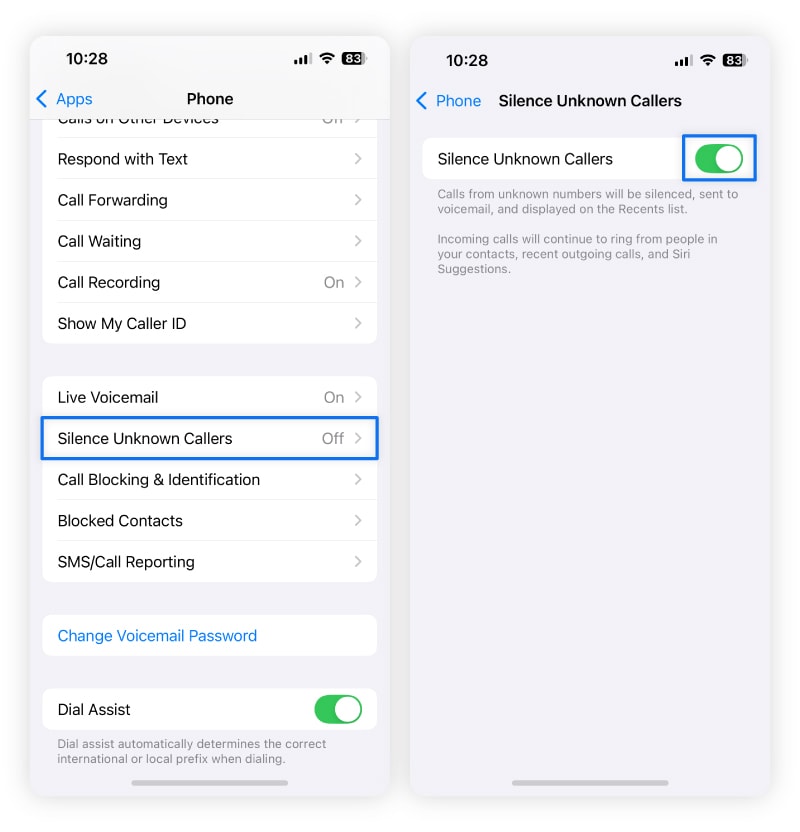
A screenshot of how to silence unknown callers on iPhone.
To silence unknown callers on Android, you need to turn on Do Not Disturb. This silences calls from anyone who is not on your list of select contacts who can contact you.
Here’s how to set up Do Not Disturb:
- Open the Settings app → Modes → Do Not Disturb → People → Calls → Contacts. Now, only calls from your contacts will ring.
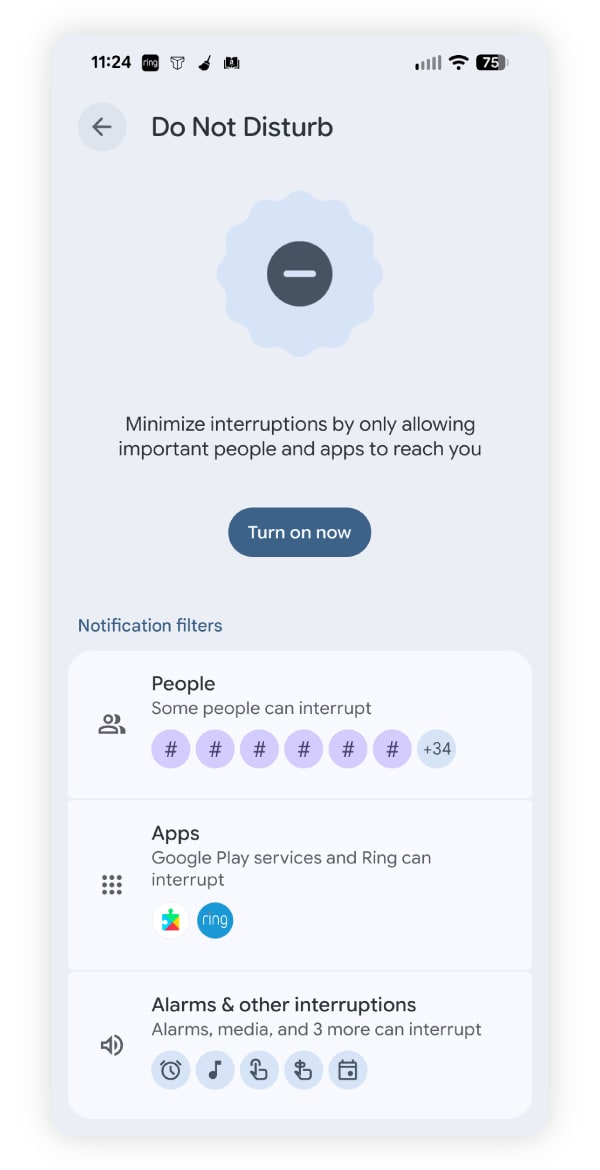
A screenshot of how to activate Do Not Disturb mode on Android phones.
Keep in mind that silencing unknown callers can also block legitimate calls from numbers you haven’t saved, like your doctor’s office, delivery services, or new contacts. Check your voicemail regularly so you don’t miss important messages.
Block suspicious calls
Blocking suspicious calls prevents scammers from reaching you repeatedly. Both iPhone and Android let you block individual numbers or unknown callers, giving you more control over who can contact you. Regularly blocking suspicious numbers reduces your risk of phishing, fraud, and ongoing harassment.
Here’s how to block suspicious calls on iPhone:
- Open the Phone app → Recents → Tap the info (i) icon next to the number → Scroll down and tap Block this Caller.
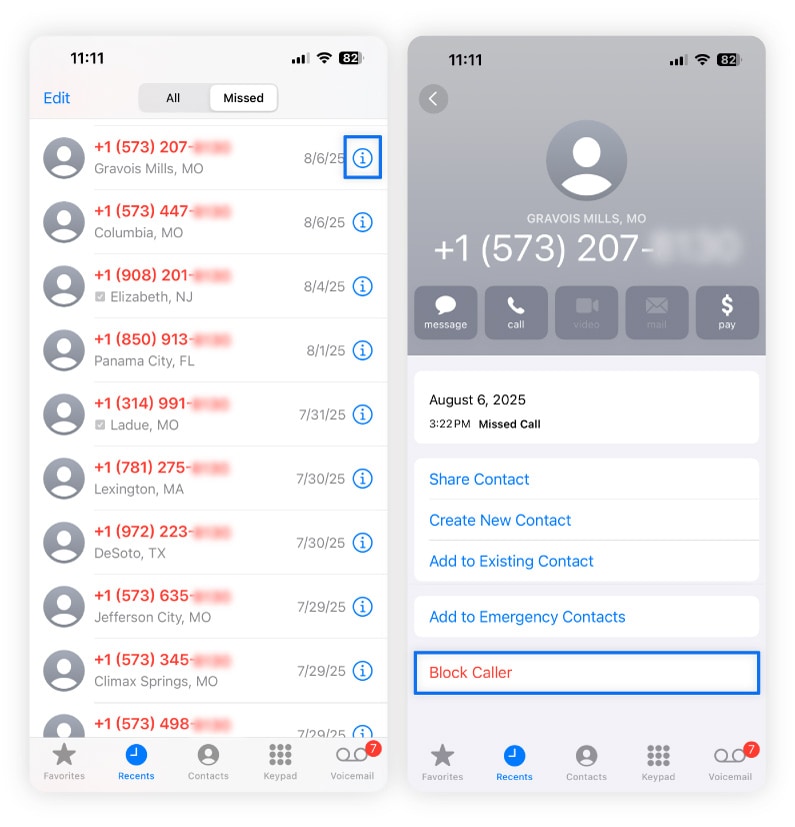
A screenshot of how to block a caller on iPhone.
Here’s how to block suspicious calls on Android:
- Open the Phone app → Recents → Tap the number → Select Block & Report spam or Block number depending on your device.
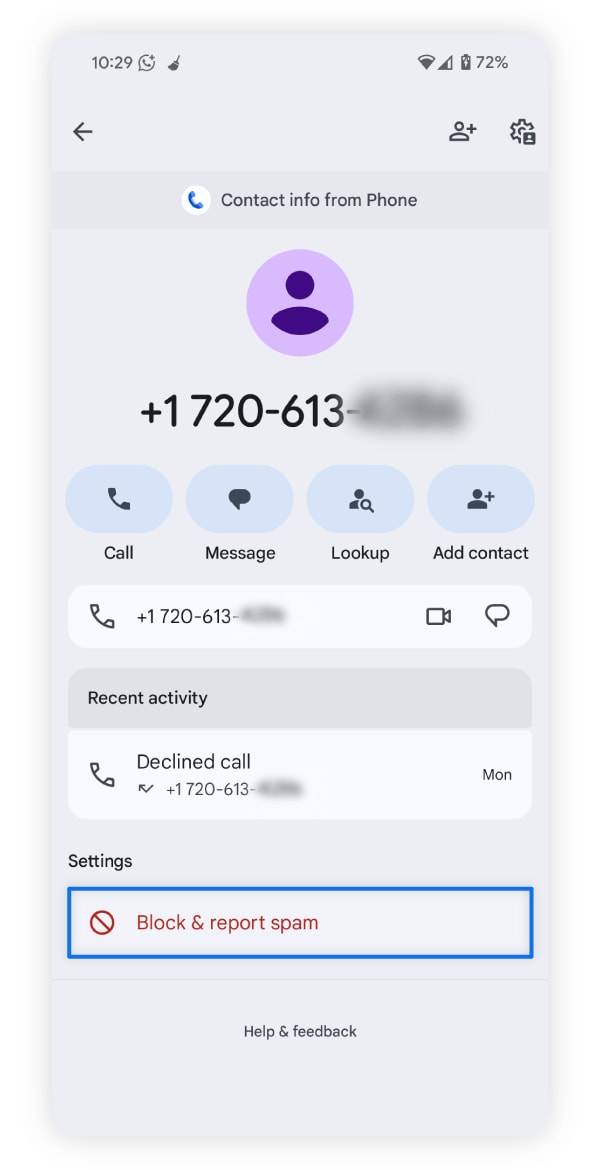
A screenshot of how to block and report a suspicious caller on Android phones.
Use call-blocking apps and spam filters
Call-blocking apps and carrier-based spam filters help automatically identify and stop scam calls before they reach you. These tools can flag suspicious numbers, block known scammers, and reduce interruptions from unwanted calls.
Here are a few popular options:
- Hiya identifies spam calls and provides a caller ID for unknown numbers.
- Truecaller flags potential scam calls and lets you block them automatically.
- Nomorobo works on both landline and mobile phones to block robocalls.
Many carriers also offer built-in spam protection, or additional services you can pay for to get better spam protection:
- Verizon Call Filter flags spam calls and lets you block numbers.
- AT&T Call Protect detects and automatically blocks fraudulent calls.
- T-Mobile Scam Shield offers scam ID, scam block, and enhanced caller protection features.
What to do if you answered a 1-888 scam call
If you shared sensitive information with a scam caller, take immediate action to protect yourself. Contact your bank or credit card company and explain the situation if you provided financial details, consider placing a fraud alert or credit freeze on your credit reports to protect against fraud, and change your passwords or enable two-factor authentication for any potentially vulnerable online accounts.
Then, be on the lookout for any signs of fraud or identity theft, monitoring your financial accounts and credit reports for suspicious activity that might indicate your information is being misused.
If you picked up a scam call, stayed calm, and didn’t provide any sensitive information, you should be OK. Answering the phone doesn’t automatically put your information at risk. But you should act with caution and take the following steps to protect yourself:
- Hang up and don’t engage: Ending the call prevents the scammer from applying further pressure or manipulating you.
- Report the number to the FTC: Submit details of the scam call to the Federal Trade Commission at ReportFraud.ftc.gov to help authorities track scams.
- Block the number on your phone: This helps prevent the same scammer getting in touch again from the same number.
- Use identity theft protection: Investing in an identity theft protection service, like LifeLock, can help you monitor your personal information, credit reports, and financial accounts for suspicious activity.
Protect yourself from scammers
Reducing your online exposure and knowing how to spot or block scam calls before you pick up are the best ways to protect against phone scammers. But your defenses won’t always be 100% effective. LifeLock Advanced provides an extra layer of protection against scams, with scam support features including reimbursement coverage for eligible scam-related losses.
Plus, as a LifeLock member, you’ll get access to an automatic data broker removal tool that can help you reduce your online exposure, and features like dark web and credit monitoring that can help you detect signs of fraud or identity theft if they happen.
FAQs
Are all 888 numbers spam?
Not all 1-888 numbers are spam. Many 888 numbers belong to legitimate businesses, customer service lines, and organizations providing real support. However, scammers often use or spoof these numbers to appear trustworthy. Always verify unknown numbers before sharing personal information, and use caution with unsolicited calls to protect yourself from potential scams.
What city is the 888 area code?
The 888 area code does not belong to a specific place. It’s a toll-free number that businesses or individuals across the United States and Canada can use. Calls from 888 numbers can originate anywhere, so treat unknown numbers with caution.
What are 888 numbers used for?
1-888 numbers are toll-free phone lines used by businesses, customer service teams, and organizations to allow people to call without paying. Scammers also exploit these numbers to appear legitimate, so always verify unknown calls before sharing personal information.
Can you get scammed calling a 1-888 number?
Yes, you can get scammed by calling a 1-888 number. Scammers often spoof these numbers to appear legitimate. Engaging with the call or providing personal information like Social Security numbers, bank details, or passwords can lead to financial loss, identity theft, or ongoing scam attempts.
Editors’ note: Our articles provide educational information about identity theft, scams, financial fraud, and other topics that can put your identity or personal accounts at risk. LifeLock offerings may not cover or protect against every type of crime, fraud, scam, or threat we write about. For more details about how we write, review, and update our articles, see our Editorial Policy.
Related articles


Scams & Fraud
Why is account services calling me? Protect against this common scam
January 09, 2025
·
9 min read



Identity Theft
What are “Potential Spam” calls and how do you stop them?
January 29, 2025
·
8 min read
Scams & Fraud
Why is account services calling me? Protect against this common scam
January 09, 2025
·
9 min read
Identity Theft
What are “Potential Spam” calls and how do you stop them?
January 29, 2025
·
8 min read
Scams & Fraud
Why is account services calling me? Protect against this common scam
January 09, 2025
·
9 min read