





 Why do we ask?


How my experience went: After I requested my information be removed from SmartBackgroundCheck, it took just over 48 hours for the request to be processed. While your results might vary, there’s no evidence that SmartBackgroundCheck won’t honor an opt-out request.
Has your personal data been recently exposed?
Check if information like your Social Security number, email, and passwords is exposed on the dark web.


You have reached the maximum number of scans allowed. Please come back after 24 hours.

Scanning the dark web...
Scanning public databases...
Scanning millions of records...
Narrowing down the search...
We need more information
Please enter a few more details to ensure we show you the right information.
Risk level:
High
You’re at high risk
We found your personal information on the dark web and on data broker sites.
Your personalized protection plan
Product Benefits:
 Up to $3M Reimbursement for identity theft, with up to $1M for Stolen Funds†††
$10K Scam Reimbursement7
Scam Support
Credit, Checking and Savings Activity Alerts: Unlimited Accounts
Credit & Payday Loan Lock2
Credit Monitoring:
3 Bureau1
Automatic Data Broker Removal8
Dark Web Monitoring
Priority 24/7 Customer Phone Support
Up to $3M Reimbursement for identity theft, with up to $1M for Stolen Funds†††
$10K Scam Reimbursement7
Scam Support
Credit, Checking and Savings Activity Alerts: Unlimited Accounts
Credit & Payday Loan Lock2
Credit Monitoring:
3 Bureau1
Automatic Data Broker Removal8
Dark Web Monitoring
Priority 24/7 Customer Phone Support
LifeLock Total
Your price:
$
349.99
Your price:
$
34.99
60-day money back guarantee with an annual plan
24/7 Live Member Support
No one can prevent all cybercrime or prevent all identity theft.
- Price valid for introductory term. After that, your price will renew at the standard price.
- Your subscription begins immediately after your transaction is complete. A payment method is required at sign-up for trials, and you will be charged at the end of your trial, unless canceled first.
- Prices are subject to change and may be charged up to 35 days prior to renewal. Cancel here or contact Member Services.
- Restrictions apply. Automatically renewing subscription required. If you're a victim of identity theft and not satisfied with our resolution, you may receive a refund for the current term of your subscription. See lifelock.norton.com/guarantee for complete details.
††† Up to $1 million coverage for Lawyers and Experts included with all plans. Reimbursement and expense compensation vary according to plan. Insurance benefits are issued by third parties. See lifelock.norton.com/legal for policy info.
1 Bureau Monitoring and Monthly Credit Report and Score / 3 Bureau Monitoring and Monthly Credit Report and Score.
2 Credit Lock cannot prevent all account takeovers, unauthorized account openings, or credit file inquiries. Deactivates if you downgrade or cancel your subscription.
7 Scam protection coverage as part of identity theft benefits is currently available to all customers residing in the United States, including U.S. territories and the District of Columbia, with the exception of residents of New York. Gen Digital is not a licensed insurance producer. Benefits under the Master Policy are issued and covered by HSB Specialty Insurance Company. You can find further details and exclusions in the summary of benefits.
8 After setup, automatic data broker removal service scans and requests removal every 90 days.
Risk level:
Medium
You’re at medium risk
We found your personal information on data broker sites.
Your personalized protection plan
Product Benefits:
Up to $1.2M Reimbursement for identity theft, with up to $100K for Stolen Funds†††
$5K Scam Reimbursement7
Scam Support
Credit, Checking and Savings Activity Alerts:
5 Accounts
Credit & Payday Loan Lock2
Credit Monitoring:
3 Bureau1
Automatic Data Broker Removal8
Dark Web Monitoring
Priority 24/7 Customer Phone Support
LifeLock Advanced
Your price:
$
199.99
Your price:
$
19.99
60-day money back guarantee with an annual plan
24/7 Live Member Support
No one can prevent all cybercrime or prevent all identity theft.
- Price valid for introductory term. After that, your price will renew at the standard price.
- Your subscription begins immediately after your transaction is complete. A payment method is required at sign-up for trials, and you will be charged at the end of your trial, unless canceled first.
- Prices are subject to change and may be charged up to 35 days prior to renewal. Cancel here or contact Member Services.
- Restrictions apply. Automatically renewing subscription required. If you're a victim of identity theft and not satisfied with our resolution, you may receive a refund for the current term of your subscription. See lifelock.norton.com/guarantee for complete details.
††† Up to $1 million coverage for Lawyers and Experts included with all plans. Reimbursement and expense compensation vary according to plan. Insurance benefits are issued by third parties. See lifelock.norton.com/legal for policy info.
1 Bureau Monitoring and Monthly Credit Report and Score / 3 Bureau Monitoring and Monthly Credit Report and Score.
2 Credit Lock cannot prevent all account takeovers, unauthorized account openings, or credit file inquiries. Deactivates if you downgrade or cancel your subscription.
7 Scam protection coverage as part of identity theft benefits is currently available to all customers residing in the United States, including U.S. territories and the District of Columbia, with the exception of residents of New York. Gen Digital is not a licensed insurance producer. Benefits under the Master Policy are issued and covered by HSB Specialty Insurance Company. You can find further details and exclusions in the summary of benefits.
8 After setup, automatic data broker removal service scans and requests removal every 90 days.
Risk level:
Low
Good news!
We didn’t find your personal information across millions of records or on public data sources.
Your personalized protection plan
Product Benefits:
Up to $1.05M Reimbursement for identity theft, with up to $25K for Stolen Funds†††
Identity Restoration Specialists
Credit, Checking and Savings Activity Alerts:
2 Accounts
Credit & Payday Loan Lock2
Credit Monitoring:
2 Bureau1
Automatic Data Broker Removal8
Dark Web Monitoring
Breach Alerts
24/7 Customer Phone Support
Lifelock Core
Your price:
$
124.99
Your price:
$
12.49
60-day money back guarantee with an annual plan
24/7 Live Member Support
No one can prevent all cybercrime or prevent all identity theft.
- Price valid for introductory term. After that, your price will renew at the standard price.
- Your subscription begins immediately after your transaction is complete. A payment method is required at sign-up for trials, and you will be charged at the end of your trial, unless canceled first.
- Prices are subject to change and may be charged up to 35 days prior to renewal. Cancel here or contact Member Services.
- Restrictions apply. Automatically renewing subscription required. If you're a victim of identity theft and not satisfied with our resolution, you may receive a refund for the current term of your subscription. See lifelock.norton.com/guarantee for complete details.
††† Up to $1 million coverage for Lawyers and Experts included with all plans. Reimbursement and expense compensation vary according to plan. Insurance benefits are issued by third parties. See lifelock.norton.com/legal for policy info.
1 Credit features require successful setup, identity verification, and sufficient credit history by the appropriate credit bureau. Credit monitoring features may take several days to activate after enrollment.
2 Identity Lock cannot prevent all account takeovers, unauthorized account openings, or credit file inquiries. Deactivates if you downgrade or cancel your subscription.
8 After setup, automatic data broker removal service scans and requests removal every 90 days.
1/2
Finding your match...

DID YOU KNOW?
10 cents
If your information is exposed or stolen in a data breach, it can end up on the dark web where it can be sold for as little as 10 cents.
100M+
LifeLock monitors hundreds of millions of data points a second.
Based on your concerns, the best plan for you is:
LifeLock Core
(Individual)
LifeLock Advanced
(Individual)
LifeLock Total
(Individual)
LifeLock Core
(2 adults)
LifeLock Advanced
(2 adults)
LifeLock Total
(2 adults)
LifeLock Core
(2 adults + up to 10 kids)
LifeLock Advanced
(2 adults + up to 10 kids)
LifeLock Total
(2 adults + up to 10 kids)
Pricing details below*
Pricing details below*
Pricing details below*
Pricing details below*
Pricing details below*
Pricing details below*
Pricing details below*
Pricing details below*
Pricing details below*
- Up to $1.05M Reimbursement for identity theft, with up to $25K for Stolen Funds†††
- Up to $1.2M Reimbursement for identity theft, with up to $100K for Stolen Funds†††
- Up to $3M Reimbursement for identity theft, with up to $1M for Stolen Funds†††
- Up to $1.05M Reimbursement for identity theft, with up to $25K for Stolen Funds††† for each adult
- Up to $1.2M Reimbursement for identity theft, with up to $100K for Stolen Funds††† for each adult
- Up to $3M Reimbursement for identity theft, with up to $1M for Stolen Funds††† for each adult
- Up to $1.05M Reimbursement for identity theft, with up to $25K for Stolen Funds††† for each adult
- Up to $1.2M Reimbursement for identity theft, with up to $100K for Stolen Funds††† for each adult
- Up to $3M Reimbursement for identity theft, with up to $1M for Stolen Funds††† for each adult
- Credit Monitoring Coverage1
- Credit Monitoring1 each adult
- Credit Monitoring1 for family
- Credit, Checking & Savings Account Activity Alerts
- Credit, Checking and Savings Activity Alerts for each adult
- Credit, Checking and Savings Activity Alerts for family
- 401K & Investment Account Activity Alerts
- 401K/Investment Account Alerts for each adult
- 401K/Investment Account Alerts for family
- Recurring and Unusual Charge Alerts
- Unexpected & Suspicious Charge Alerts for each adult
- Unexpected & Suspicious Charge Alerts for family
- Stolen Funds Reimbursement†††
- Stolen Funds Reimbursement††† for each adult
- Stolen Funds Reimbursement††† for family
- Lawyers and Experts†††
- Lawyers & Experts††† for each adult
- Lawyers & Experts††† for family
- Automatic Data Broker Removal8
- Automatic Data Broker Removal8 for each adult
- Automatic Data Broker Removal8 for family
- Scam Reimbursement7
- Scam Reimbursement7 for each adult
- Scam Reimbursement7 for family
- Credit Reports & Scores1
- Credit Report & Score for each adult
- Credit Report & Score for family
- Social Media Monitoring
- Social Media Monitoring for each adult
- Social Media Monitoring for family

We have more plans to choose from.
See all plans

Have questions?
Contact sales
*Your subscription begins immediately after payment and automatically renews unless cancelled. Discount for annual plans are compared to monthly billing. Prices subject to change and may be charged up to 35 days before current term ends. Cancel here or contact Member Services.
††† Up to $1 million coverage for Lawyers and Experts included with all plans. Reimbursement and expense compensation vary according to plan. Insurance benefits are issued by third parties. See LifeLock.Norton.com/legal for policy info.
1 Credit features require successful setup, identity verification and sufficient credit history by the appropriate credit bureau. Credit monitoring features may take several days to activate after enrollment.
7 Scam protection coverage as part of identity theft benefits is currently available to all customers residing in the United States, including U.S. territories and the District of Columbia, with the exception of residents of New York. Gen Digital is not a licensed insurance producer. Benefits under the Master Policy are issued and covered by HSB Specialty Insurance Company. You can find further details and exclusions in the Summary of Benefits.
8 After setup, automatic data broker removal service scans and requests removal every 90 days.
Why do we ask?
Identifying your concerns gives us the ability to recommend the right plan for your needs.
Return to quiz
Why do we ask?
Knowing this number helps us recommend coverage that fits your needs.
Return to quiz
Why do we ask?
Providing your email address makes you eligible for notifications of potential identity threats.
Return to quiz
What is SmartBackgroundChecks and how to opt out
If your personal information is available on SmartBackgroundChecks, spammers, scammers, and fraudsters may be able to access it, no questions asked. Learn how to opt out of this popular people-search website manually, and how LifeLock can help you reduce your overall online exposure with Automatic Data Broker Removal.


You might have heard about SmartBackgroundChecks only recently, but chances are, it already knows you pretty well. It's a people-search website — a type of data broker accessible to the general public — that, according to its own homepage, contains “information on most adults in the U.S.,” pulled from over 2,000 sources.
In the likely event that there’s a profile about you on SmartBackgroundChecks, details such as your full name, past addresses, and phone number might be in public view. And while SmartBackgroundChecks suggests that it’s there to help users find old childhood friends or look up unknown phone numbers, there’s nothing stopping scammers and fraudsters from using the site to pick their next target.
Fortunately, it’s easy to opt out of data brokers like SmartBackgroundChecks and reduce online exposure of your information in just a few simple steps.
How to opt out of SmartBackgroundChecks
To delete your listing and any associated information from SmartBackgroundChecks, you’ll need to complete the site’s opt-out process. This involves locating your record, verifying your identity, and submitting a removal request. After processing and validating the request, the platform will remove the listing and notify you when the process is complete, which may take several days.
Here’s a guide to opting out of SmartBackgroundChecks:
1. Go directly to the SmartBackgroundChecks opt-out page or scroll to the very bottom of the homepage and click Do Not Sell My Personal Information.
2. Enter a valid email address, accept the terms, and complete the CAPTCHA verification step to start the removal process.
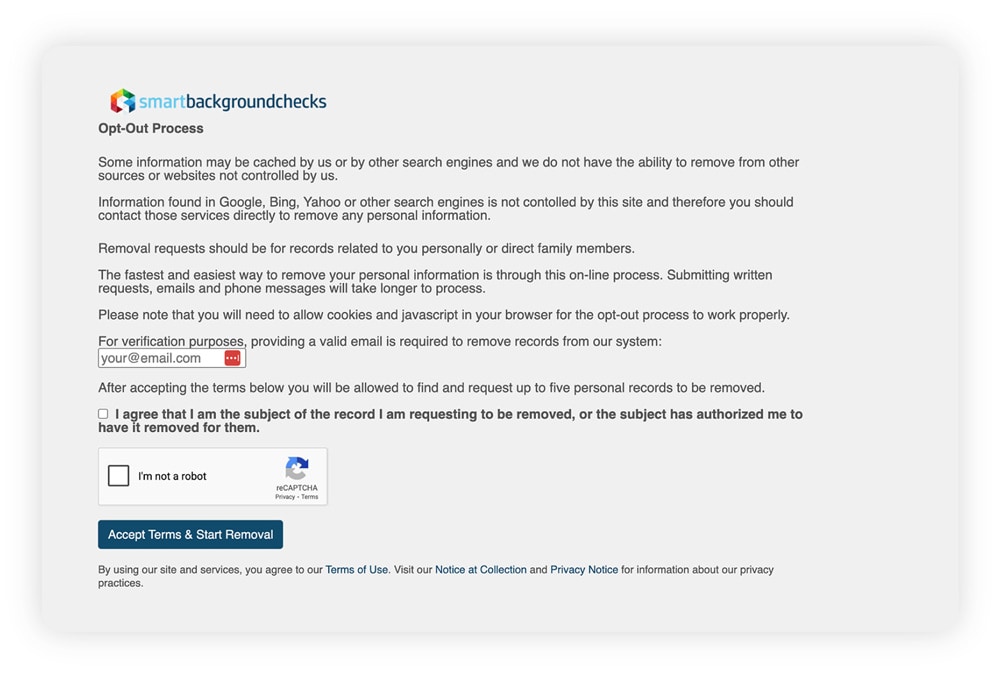
A screenshot showing the SmartBackgroundChecks opt-out request page.
3. Use the search tool to look for the listing you want to be removed from SmartBackgroundChecks, searching by name, city/state, phone, or address.
4. Click your listing when you find it, and then click the Request My Record To Be Removed button.
5. Click the confirmation link in the email SmartBackgroundChecks sends to your inbox to finalize the request.
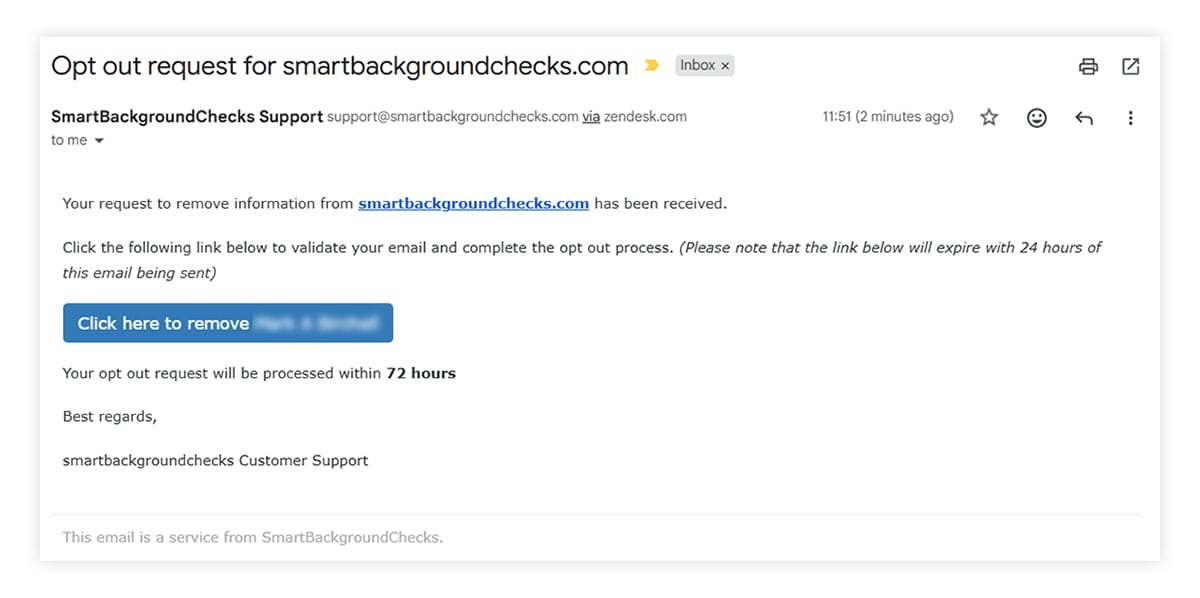
A screenshot showing the SmartBackgroundChecks opt-out email confirmation.
To confirm your data has been removed, check SmartBackgroundChecks again after 72 hours have passed. And remember, your data can reappear in the future as SmartBackgroundChecks updates its database, so it's worth revisiting every few months to make sure you’re not exposed again.
Other ways to remove your information from SmartBackgroundCheck
Using the online opt-out process is the most straightforward route to removing your information from SmartBackgroundCheck, but there are some other options to try if it doesn’t work for you, including opting out over the phone.
Here’s a more detailed look at alternative methods to opt out of SmartBackgroundChecks:
- Call in: If the online opt-out process isn’t working or you’d rather speak to a person on the phone, you can call SmartBackgroundCheck on 800- 571-0614, although this process may take longer.
- Use a data broker removal service: Automatic data broker removal services, like the one included in LifeLock, monitor for your information across lots of different data broker sites and submit opt-out requests on your behalf.
- Hire an attorney: If your data hasn’t been removed after submitting multiple opt-out requests, or you've suffered harm as a result of it being listed, a privacy attorney could help you get your opt-out request processed.
- Remove your information from Google: Even if your listing on SmartBackgroundChecks is taken down, cached versions can still surface in search results. You can contact Google to ask for these results to be removed from their index using the request form.
While SmartBackgroundCheck claims that it will process opt-out requests regardless of where you live, residents of certain states may have stronger legal rights than others when it comes to online privacy.
According to the International Association of Privacy Professionals (IAPP), nearly 20 states, including California, Virginia, and Colorado, have data privacy laws that oblige companies to submit to requests for the deletion of personal information. If you’re in one of those states and you’re struggling to get your information removed from SmartBackgroundCheck, consider contacting local authorities for more information.
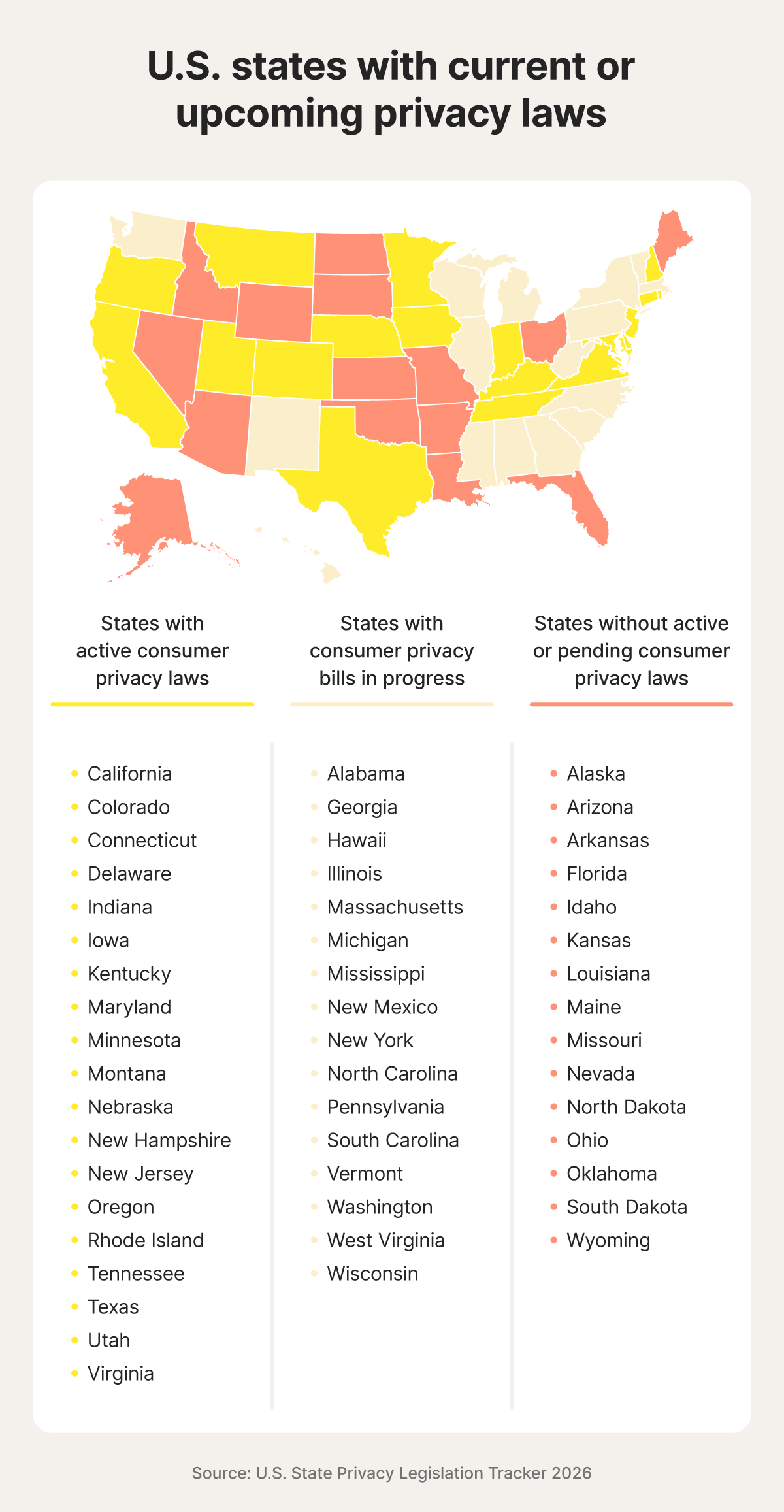
A map shares the U.S. states that have or are planning to pass privacy laws.
What SmartBackgroundChecks does
SmartBackgroundChecks collects information from public records and other data sources to create detailed personal profiles. Users can search by name, address, phone number, or email address to find information such as contact details, addresses, relatives, and other publicly available records.
Information that might appear on your SmartBackgroundChecks profile includes your:
- Full name
- Aliases
- Age
- Current and past addresses
- Phone numbers
- Email addresses
- Family members
SmartBackgroundChecks also links to other data broker websites, like PeopleFinders and PeopleLooker, where users willing to pay for a membership may be able to get more information about you, including arrest records, social media profiles, and owned properties.
This is all perfectly legal — like other data brokers, SmartBackgroundChecks simply compiles data that is already publicly available, trawling billions of public records, like:
- Voter rolls
- Census records
- Property records
- Telephone directories
- Court documents
- Business filings
Is SmartBackgroundChecks legit?
Yes, SmartBackgroundChecks is a legitimate company that operates within the law to aggregate publicly available data. However, the website isn't accredited with the Better Business Bureau (BBB) or subject to the Fair Credit Reporting Act (FCRA).
The FCRA is a federal data privacy law that governs how consumer information is collected, shared, and used for decisions such as employment, housing, insurance, and credit. Companies that qualify as consumer reporting agencies must comply with strict requirements related to accuracy, dispute resolution, and consumer consent.
SmartBackgroundChecks isn’t a consumer reporting agency, meaning its reports cannot legally be used for employment screening, tenant screening, credit decisions, or similar purposes. Individuals or organizations that do use the information for those purposes may face legal liability.
At the same time, SmartBackgroundChecks isn’t subject to the same FCRA requirements around accuracy, dispute procedures, or user consent that other data brokers are. While the company may still be subject to certain state privacy laws, those protections vary significantly by jurisdiction.
Why should I remove my information from SmartBackgroundChecks?
Removing your personal information from the internet can help prevent spammers, scammers, and fraudsters from getting the details they need to contact you, make a scam more convincing, or even steal your identity.
These are just some of the potential benefits of removing your information from data broker websites like SmartBackgroundChecks:
- Reduced spam: Your phone number or email address appearing on a data broker site makes you an easy target for robotexting, spam calls, or email marketing campaigns.
- Fewer (and potentially less convincing) phishing attacks: Scammers can turn to data broker websites to find their next targets, harvesting phone numbers and email addresses along with other personal details they can use to craft targeted messages that are much harder to identify as fake.
- Identity theft protection: The more of your personal data cybercriminals can find online, the more likely it is they’ll be able to gather enough to impersonate you in security checks and commit identity theft, whether that’s opening new credit accounts in your name or stealing your tax return.
- Minimize the risk of doxxing: Data brokers make it easy for someone to gather and publish your personal details in a more public online space, like on social media. That can lead to harassment, threats, and the potential for real-world harm from trolls or stalkers.
Tackle data broker exposure automatically
SmartBackgroundChecks isn’t the only data broker to be concerned about — there are hundreds more just like it. Manually opting out of all of them can take hours, and you’ll have to recheck your exposure every few months to make sure your information hasn’t been added again. LifeLock can help you handle the challenge automatically.
The Automatic Data Broker Removal service submits opt-out requests to data brokers like SmartBackgroundCheck on your behalf every 90 days, so you can get peace of mind that your limiting exposure of your personal information online. Plus, you’ll get dark web monitoring, financial account alerts, and more features that can help you protect against fraud and identity theft.
FAQs
Is SmartBackgroundChecks legal?
Yes, SmartBackgroundChecks operates legally by pulling information from public records and collating it into profiles. However, it’s not a Consumer Reporting Agency, so it’s illegal to use it for employment, housing, or credit decisions.
What should I do if I find my information on SmartBackgroundChecks?
If you find your information on SmartBackgroundChecks, or any other data broker website, it’s best to request its removal through the site's opt-out process. However, your data may reappear when these websites refresh their databases, so check back every few months or use a data-broker removal service to stay on top of your exposure.
Is SmartBackgroundChecks safe?
SmartBackgroundChecks is a safe website in the sense that it isn’t a scam, or a front for malware. But your information being listed on the website can be unsafe, giving scammers or fraudsters access to details they can use to target you in phishing attacks or steal your identity.
Editors’ note: Our articles provide educational information about identity theft, scams, financial fraud, and other topics that can put your identity or personal accounts at risk. LifeLock offerings may not cover or protect against every type of crime, fraud, scam, or threat we write about. For more details about how we write, review, and update our articles, see our Editorial Policy.
Related articles
![How to remove your information from the internet [11 free ways]](/content/dam/lifelock/learn/thumbnails/remove-personal-information-from-the-internet-thumb-2025.jpg)
Identity Theft
How to remove your information from the internet [11 free ways]
August 25, 2026
·
11 min read

Internet Security
How to find out if your information is on the dark web
January 07, 2026
·
10 min read


Internet Security
How to protect your digital footprint: 13 key strategies
March 14, 2025
·
10 min read


Internet Security
How to opt out and remove your info from data broker sites
August 15, 2025
·
2 min read
Identity Theft
How to remove your information from the internet [11 free ways]
August 25, 2026
·
11 min read
Internet Security
How to find out if your information is on the dark web
January 07, 2026
·
10 min read
Internet Security
How to protect your digital footprint: 13 key strategies
March 14, 2025
·
10 min read
Internet Security
How to opt out and remove your info from data broker sites
August 15, 2025
·
2 min read
Identity Theft
How to remove your information from the internet [11 free ways]
August 25, 2026
·
11 min read
Internet Security
How to find out if your information is on the dark web
January 07, 2026
·
10 min read
Internet Security
How to protect your digital footprint: 13 key strategies
March 14, 2025
·
10 min read